
GitHub Copilot HydraFusion: enable the multi-model orchestrator
What GitHub Copilot HydraFusion is (a research-preview orchestrator, not a model), how to enable it in Copilot CLI, VS Code and the Copilot app, how Single, Cascade and Critique execution patterns work, when HydraFusion Max is worth it, and what it bills — on real screen recordings.
HydraFusion at a glance
- HydraFusion is an orchestrator, not a model: it reads each prompt and picks the execution pattern, the per-pass reasoning effort and the models itself — you never pick a model manually.
- Three execution patterns: Single (one model does everything), Cascade (cheap draft → judge → escalate only if the check fails) and Critique (frontier draft → cheap critic → revise once).
- Enable it in three moves: copilot update → copilot --experimental → /model → HydraFusion (Research Preview). VS Code 1.140+ uses the chat.copilot.hydraFusion.enabled setting; the Copilot app has a Settings → Experimental toggle.
- Billed per model at that model's standard rate — there is no separate HydraFusion charge and the Auto model-selection discount does not apply. /usage shows AI credits per model.
- HydraFusion Max (added 2026-10-14) adds extra-high reasoning effort for demanding tasks. Discarded drafts do not auto-undo their file edits — review before committing.
Project HydraFusion: Multi-model orchestration in GitHub Copilot
ChannelGitHub14:27
Using HydraFusion — GitHub Copilot documentation
Docsdocs.github.com
Frames come from GitHub's own Copilot Day deep dive and the official Introducing Project HydraFusion trailer — full-screen demo captures with no facecam and no burned-in captions on any kept frame. Facts are cross-checked against the Using HydraFusion documentation and the 2026-10-14 changelog. On-screen model names show the launch-time pool (GPT-5.6 Sol, Claude Opus 5, Fable 5.1); the pool has since been updated to Claude Opus 5.5, GPT-6 Astra, GPT-6.1 Sol and GPT-6 Luna.
Video frames remain the property of their creators and are embedded here as step-by-step documentation with attribution and deep links.
Enable and use HydraFusion step by step
Step 1 — Know what you are enabling
- 1
Understand what HydraFusion is
HydraFusion sits in the model picker but is not a model — it is an orchestrator that treats every prompt as an optimization problem. For each request it picks the execution pattern (Single, Cascade or Critique), a reasoning effort for every pass, and which models run which pass, using capability signals for reasoning, code generation, debugging and tool use. The choice is per-prompt, so two prompts in one session can run completely different plans — and the router itself generates no part of the answer.
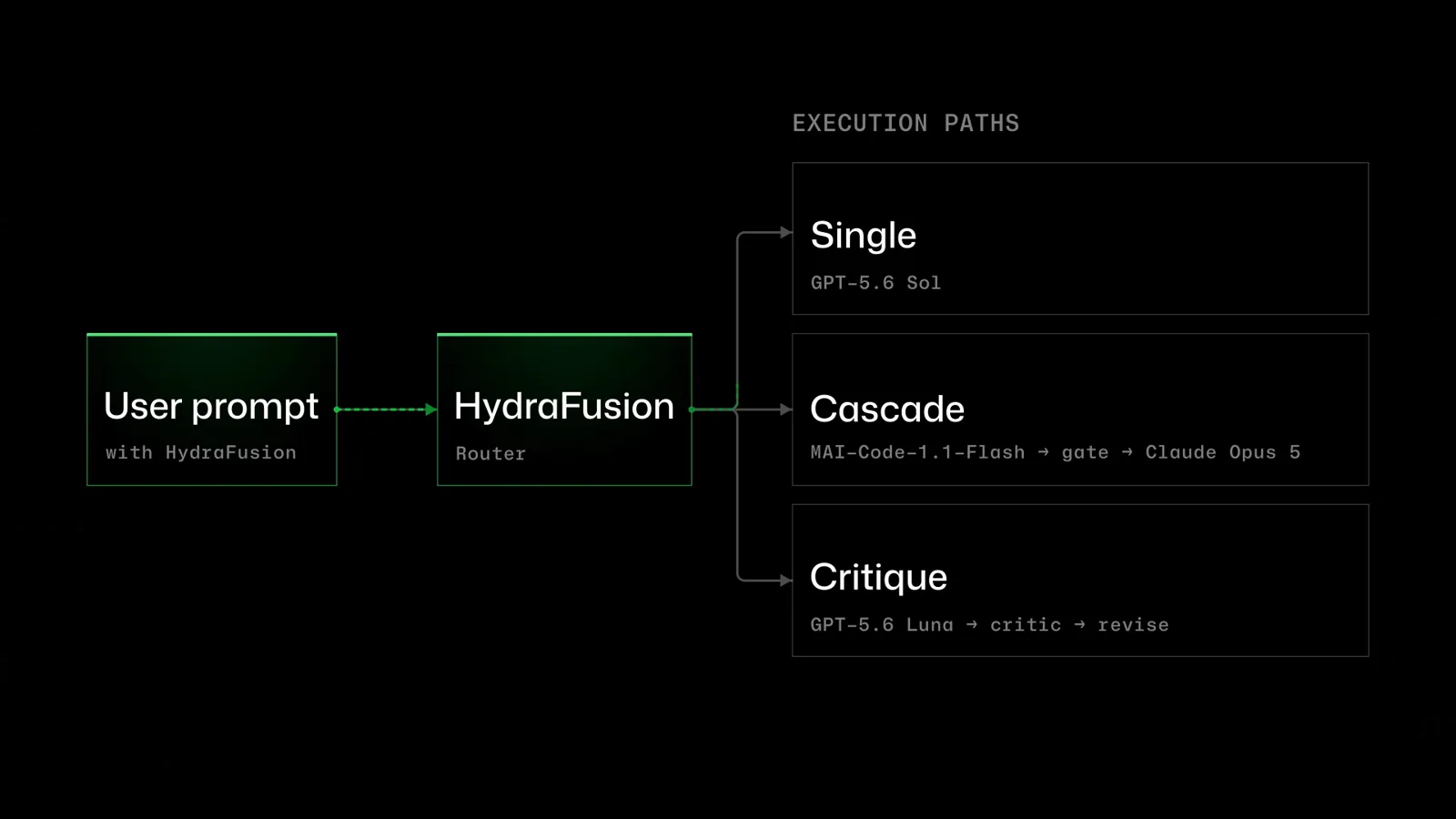
The execution-paths diagram from GitHub's intro animation: one user prompt routed by the HydraFusion router into Single, Cascade (draft → gate → stronger model) and Critique (draft → critic → revise).Watch at 0:42 - 2
Check you can actually get it
HydraFusion is a research preview: no SLA, not for production workloads, subject to change. It ships in three surfaces — Copilot CLI, VS Code 1.140+ (or Insiders) and the GitHub Copilot app. One gate trips people up: the picker only offers HydraFusion when your plan and your organization's model policies allow at least some of the models in its pool. If no allowed model qualifies, the entry silently never appears — and on managed enterprise environments an admin must enable preview features first.
- 3
Update Copilot CLI first
Run copilot update before anything else — the HydraFusion entry is a recent addition and older builds do not list it. If /model still shows nothing after the next step, /update prerelease moves the CLI onto the prerelease channel where the preview ships first. VS Code needs 1.140 or later (or Insiders); the Copilot app just needs its latest build.
Step 2 — Turn it on and send your first prompt
- 4
Turn on experimental features
HydraFusion hides behind the experimental flag. For a one-off run, pass it inline: copilot --experimental --model hydrafusion -p "YOUR-PROMPT". To keep it in every session, run /experimental on and restart the CLI. In VS Code, enable the chat.copilot.hydraFusion.enabled setting; in the Copilot app, flip Settings → Experimental → HydraFusion.
- 5
Select HydraFusion in the model picker
Open /model and pick HydraFusion (Research Preview) — it lists like a model even though it is not one. Read the two lines the picker prints before you continue: "HydraFusion routes the first eligible turn and may use multiple models. Premium usage varies with the selected route." The change applies to the current session only; /config model makes it the default for future sessions.
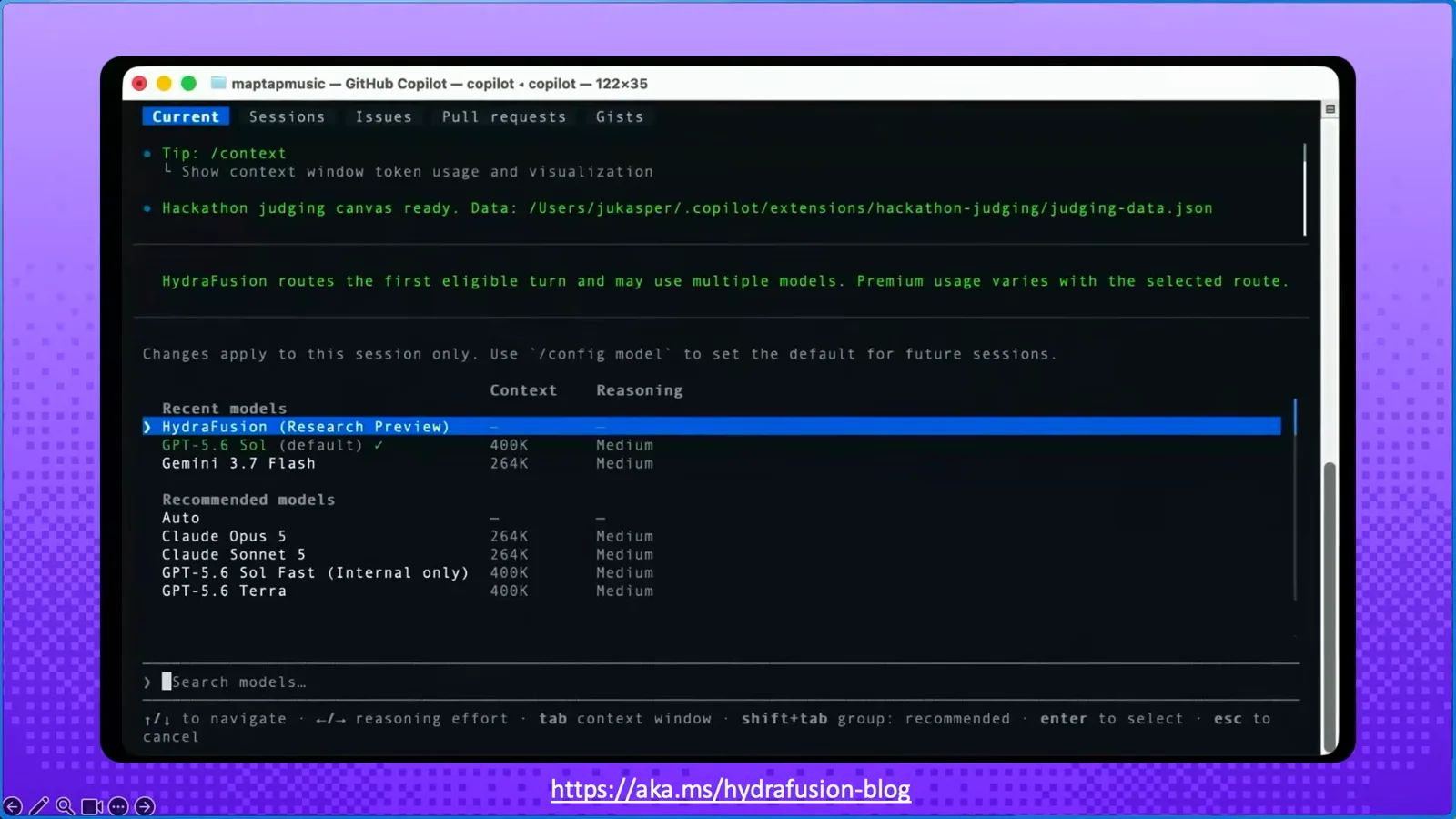
The Copilot CLI model picker with HydraFusion (Research Preview) highlighted under Recent models, above the launch-time pool: GPT-5.6 Sol (default), Gemini 3.7 Flash, Claude Opus 5, Claude Sonnet 5 and GPT-5.6 Terra.Watch at 1:00 - 6
Send a prompt and watch the plan form
Send a real task and the progress view shows what the router decided: the chosen pattern, each pass's status, the current activity and the elapsed time — "Fusion · selecting an approach…", "Fusion · drafting…", "Fusion · checking…", "Fusion · preparing final response…". Press Esc to interrupt a run; a summary stays in the conversation afterwards. In VS Code and the app, hover over the response footer to see which models were used.
Step 3 — Read the three execution paths
- 7
Read a SINGLE plan: one model was enough
On the type-hints-and-docstrings task the router chose SINGLE: one SOLVE pass with gpt-5.6-sol — no second model, no review step. The CLI measured the whole task at 5.3 AI units while solo Opus 5 burned 32.1 and solo Fable 5.1 20.3 on the same prompt. SINGLE is what you get on well-scoped work: the router does not pay for review it does not need.
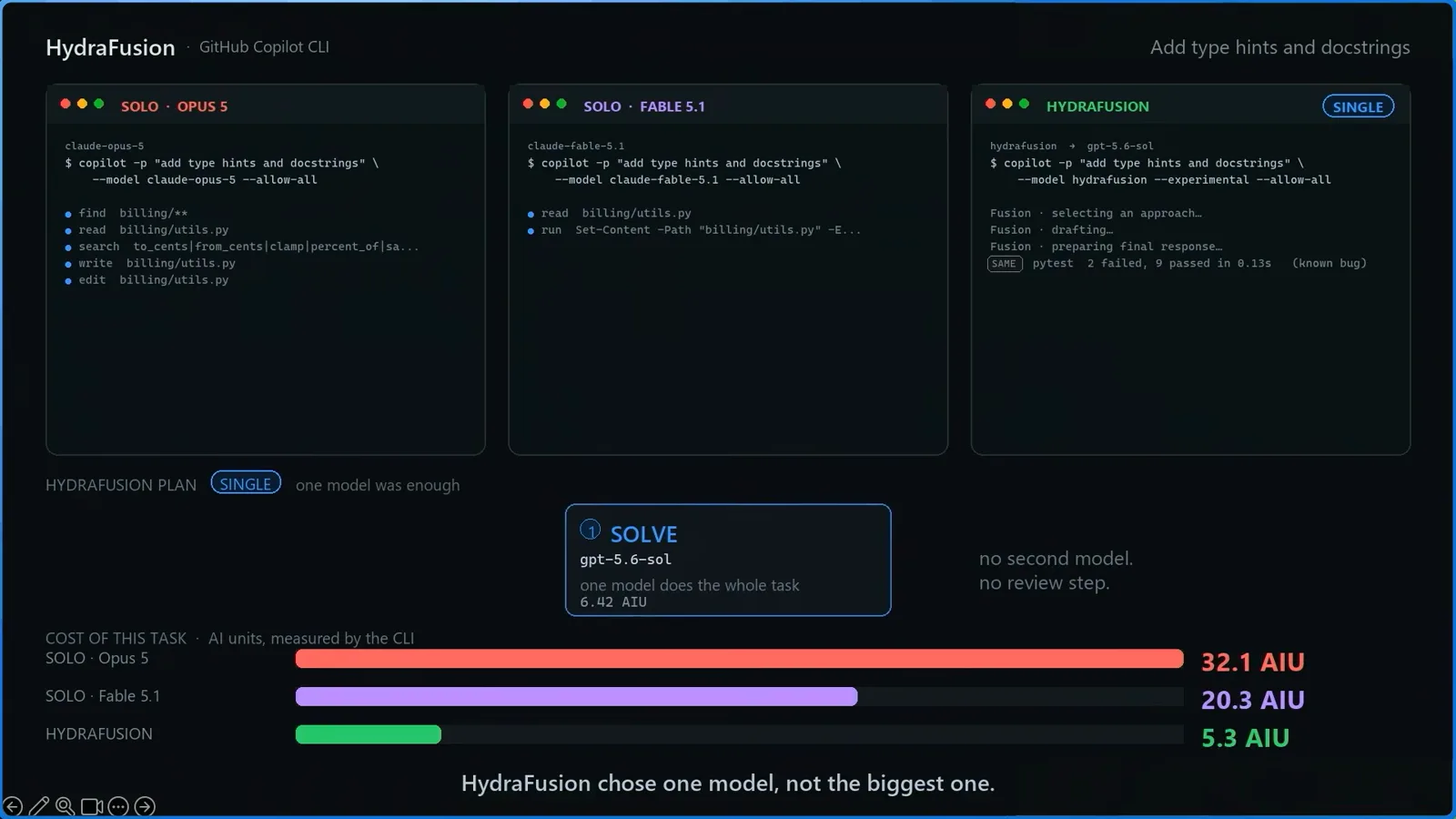
The SINGLE plan card — SOLVE with gpt-5.6-sol, "one model does the whole task" — beside the cost bars: HydraFusion 5.3 AIU vs solo Opus 5 at 32.1 and solo Fable 5.1 at 20.3 on the same type-hints task.Watch at 6:40 - 8
Read a CASCADE plan: draft cheap, escalate only on failure
On "fix the failing retry tests" the router ran CASCADE: gpt-5.6-luna drafted for 0.86 AIU, a gpt-5.6-sol judge graded the attempt for 0.22 and printed "verdict: reject", then gpt-5.6-sol redid the work for 5.25 — after which the suite went green (pytest 11 passed). Total: 5.5 AIU against 27.2 for solo Opus 5. Cascade only pays the escalation price when the cheap draft actually fails the check.
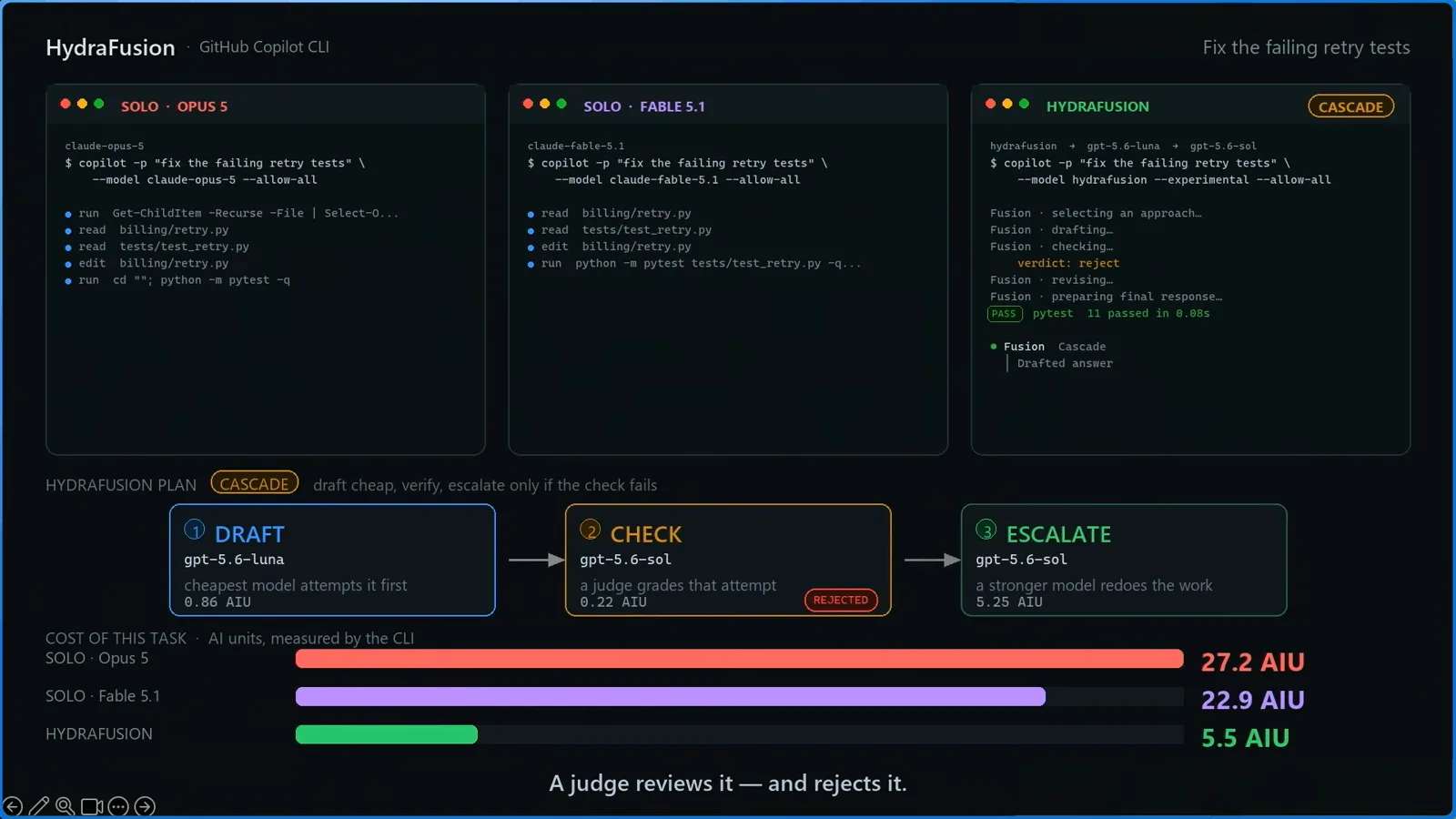
The CASCADE chain on the retry-tests task: DRAFT gpt-5.6-luna (0.86 AIU) → CHECK judge (0.22 AIU) stamped REJECTED → ESCALATE gpt-5.6-sol (5.25 AIU), with the task bars totalling 5.5 AIU.Watch at 7:40 - 9
Read a CRITIQUE plan: pay a second model to review
On the charge-endpoint migration — high blast radius — the router picked CRITIQUE: claude-opus-5 drafted (47.16 AIU), gpt-5.6-sol audited the draft for 0.60 and stamped it SENT BACK, then claude-opus-5 revised once for 15.86 until the suite passed. Critique is the expensive pattern — 60.7 AIU here, more than solo Opus 5's 39.9 — and it is what the router reserves for work where a wrong merge costs more than the review.
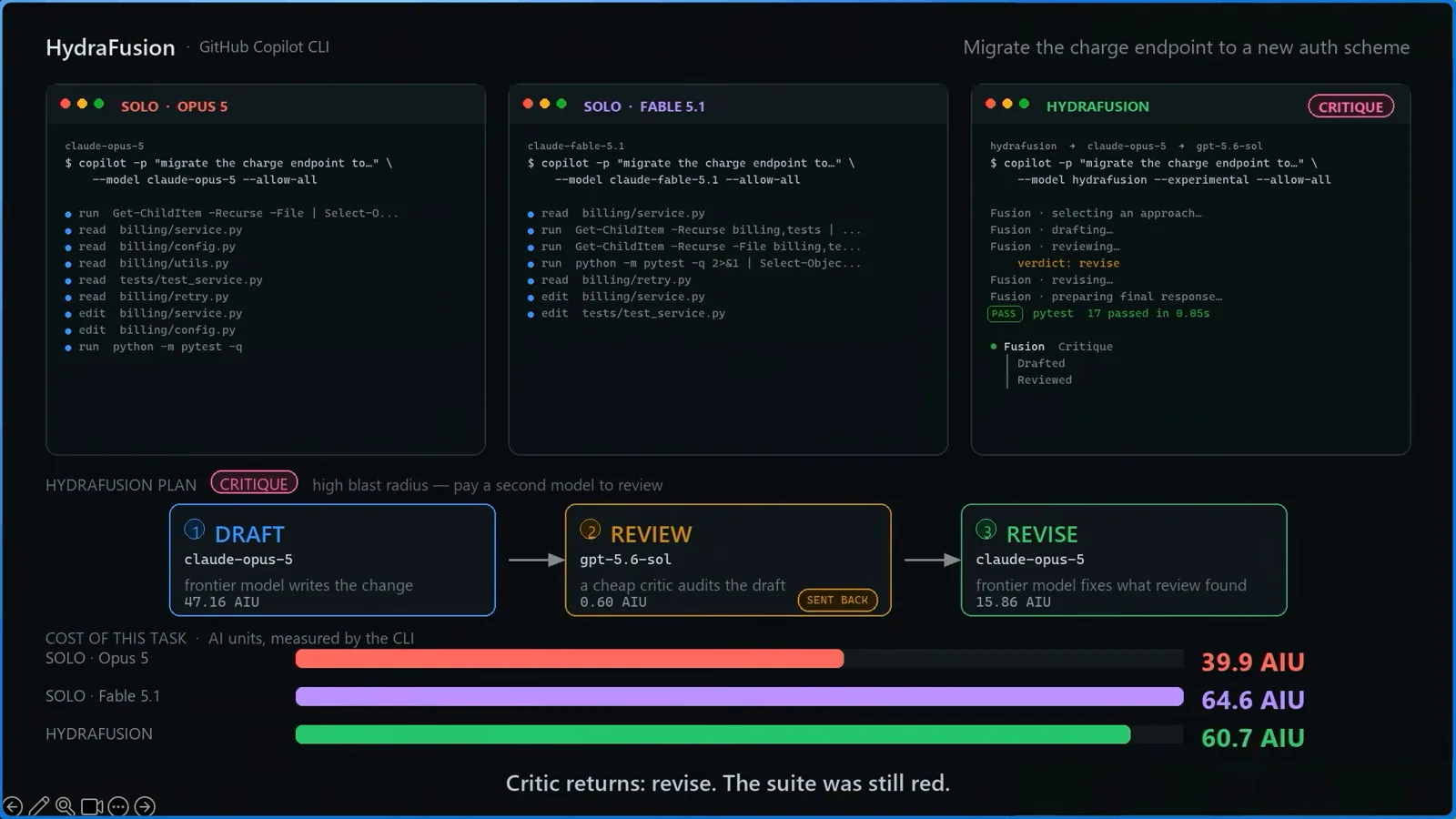
The CRITIQUE chain on the endpoint-migration task: DRAFT claude-opus-5 → REVIEW gpt-5.6-sol (SENT BACK) → REVISE claude-opus-5, totalling 60.7 AIU against solo Opus 5 at 39.9 and solo Fable 5.1 at 64.6.Watch at 8:20
Step 4 — Max, billing and clean exits
- 10
Switch to HydraFusion Max for demanding tasks
The 2026-10-14 changelog added a second entry to the picker: HydraFusion Max. Standard HydraFusion drafts at medium reasoning effort and reviews at high, positioned for substantial well-scoped work — complex bug fixes, multi-file changes. Max adds extra-high reasoning effort and is tuned for frontier capability on the most demanding tasks. Pick it from the same /model list; everything else about the workflow is identical.
- 11
Audit the bill with /usage
HydraFusion bills per model at that model's standard rate — no separate HydraFusion charge, and the Auto model-selection discount does not apply. Run /usage in the CLI to see AI credits per model. In the recorded four-task run the totals were 84.8 AIU for HydraFusion against 146.5 for solo Opus 5 and 159.0 for solo Fable 5.1 — 42% and 47% cheaper — but the critique-heavy task alone cost 63.6, so route mix drives the bill.
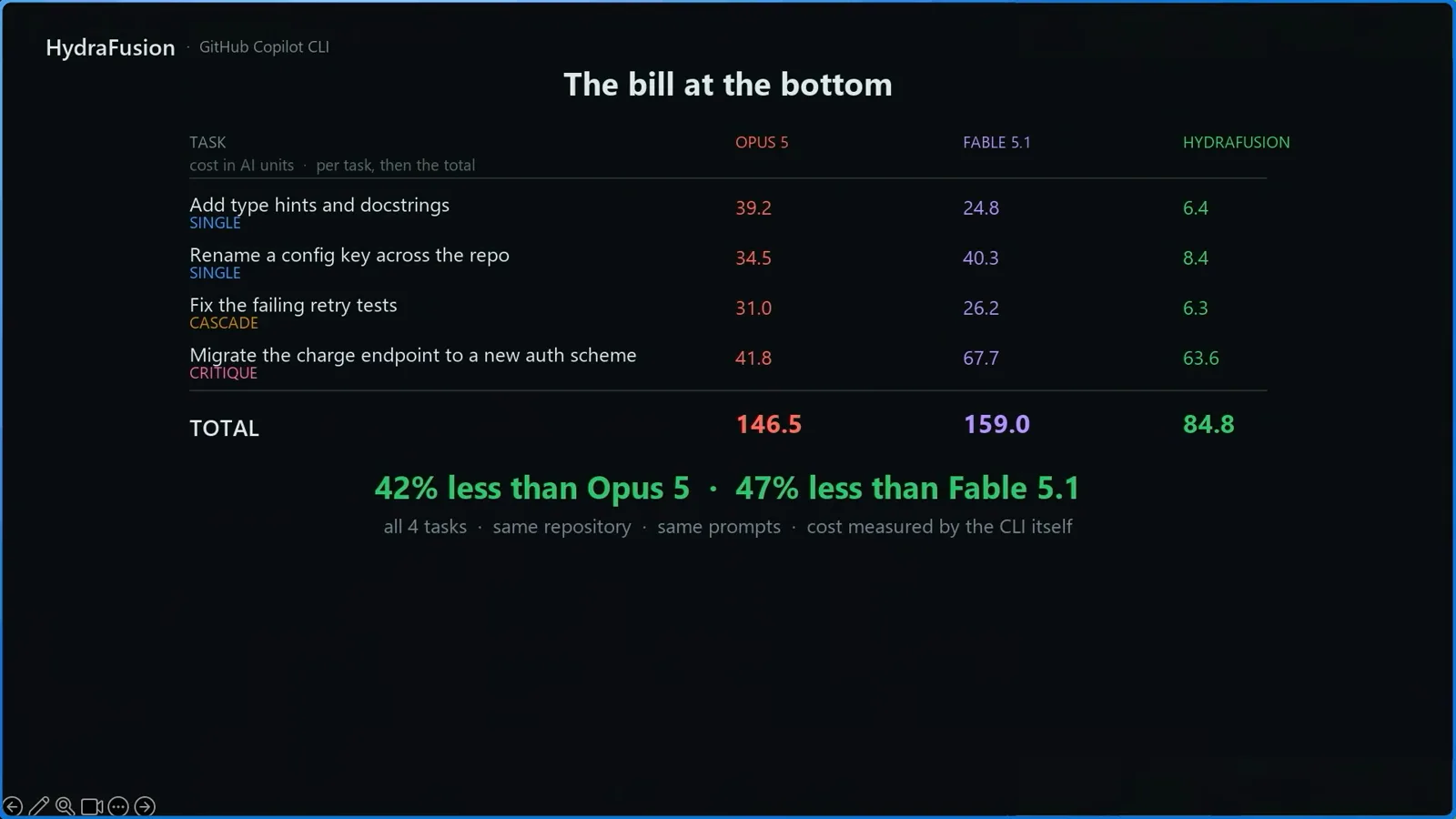
"The bill at the bottom" slide: per-task AI units for the four demo tasks and the totals — HydraFusion 84.8 vs solo Opus 5 at 146.5 and solo Fable 5.1 at 159.0, 42% and 47% cheaper.Watch at 9:00 - 12
Review discarded drafts before committing
Two preview limitations to work into your habits. First, if a pass is discarded — a Cascade draft the judge rejects, a Critique pass sent back — the workspace changes it already made are not automatically undone, so diff and review before you commit. Second, HydraFusion neither works with nor starts subagents. For routine prompts, plain Auto remains the cheap default; the official benchmarks claim TerminalBench 2.1 at 67% lower cost plus 4.9 points of quality, DeepSWE 36% lower (−1.5 points) and CheckpointBench 65% lower (−0.1 points) versus Opus 5.
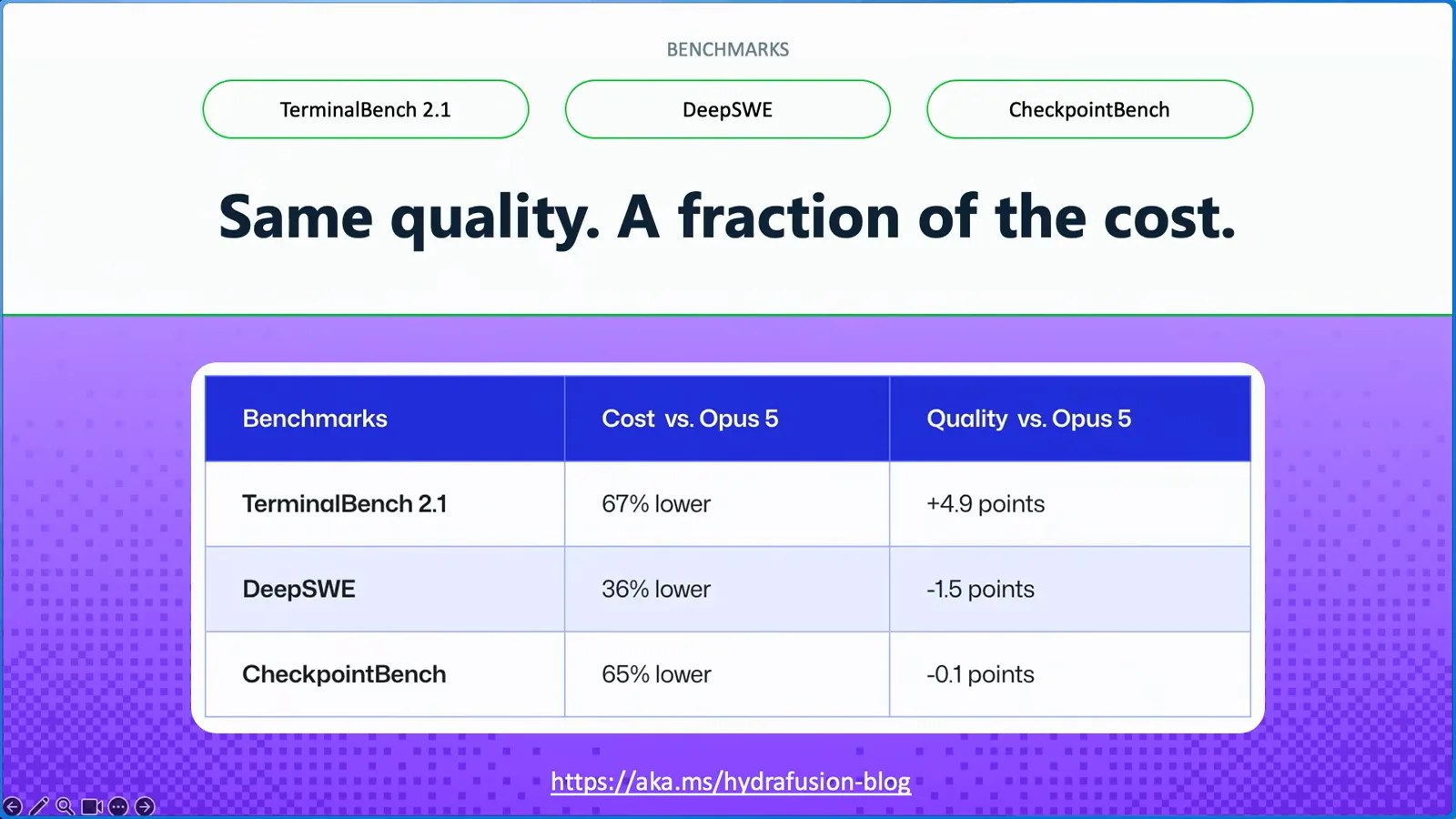
The benchmark table from the official walkthrough: TerminalBench 2.1 at 67% lower cost with +4.9 points of quality versus Opus 5, DeepSWE 36% lower, CheckpointBench 65% lower.Watch at 10:25
HydraFusion vs HydraFusion Max
Both entries live in the same model picker and run the same router — the difference is how hard each pass is allowed to think. GitHub shipped the Max option in the 2026-10-14 "HydraFusion updates and new Max option" changelog alongside the updated model pool (Claude Opus 5.5, GPT-6 Astra, GPT-6.1 Sol, GPT-6 Luna), per-step reasoning effort and the Cascade judging step.
- 1Standard HydraFusion is the balanced mode: drafts run at medium reasoning effort and reviews at high, positioned for substantial well-scoped tasks like complex bug fixes and multi-file changes.
- 2HydraFusion Max adds extra-high reasoning effort — the docs describe it as "tuned for frontier capability on more demanding tasks", for the deepest reasoning and most thorough analysis.
- 3Both are chosen from the same picker (HydraFusion and HydraFusion Max, both labelled Research Preview), and you can switch between them per session with /model.
- 4Max multiplies token burn: multi-pass execution plus extra-high effort per pass consumes AI credits noticeably faster than standard — and every pass still bills at its model's standard rate.
- 5Neither entry has an SLA, both can change during the preview, and neither works with subagents — Max is a capability knob, not a stability tier.
- 6Practical split: keep standard HydraFusion for everyday multi-file work, reserve Max for the task you would otherwise hand to the most expensive solo model, and use plain Auto for routine prompts where even the router is not worth the premium.
The recorded deep dive predates Max, so its numbers — 84.8 AIU across four tasks, 42–47% under the solo models — measure standard HydraFusion only. Treat them as the Single-route floor: Critique-heavy tasks under Max will land higher.