
Claude Code Ultracode & Effort Levels: the /effort Guide
Effort decides how hard Claude thinks — and how fast it burns your limits. This guide explains all five effort levels, the per-model defaults, /effort auto, and ultracode: the orchestration toggle that v2.1.284 turned into an independent switch you can stack on any level.
TL;DR — effort and ultracode in four lines
- Five effort levels: low, medium, high, xhigh, max — calibrated per model. Default is high on most models, but Opus 5.5 and Sonnet 5.5 default to medium, and Opus 4.7 to xhigh.
- Change it with /effort (slider) or /effort <level>; /effort auto clears your saved level and returns the model to its default. Enter saves as default; s keeps it for this session only.
- Ultracode is a Claude Code setting, not an effort level: it has Claude orchestrate dynamic workflows for substantive tasks. Since v2.1.284 it is its own toggle — Tab in /effort, or /effort ultracode on|off — and no longer forces xhigh effort.
- Ultracode vs max in one line: max is the deepest raw reasoning level (prone to overthinking); ultracode adds workflow orchestration on top of whichever level you picked. They answer different questions — depth vs. coordination.
Model configuration & effort — Claude Code documentation
Docs:code.claude.com
Claude Code CHANGELOG — v2.1.284 (Ultracode becomes its own toggle)
Changelog:github.com/anthropics/claude-code
How to Use Claude Effort Levels (Full Guide)
Channel:Ryan & Matt Data Science13:24
Facts on this page come from the official effort documentation and the v2.1.284 changelog; the diagram is an original illustration for this guide. The listed video tests the same five effort levels in Claude's co-work app — useful real-world token-burn data, though its screens show a different surface than Claude Code. No frames from it are used here.
Effort levels and ultracode, step by step
1 · Know the scale
- 1
Understand what effort actually controls
Effort is Claude Code's reasoning dial: it sets how much thinking the model puts into your requests, which directly moves response quality, latency, and how fast you burn usage limits. The official docs are blunt about the scale being per-model — the same level name is not the same underlying value across models.
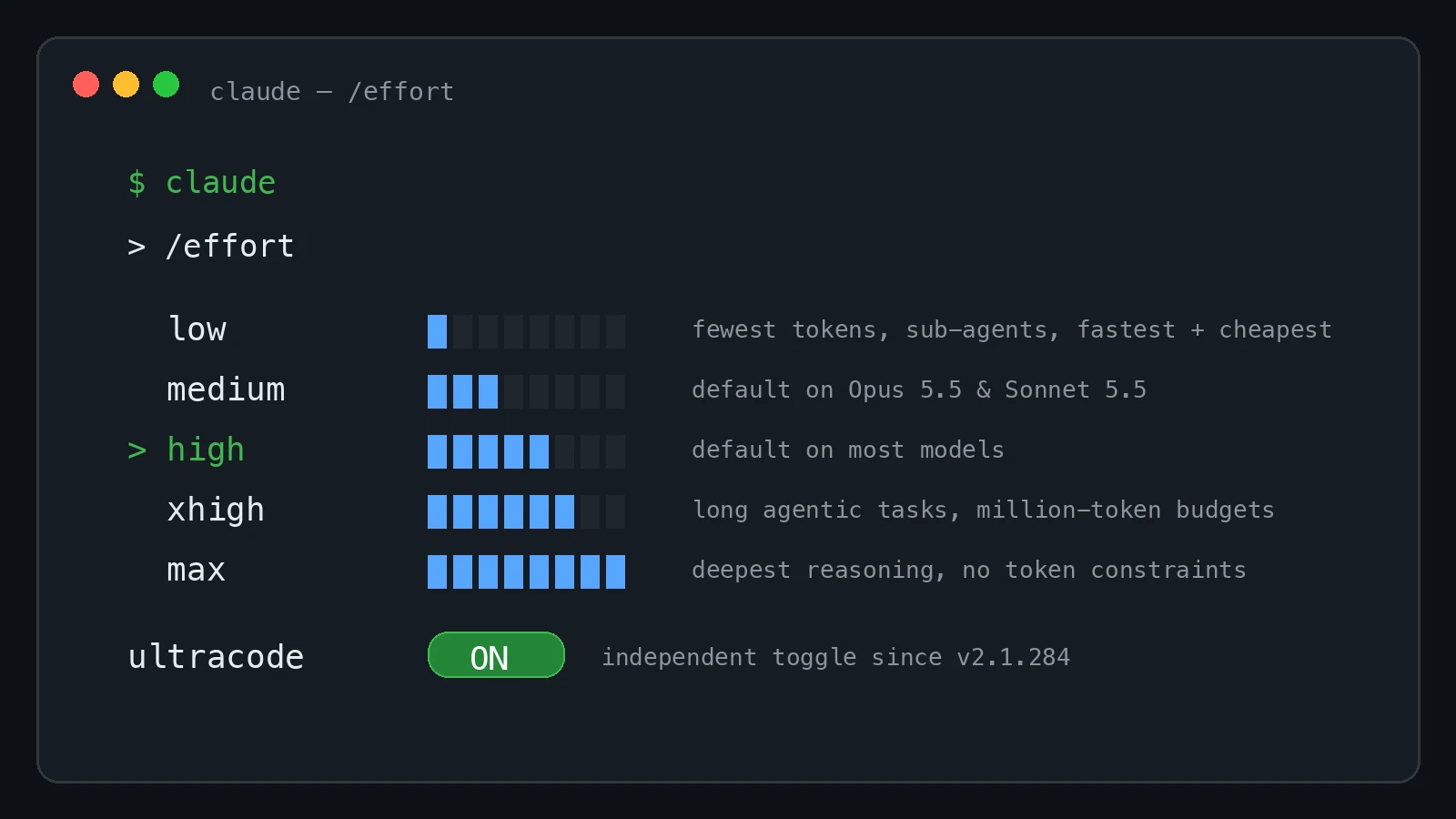
The /effort scale at a glance: five levels plus the ultracode toggle (diagram drawn for this guide). - 2
Learn the five levels and when each earns its tokens
low is for quick exchanges you review yourself — brainstorms, first sketches, renames. medium handles day-to-day work with clear scope. high is for work where verification matters or edge cases lurk. xhigh buys deeper reasoning at higher token spend for long-running agentic tasks. max is for hard problems you want Claude to grind through alone — the docs warn it can show diminishing returns and overthink.
- 3
Check your model's default before you blame the model
Defaults are not uniform: high on every model that supports effort, except Opus 5.5 and Sonnet 5.5, which default to medium, and Opus 4.7, which defaults to xhigh. If responses feel slow or limits vanish fast, check the effort line before assuming the model — and note Sonnet 5.5 became the default Sonnet model in v2.1.284, with 1M context at $2/$10 per million tokens.
2 · Change it like you mean it
- 4
Change it live with /effort
Type /effort in a session and a slider opens — arrow keys move across the levels, Tab reaches the ultracode toggle. Inside the /model picker, left/right adjusts the same control. For one-off runs, the --effort flag sets a level for that session, and the CLAUDE_CODE_EFFORT_LEVEL environment variable works for automation.
- 5
Set a level directly — and know what auto means
/effort <level> sets the level without opening the slider. The quietly useful one is /effort auto: it clears the saved level for the active model, so Claude Code falls back to that model's default. The environment variable accepts auto too. If a session behaves oddly after experiments, auto is the reset button.
- 6
Make your choice permanent (the right way)
In the /effort slider, Enter saves the level as your default while s applies it to this session only. In settings, you can set effort per model under modelSettings or use a top-level effortLevel fallback — with one trap: max is not accepted in either key, and unless it comes from the environment variable, max applies to the current session only. Skills and subagents can carry their own effort in frontmatter, capped by maxEffortLevel.
3 · Ultracode, the new toggle
- 7
Understand what ultracode is
Ultracode is a Claude Code setting rather than a model effort level: per the official docs, it has Claude orchestrate dynamic workflows for substantive tasks — breaking big work into coordinated steps instead of one long solo reasoning binge. That is why it used to ship fused with xhigh: orchestration on top of deep reasoning.
- 8
Catch up on the v2.1.284 change
Before v2.1.284, ultracode was the top stop of the /effort slider, and enabling it forced xhigh effort. The September 2026 changelog changed that: ultracode is now its own toggle — Tab in /effort, or /effort ultracode on|off — and it no longer forces xhigh; it stays on at any effort level. The VS Code extension replaced the slider's ultracode stop with an on/off switch (the model pill shows “· Ultracode”), and new effortSlider keybinding actions cover decreaseEffort, increaseEffort, and toggleUltracode.
- 9
Decide between ultracode and max
They are different axes. max answers “think as hard as possible on this one problem” — deepest raw reasoning, no token constraints, with a documented overthinking risk. Ultracode answers “coordinate the work” — workflow orchestration layered over whatever level you picked, now including max if you want both. Rule of thumb: gnarly single-question debugging → max; multi-step builds where sequencing and delegation matter → ultracode; both → max effort with ultracode on.
- 10
Know the constraints before you rely on it
The docs list ultracode as unavailable when workflows are turned off, when the model doesn't support xhigh effort, or when an effort cap below xhigh applies. Managed maxEffortLevel and org caps can shrink the level list per model, and unsupported levels fall back to the highest supported level at or below — xhigh runs as high on Opus 4.6. If CLAUDE_CODE_EFFORT_LEVEL is pinned to a level other than xhigh, requests run at that level with orchestration inactive. For one-turn bursts without touching any setting, the ultrathink keyword adds deeper reasoning for that turn only.
Per-model defaults and the level list
Four facts save the most support tickets:
- 1Most models default to high effort; medium is the exception, not the rule — it is the default only on Opus 5.5 and Sonnet 5.5.
- 2Opus 4.7 defaults to xhigh. Opus 4.6 and Sonnet 4.6 do not offer xhigh at all — levels above their ceiling fall back to the highest supported level.
- 3Models not listed in the docs' effort table do not support effort; Sonnet 5.5 joined the table in v2.1.284 as the new default Sonnet model (1M context, $2/$10 per Mtok, $0.20/Mtok cache reads).
- 4The scale is calibrated per model: “the same level name does not represent the same underlying value across models.” Migration guidance in the docs is blunt — Opus 5.5 at medium matches or exceeds Opus 5 at high.
Resolution order when nothing is saved: an explicit choice (environment variable, --effort flag, or /effort in session) wins, then saved settings (modelSettings per model, or a top-level effortLevel fallback), then the model default.