
Google Antigravity CLI Tutorial: agy, /config & Subagents
Google's own demo, replayed as 14 annotated steps: launch agy in any terminal, have it build a journal-and-todo app from one prompt, and pick up /config, /diff, artifacts, session resume and subagents along the way.
Antigravity CLI in 30 seconds
- The Antigravity CLI installs a binary called agy — run it inside any project folder and you get the full agent experience: a model header, slash commands and a prompt box.
- /config is the control room: thirteen settings including Rendering Mode (native terminal (inline) vs alt-screen) and Tool Permission (request-review, always-proceed, strict).
- Every run writes artifacts — implementation_plan.md and walkthrough.md in this demo — stored under ~/.gemini/antigravity-cli/ and reviewable with /artifact.
- Talk to the agent mid-task with /btw, audit changes with /diff, draft long prompts in your editor via ctrl+g, and resume your last session with agy -c.
Google Antigravity CLI Full Walkthrough
Channel: Google Antigravity7:09
Getting started with the Antigravity CLI — official docs
Docs: antigravity.google/docs
Frame captures come from Google's official demo recording (Antigravity CLI 0.1.3, Gemini 3.5 Flash); every step links to the exact second it was taken from. The CLI moves fast — expect small label differences in newer builds.
Screenshots © Google, taken from the public demo for identification and commentary. All step-by-step copy is our own.
The Antigravity CLI walkthrough, step by step
Launch, configure and start the build
- 1
Launch agy in your project folder
Install once and the Antigravity CLI registers the agy binary — run it inside any project directory. The header shows what you are working with: the CLI version (0.1.3 in the demo), the active model (Gemini 3.5 Flash) and the workspace path (~/Develop/todo-list). The prompt box starts empty, with a "? for shortcuts" hint in the corner.
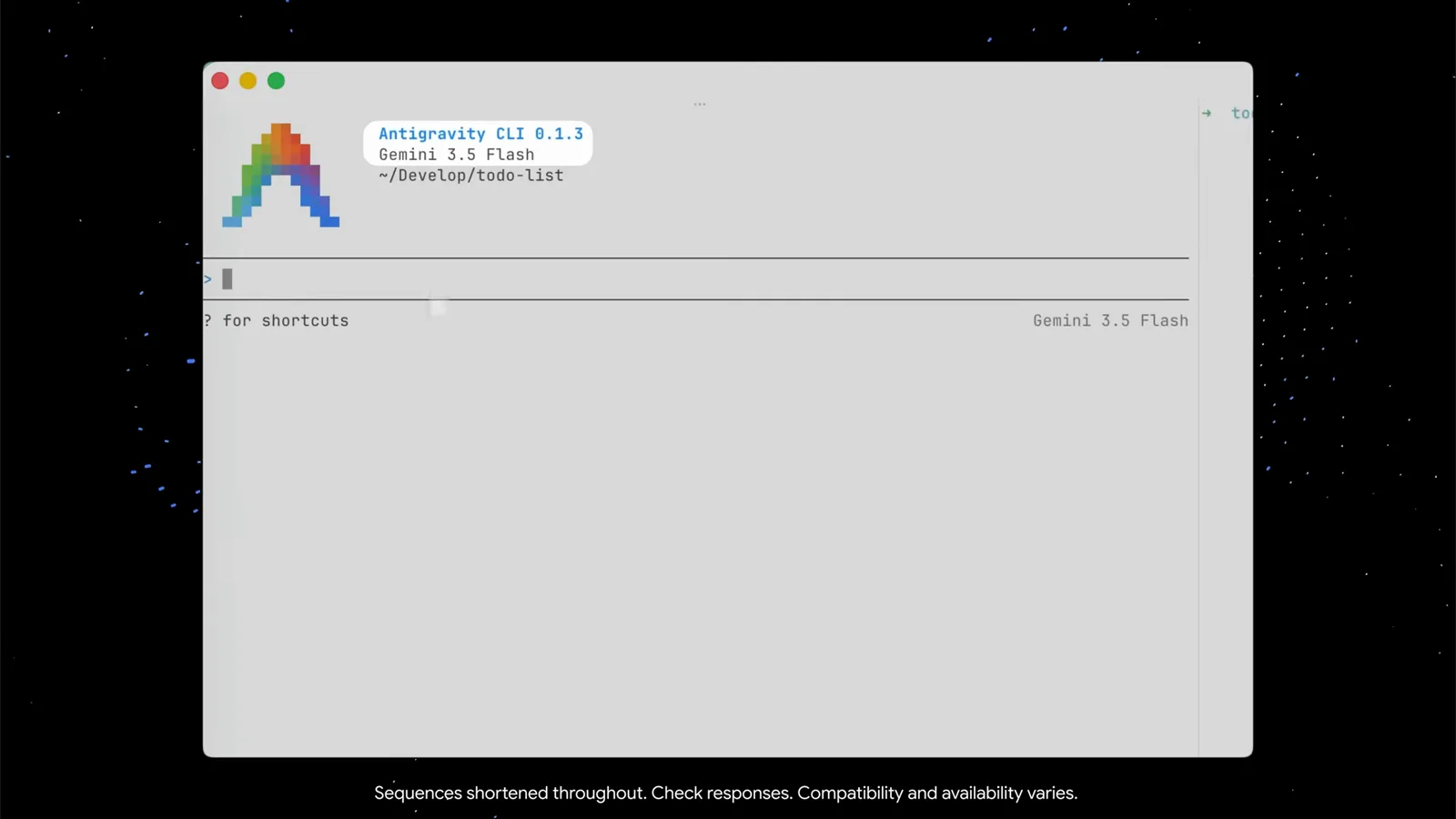
The agy welcome header: version, model and workspace at a glance.Watch at 0:19 - 2
Open /config to see every setting
Type /config and a Settings panel opens with a Search field on top — start typing to filter. The demo install shows thirteen entries, from Animation Speed and Artifact Review to Rendering Mode (native terminal (inline)) and Tool Permission. Arrow down to any row and a one-line description of the selected setting appears at the bottom; Esc closes the panel.
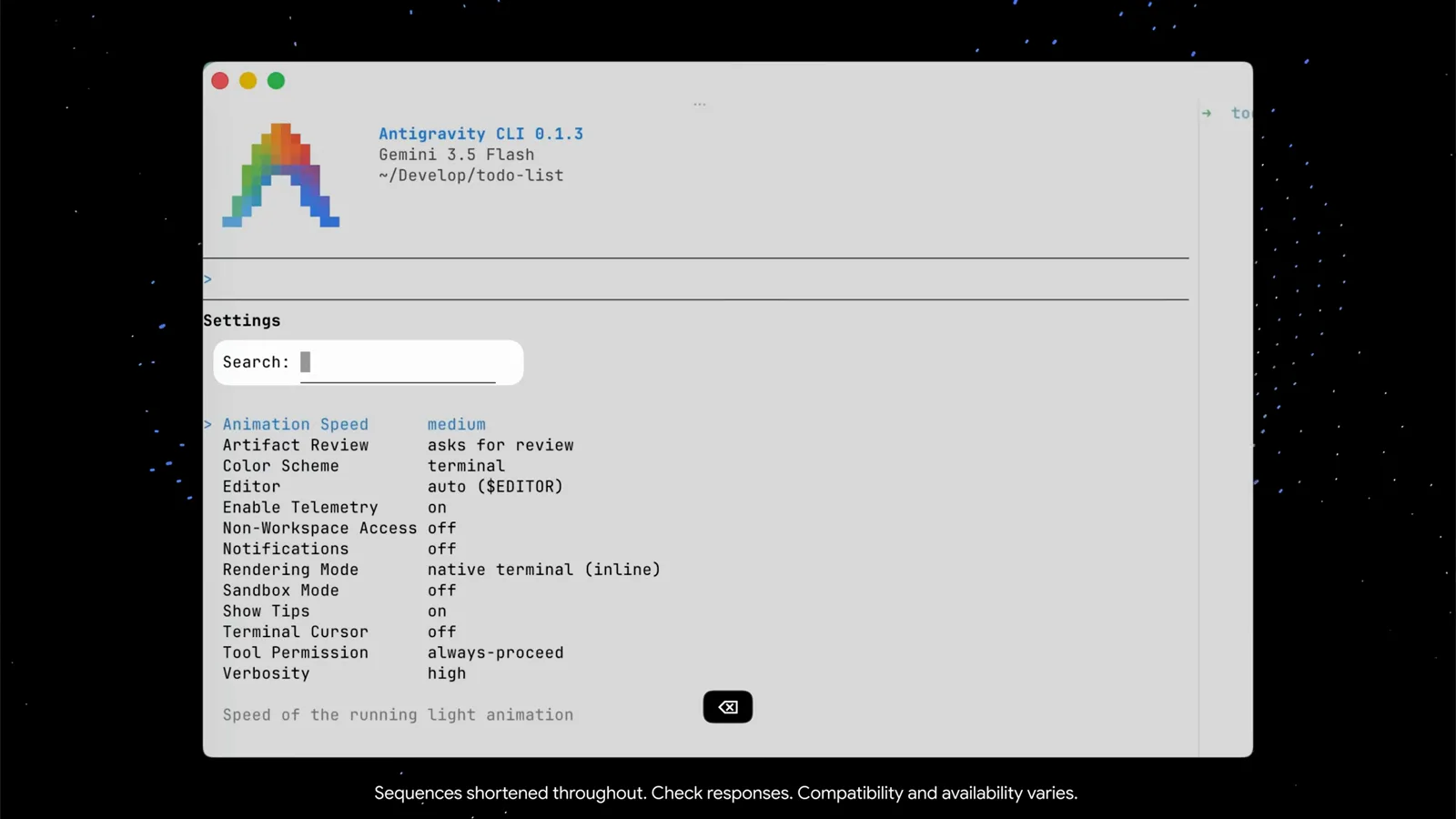
/config lists all thirteen settings with live search and per-row hints.Watch at 0:27 - 3
Give the agent a concrete first prompt
The demo pastes a structured request: build a beautiful, zero-dependency "Minimalist Markdown Journal & To-Do CLI" in Python. It spells out three requirements — tasks in a todo.md file with [ ]/[x] toggling, timed notes appended to journal.md, and vibrant ANSI colors with clean Unicode icons. Naming the files, the format and the look hands the agent everything it needs in one turn.
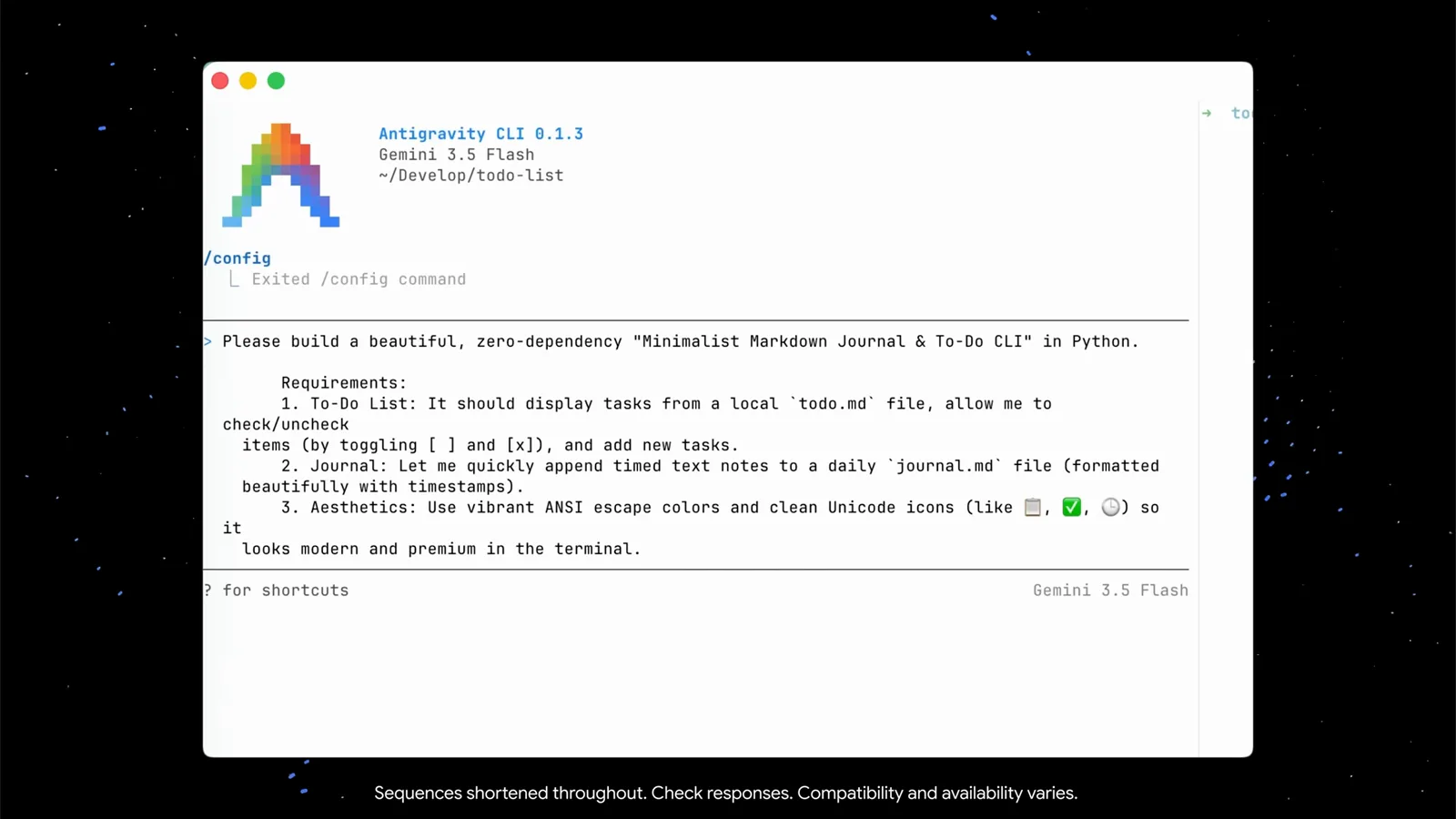
A good first prompt names the files, the format and the look.Watch at 0:43 - 4
Talk to the agent while it works with /btw
You do not have to wait. While the agent compiles jtodo.py and stages its first atomic git commit, the demo types "/btw what are you doing?" — the slash command for asking a side question without interrupting the current task. The agent explains the plan (initialize the workspace, create the foundations, commit) and keeps building. Watch the tips under the prompt box too: ctrl+g opens your external editor for long prompts.
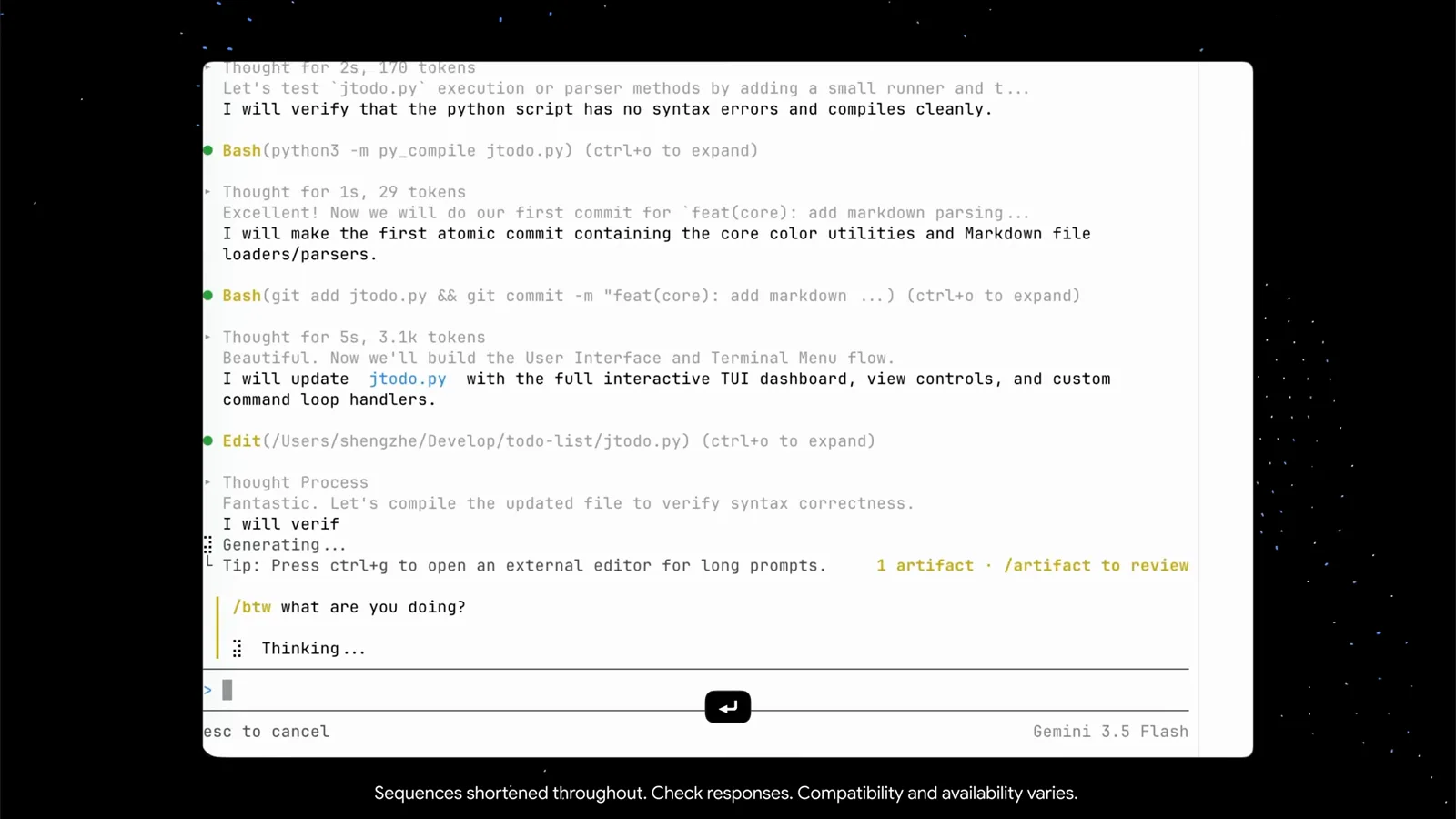
/btw gets you a progress report without derailing the run.Watch at 1:15
Review artifacts, diffs and the running app
- 5
Watch context burn with the token board
The context view pairs a dot grid with real numbers: Gemini 3.5 Flash at 52.8k of 1.0M tokens (5.0%), split into user messages, agent responses, tool calls, system prompt and tools, subagents and free space. The same view lists the session's checkpoints (/rewind) and the artifact files the agent has written — two so far, implementation_plan.md and walkthrough.md.
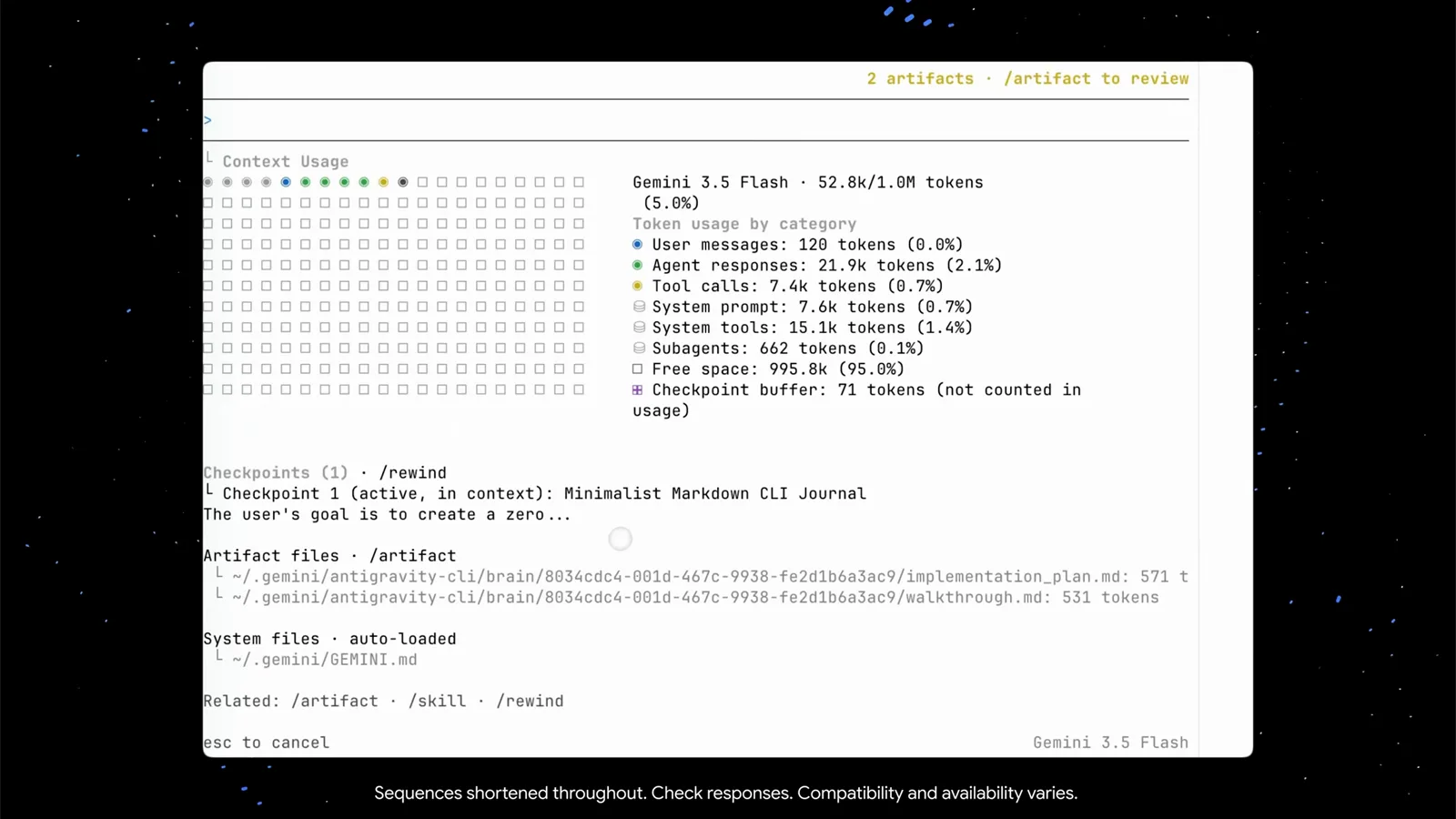
The token board turns context anxiety into arithmetic.Watch at 1:40 - 6
Read the walkthrough artifact
Open the artifacts and walkthrough.md explains what the agent did: the repository structure (jtodo.py, test_jtodo.py, README.md, .gitignore), the design decisions it made, and how daily journaling works. The viewer has its own keys — arrows to scroll, pgup/pgdn to page, c to comment, esc to close.
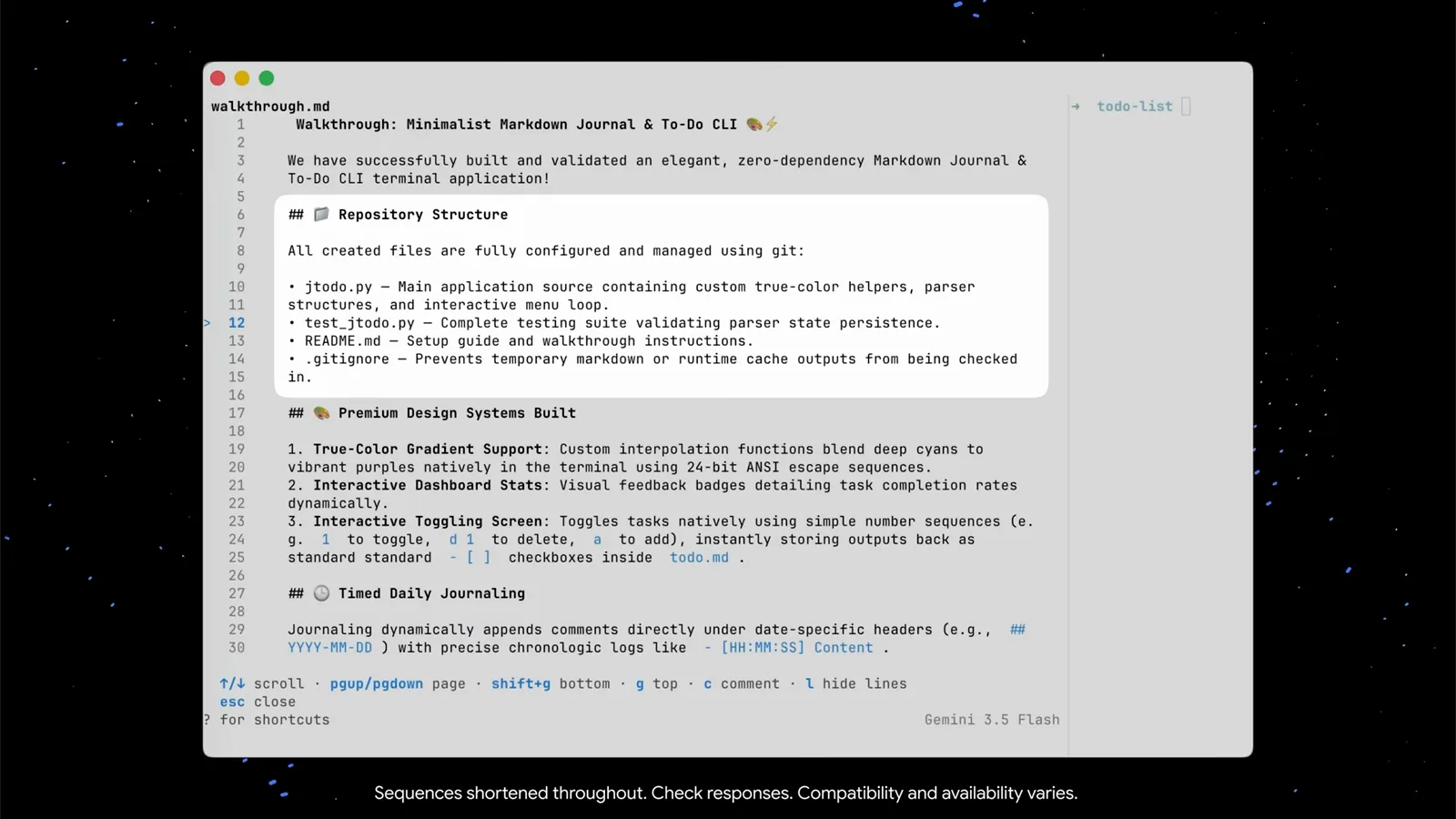
walkthrough.md is the agent's own report on what it built.Watch at 1:57 - 7
Approve artifacts when action is required
Antigravity CLI does not just dump files — it asks. An "Action required (2 left)" bar lists walkthrough.md and a new implementation_plan.md for review. The keyboard line says it all: arrows to navigate, y/n to approve or reject, shift+a to approve all, p to preview, esc when you are done. Nothing gets silently waved through unless you set it that way.
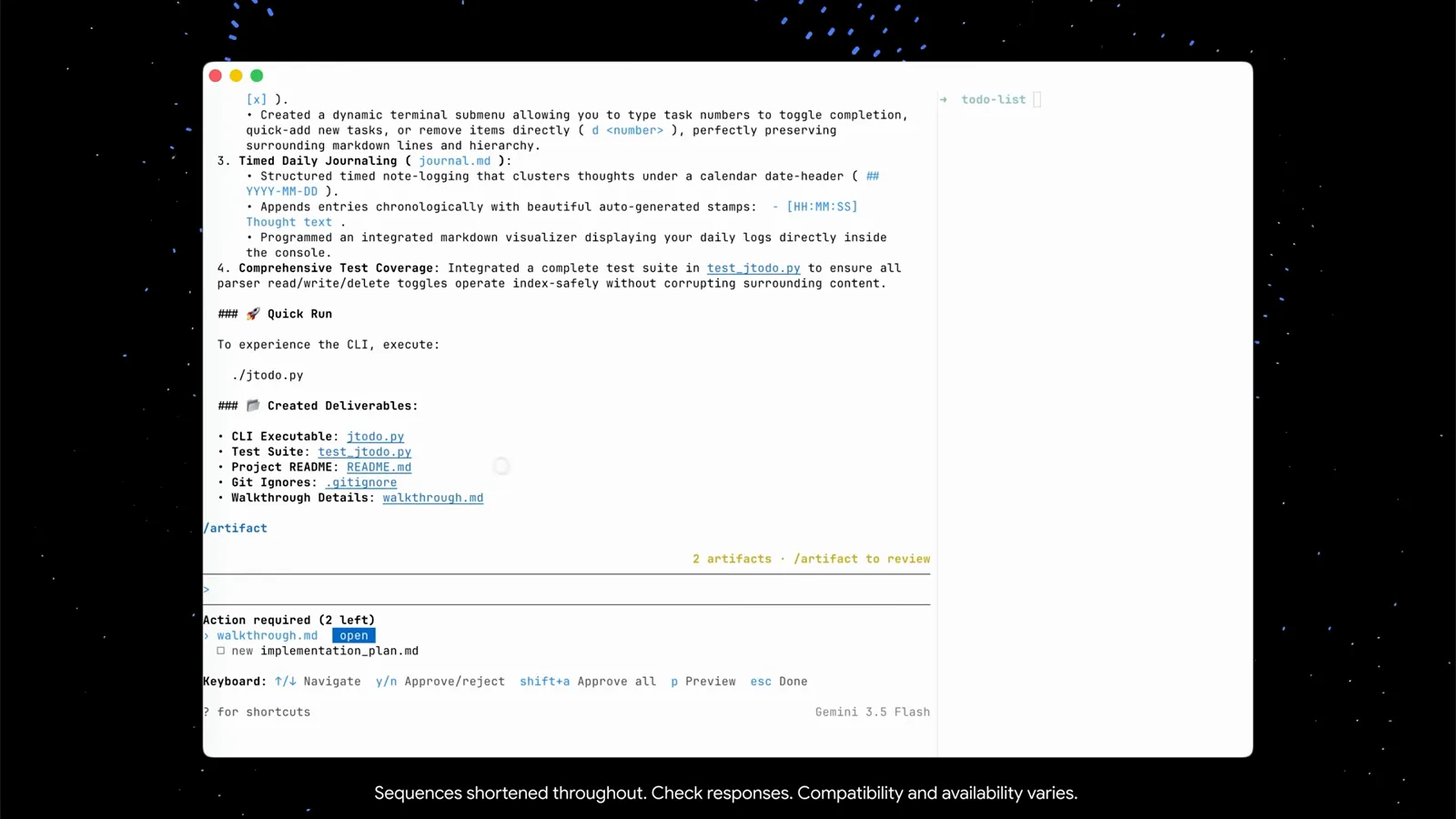
The review bar: y/n per artifact, shift+a to approve them all.Watch at 2:15 - 8
Audit exactly what changed with /diff
After asking the agent to improve the app's option selection, the demo checks the outcome with /diff — "View uncommitted changes and per-turn diffs". It reads your VCS (Git here) and shows what the agent did this turn, file by file. The to-do list now supports cursor selection, and the diff proves it is only the change you asked for.
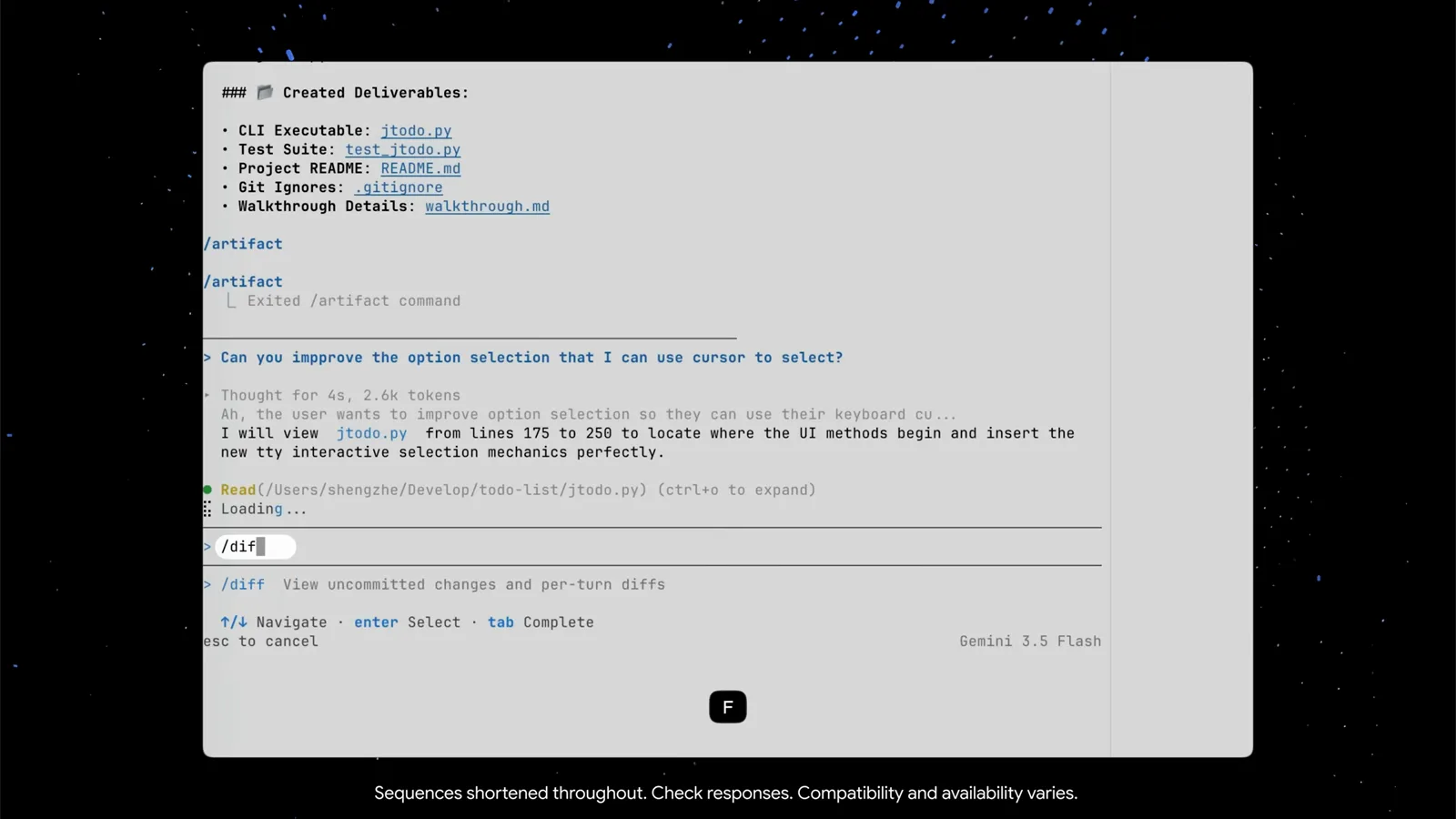
/diff reads Git so you do not have to.Watch at 2:48 - 9
Run the app and keep iterating
In a second terminal panel — a plain shell, not part of the CLI — the demo launches ./jtodo.py. The finished menu greets you: stats up top, then View & Toggle To-Do Tasks, Quick-Add a To-Do Task, Write Daily Journal Entry, Read Today's Journal Entries, Exit Application. Thanks to the upgrade you now move with the up/down arrow keys and confirm with Enter. Spot anything off? Type the next prompt back in agy and the loop continues.
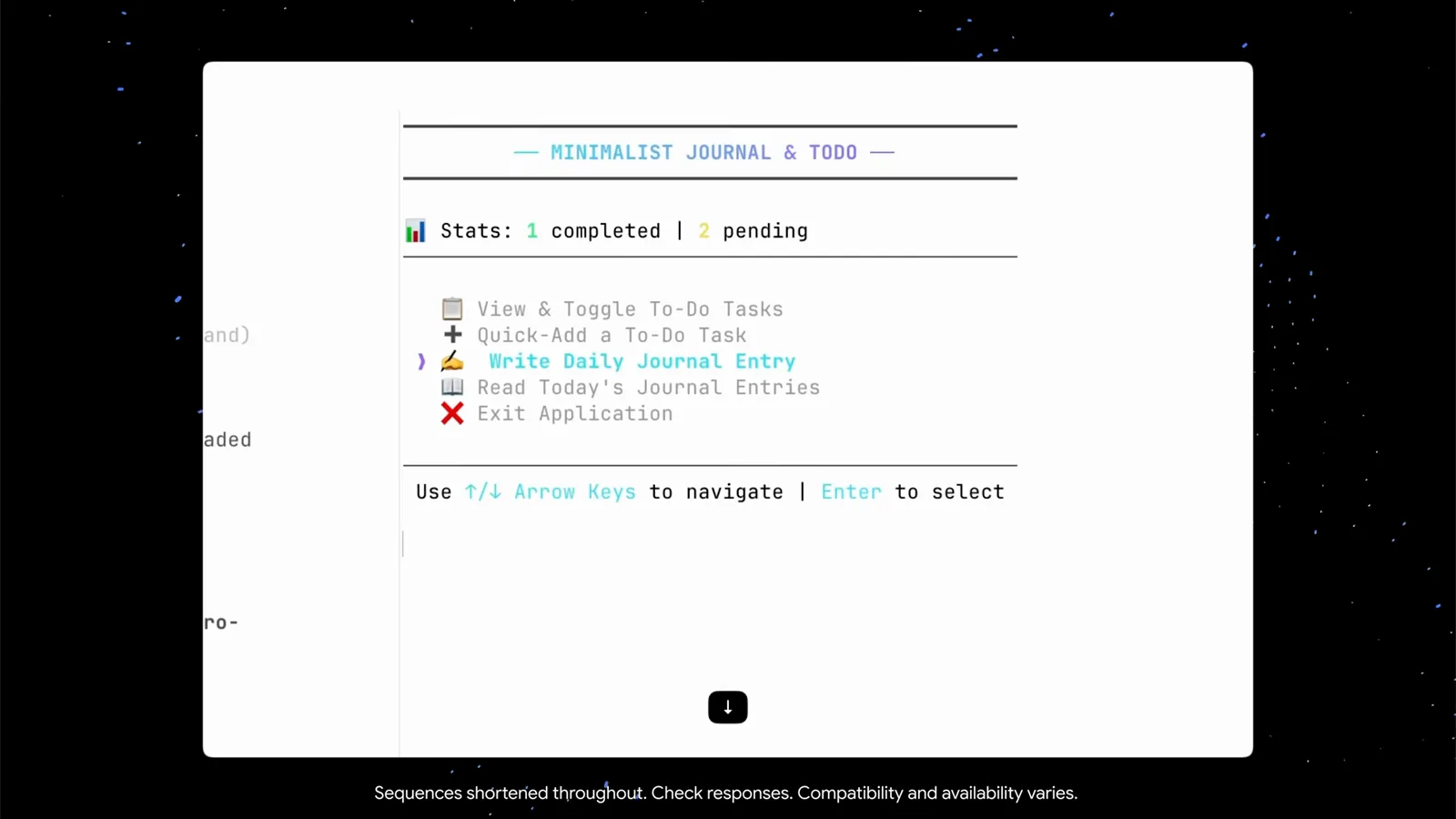
The built app in a second panel — arrow keys to navigate, Enter to select.Watch at 3:08
Sessions, subagents and permissions
- 10
Press / for commands, /help for the cheat sheet
Typing a single / opens the full slash-command menu — /add-dir, /agents, /artifact, /btw, /changelog and 39 more, each with a one-line description. For keyboard moves, /help opens a tabbed cheat sheet (general / commands / shortcuts): ctrl+g for editor prompts, ctrl+l to clear the screen, ctrl+o to expand tool output, shift/alt+click to select and copy text.
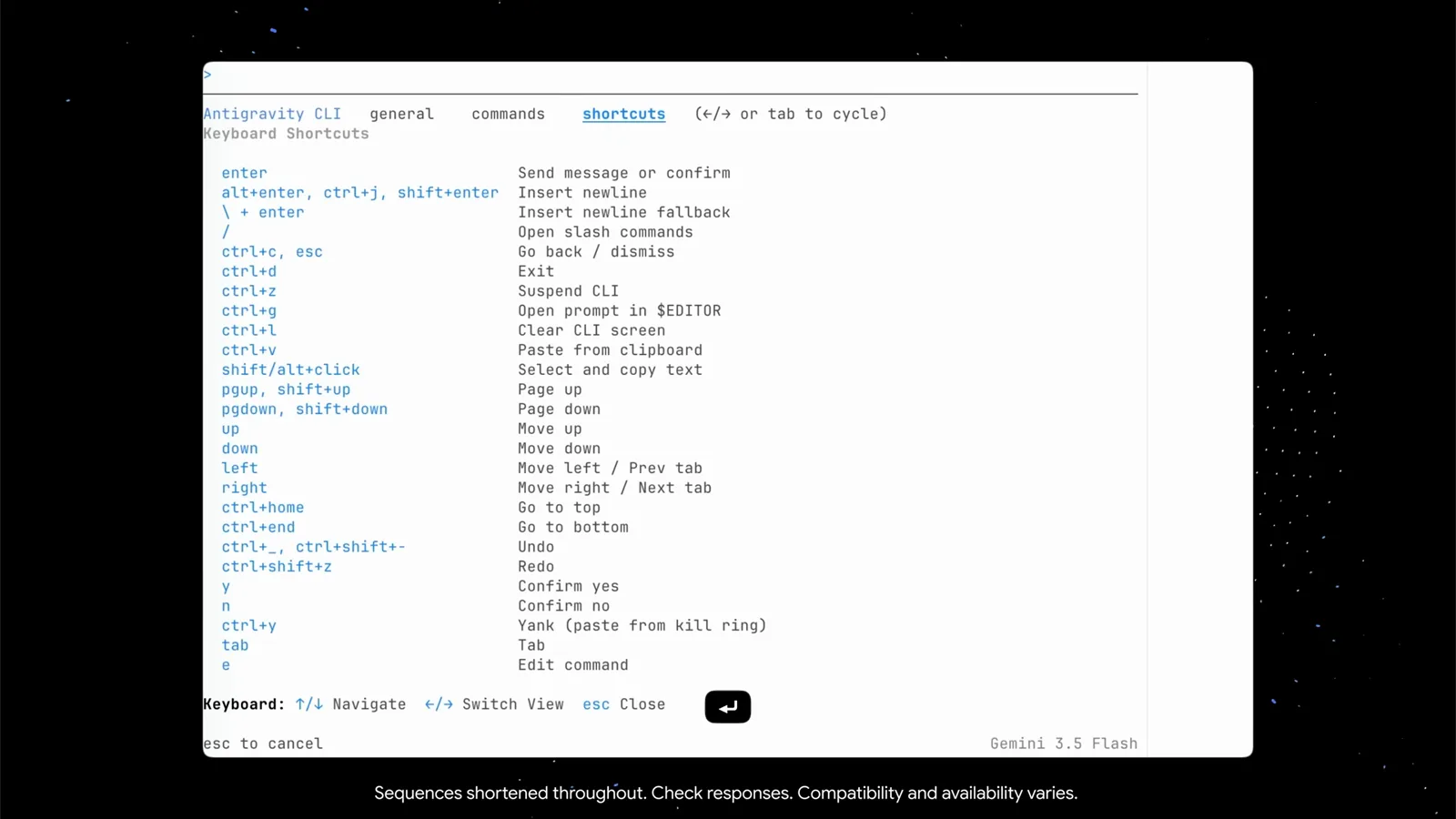
/help tabs through general info, commands and keyboard shortcuts.Watch at 3:32 - 11
Close the terminal — sessions survive
Conversations are stored locally, and the CLI tells you exactly how to get back: the footer prints "Resume: agy --conversation=8034cdc4… (or -c)". So agy -c continues your previous session with all context intact, and the full conversation id targets a specific one. Losing your terminal no longer means losing your work.
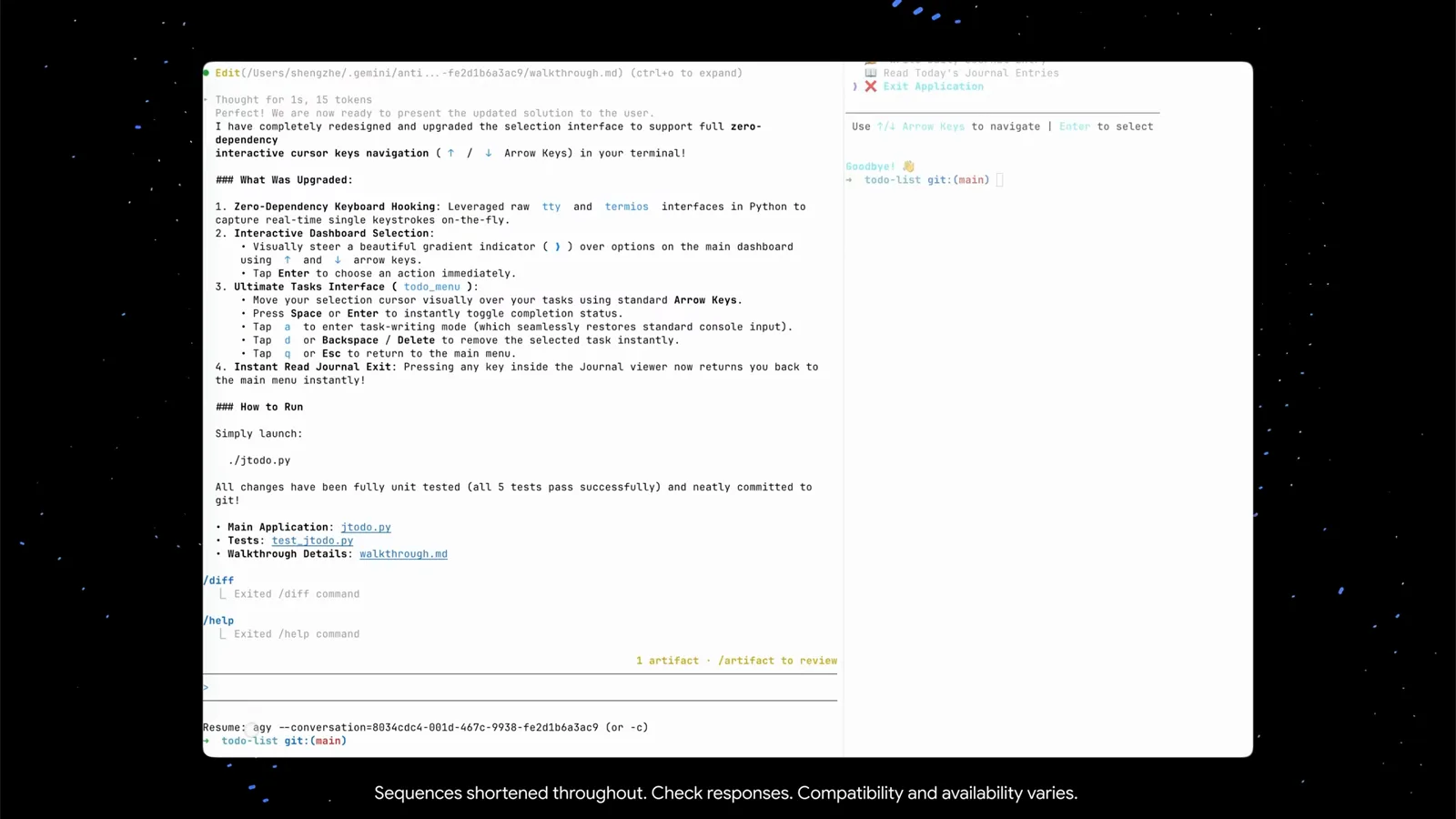
The resume hint prints the exact agy --conversation id — or just use -c.Watch at 3:42 - 12
Delegate research to a subagent
Out of ideas? The demo just asks: "can you do research to improve the todo list?" The main agent decides it needs a specialized research subagent, composes the research prompt itself, and dispatches an Agent tool call — "research: Markdown TUI Researcher". The status bar switches to "Gemini 3.5 Flash · 1 subagent(s)". You can also invoke subagents explicitly via the /agents command.
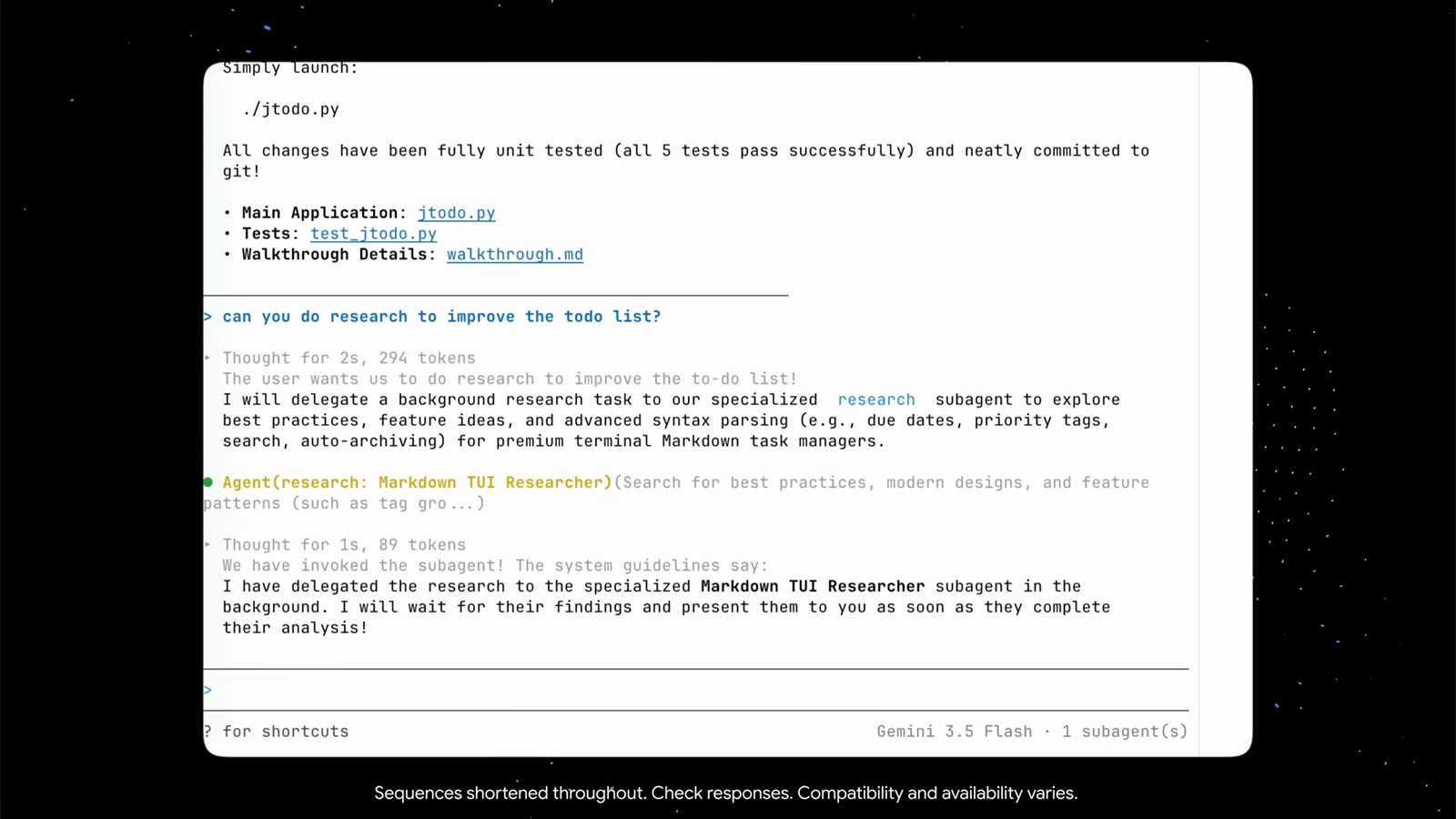
A plain prompt is enough — the CLI writes the subagent's brief itself.Watch at 4:20 - 13
Watch the subagent work in its own view
Enter the subagent view and the header comes first: running for 34 seconds, 11 steps, a session id. Below it, the prompt the main agent derived, the allowed tools (ListDir, Read, WebSearch) and a live trajectory — it lists the project directory, reads jtodo.py, then runs two web searches on task-manager design patterns. Press esc to hop back to the main agent, which collects the findings and implements the best ones.
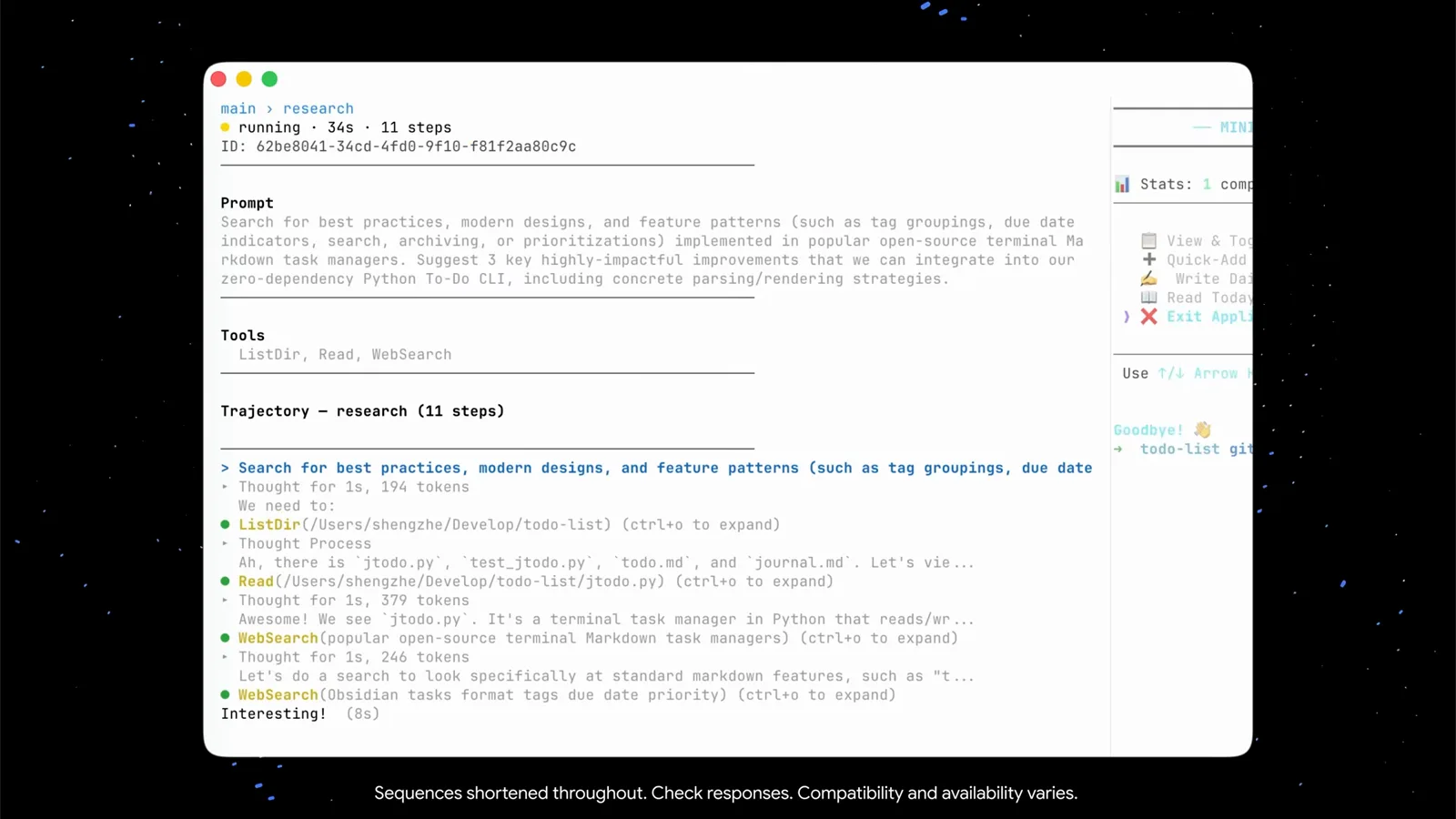
Elapsed time, step count and every tool call, live.Watch at 4:43 - 14
Pick your autonomy level: Tool Permission
Back in /config, the Tool Permission row is the autonomy dial, with three values. request-review — the agent asks before acting (the safe default). always-proceed — no interruptions, which is what the demo used to build the whole app. strict — the agent confirms every single action with you first. On screen they read request-review, always-proceed and strict; pick per project and change any time.
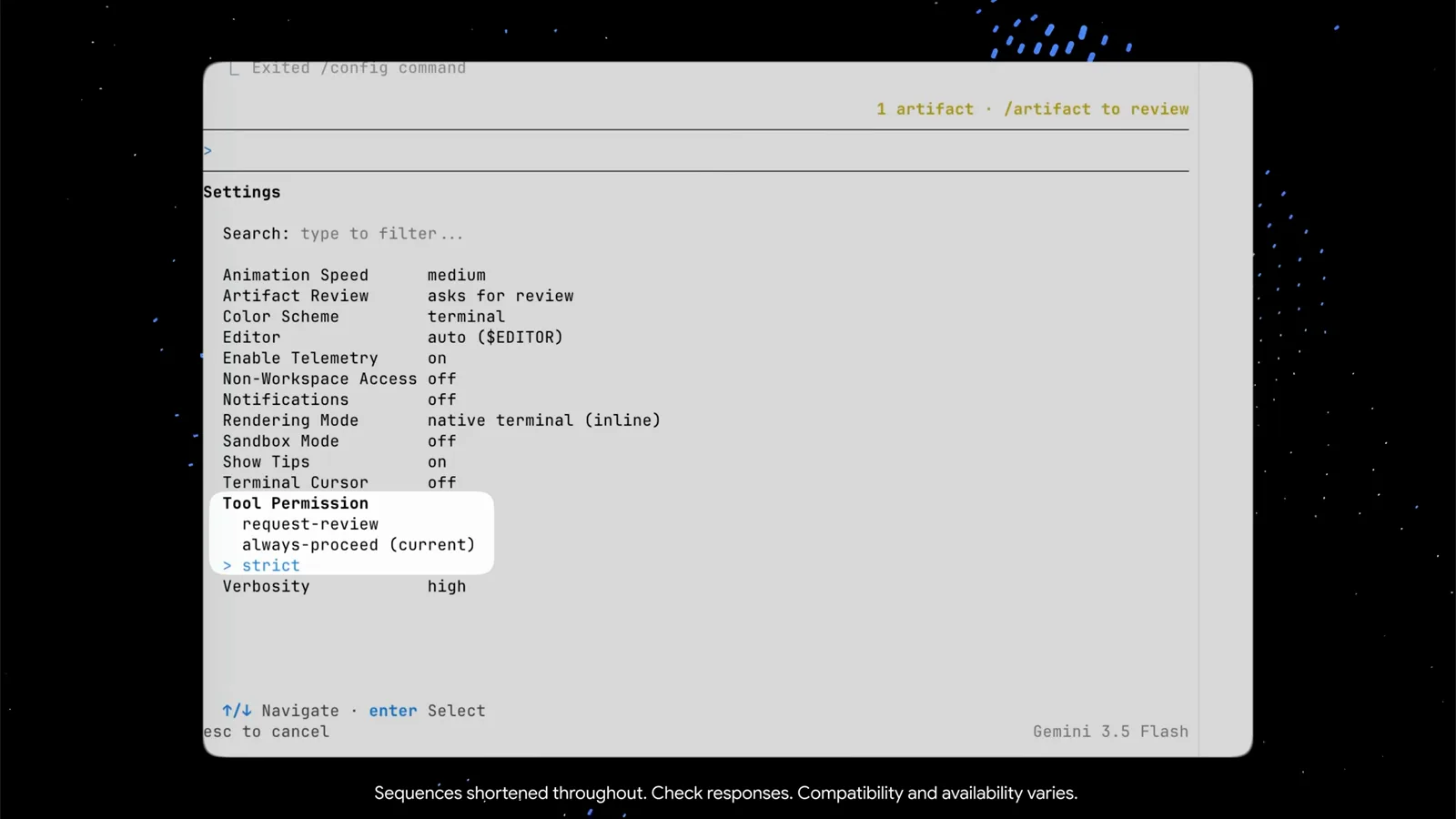
Three modes: request-review, always-proceed or strict — your call.Watch at 6:18
Antigravity CLI vs the Antigravity IDE
The CLI delivers the full Antigravity experience in your terminal, but the two surfaces are tuned for different moments. Where they actually differ:
- 1Surface: agy runs in any terminal you already have — over SSH, in a tmux pane beside your editor, on a machine with no GUI. The IDE is a full graphical editor with its own built-in browser.
- 2Rendering: the CLI lets you choose native terminal (inline) — normal scrollback with mouse and copy-paste — or alt-screen mode, a full-screen alternate buffer that suits parallel workflows.
- 3Permissions: the CLI's dial is Tool Permission in /config (request-review / always-proceed / strict); the IDE asks for approval before actions in its own way.
- 4Artifacts and sessions work the same way in spirit — plans and walkthroughs you approve, locally stored conversations — but the CLI keeps them under ~/.gemini/antigravity-cli/ and resumes them with agy -c.
A practical split: sketch and explore in the IDE where you can see the app render, then hand long autonomous runs — refactors, research, batch edits — to agy in a terminal where they run quietly beside your work.
Antigravity CLI troubleshooting and power keys
Small snags from the demo, each with the fix the CLI itself provides:
- 1Long prompt unwieldy in the input box? Press ctrl+g — Antigravity CLI opens the draft in your $EDITOR (the demo shows auto) and hands it back when you save.
- 2Tool lines like Bash(…) or Edit(…) truncate with "(ctrl+o to expand)" — press ctrl+o on the line to unfold the full command and output.
- 3Closed the terminal mid-task? Run agy -c to continue the previous session, or agy --conversation=<id> for a specific one — conversations are stored locally.
- 4Agent too eager or too clingy? That is Tool Permission in /config: request-review asks each time, always-proceed never interrupts, strict confirms literally every action.
- 5Copy-paste behaving oddly? In native terminal (inline) rendering the mouse works normally — and /help's shortcut list shows shift/alt+click as the select-and-copy fallback. For heavy parallel setups, try alt-screen rendering instead.
Still stuck? The "?" shortcut hint, /help and /changelog inside the CLI are the fastest way to see what your build supports — the CLI moves quickly and labels drift between versions.