
Google Antigravity CLI 上手教程:agy、/config 与子代理
把 Google 官方演示重排成 14 个带注释的步骤:在任意终端里启动 agy,让它从一条 prompt 建出一个 journal + 待办应用,顺手吃透 /config、/diff、artifacts、会话恢复和子代理。
30 秒看懂 Antigravity CLI
- Antigravity CLI 装完就是一个叫 agy 的二进制——在任何项目目录里运行,就能得到完整的 agent 体验:模型信息头、slash 命令和输入框。
- /config 是控制台:十三项设置,包括 Rendering Mode(native terminal (inline) 与 alt-screen)和 Tool Permission(request-review、always-proceed、strict)。
- 每轮运行都会产出 artifacts——本片 demo 里是 implementation_plan.md 和 walkthrough.md——存在 ~/.gemini/antigravity-cli/ 下面,用 /artifact 查看。
- 任务跑着也能聊:/btw 问进度不中断;/diff 审查改动;ctrl+g 调外部编辑器写长 prompt;agy -c 恢复上一场会话。
Antigravity CLI 图文 walkthrough
启动、配置、开工
- 1
在项目目录里启动 agy
安装一次,Antigravity CLI 就会注册好 agy 这个二进制——在任何项目目录里直接运行。顶部信息头告诉你当前环境:CLI 版本(demo 里是 0.1.3)、当前模型(Gemini 3.5 Flash)和工作区路径(~/Develop/todo-list)。输入框初始为空,角落里有一行“? for shortcuts”提示。
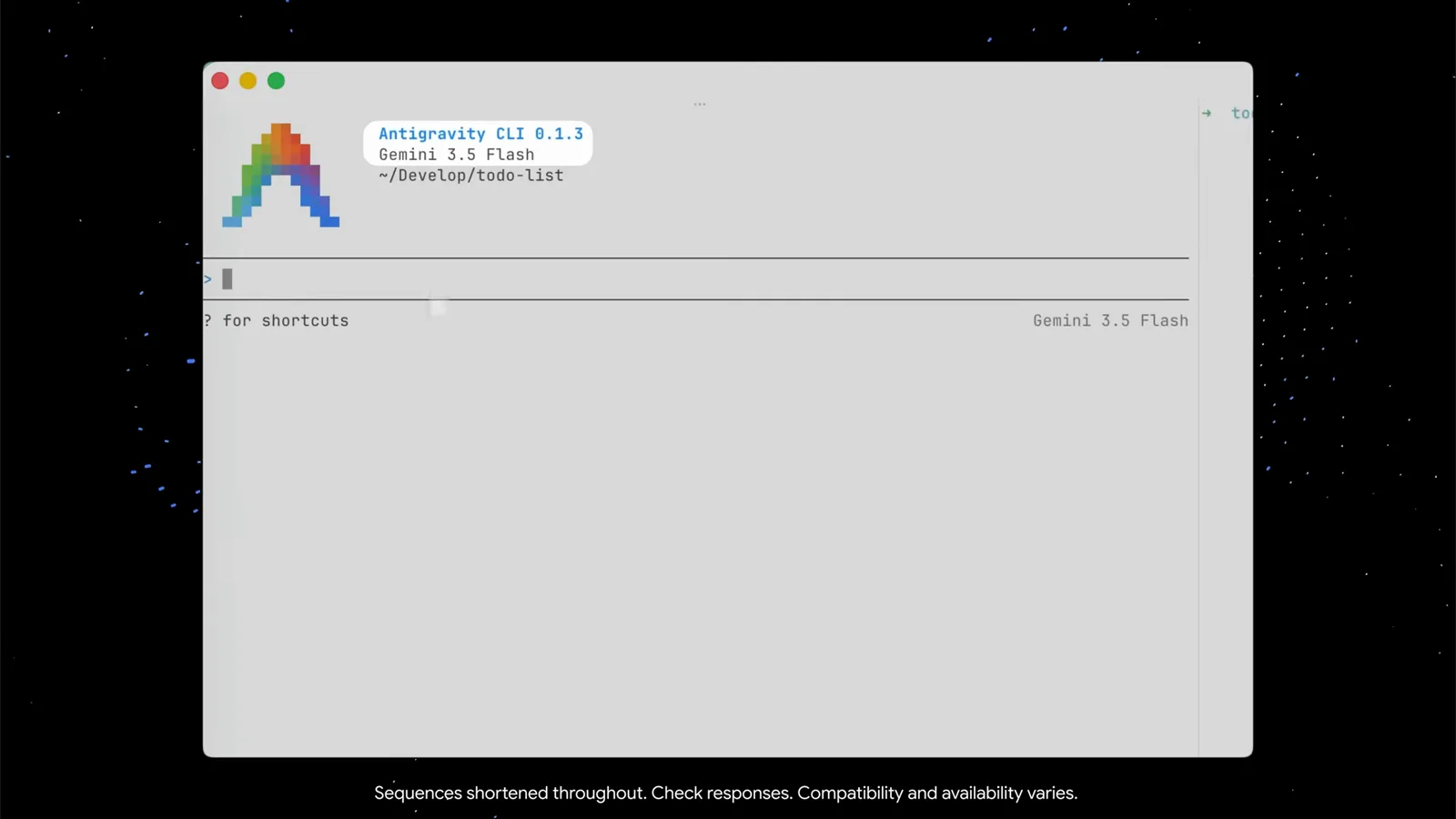
agy 的欢迎信息头:版本、模型、工作区一眼看清。跳到 0:19 观看 - 2
打开 /config 看全部设置
输入 /config,设置面板弹出,顶部是 Search 过滤框——边输边筛。demo 环境里有十三项设置,从 Animation Speed、Artifact Review 到 Rendering Mode(native terminal (inline))和 Tool Permission。方向键移到任意一行,底部会显示这一项的一句话说明;Esc 关闭面板。
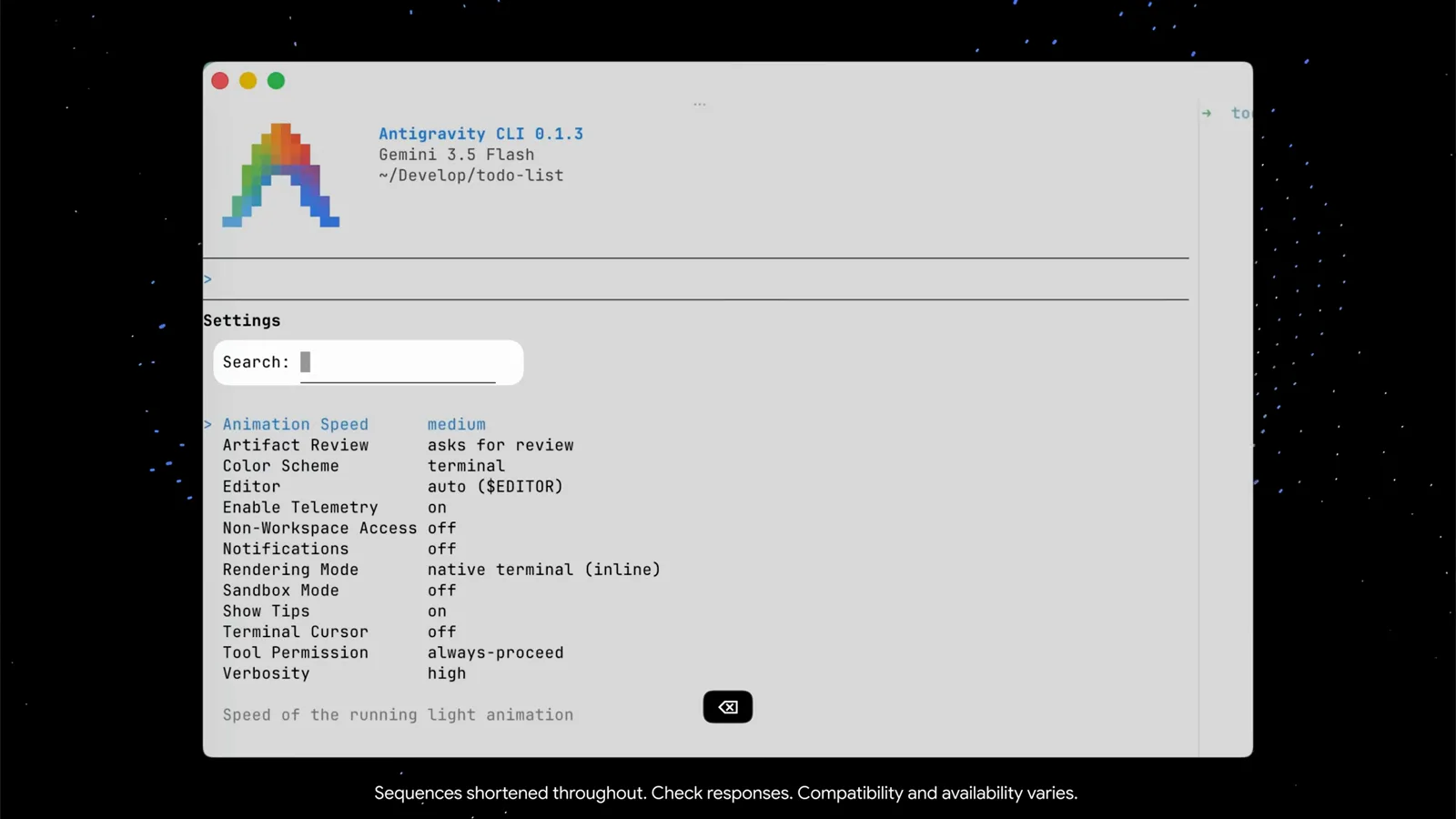
/config 列出全部十三项设置,支持即时搜索和逐行提示。跳到 0:27 观看 - 3
给 agent 一条具体的首条 prompt
demo 粘贴的是一条结构化需求:用 Python 做一个漂亮的、零依赖的“Minimalist Markdown Journal & To-Do CLI”。三条要求写得清清楚楚——任务放在 todo.md 里、支持 [ ]/[x] 勾选;随手记的笔记按时间追加到 journal.md;用鲜艳的 ANSI 颜色和干净的 Unicode 图标。把文件名、格式、长相都写明白,agent 一轮就能拿到全部信息。
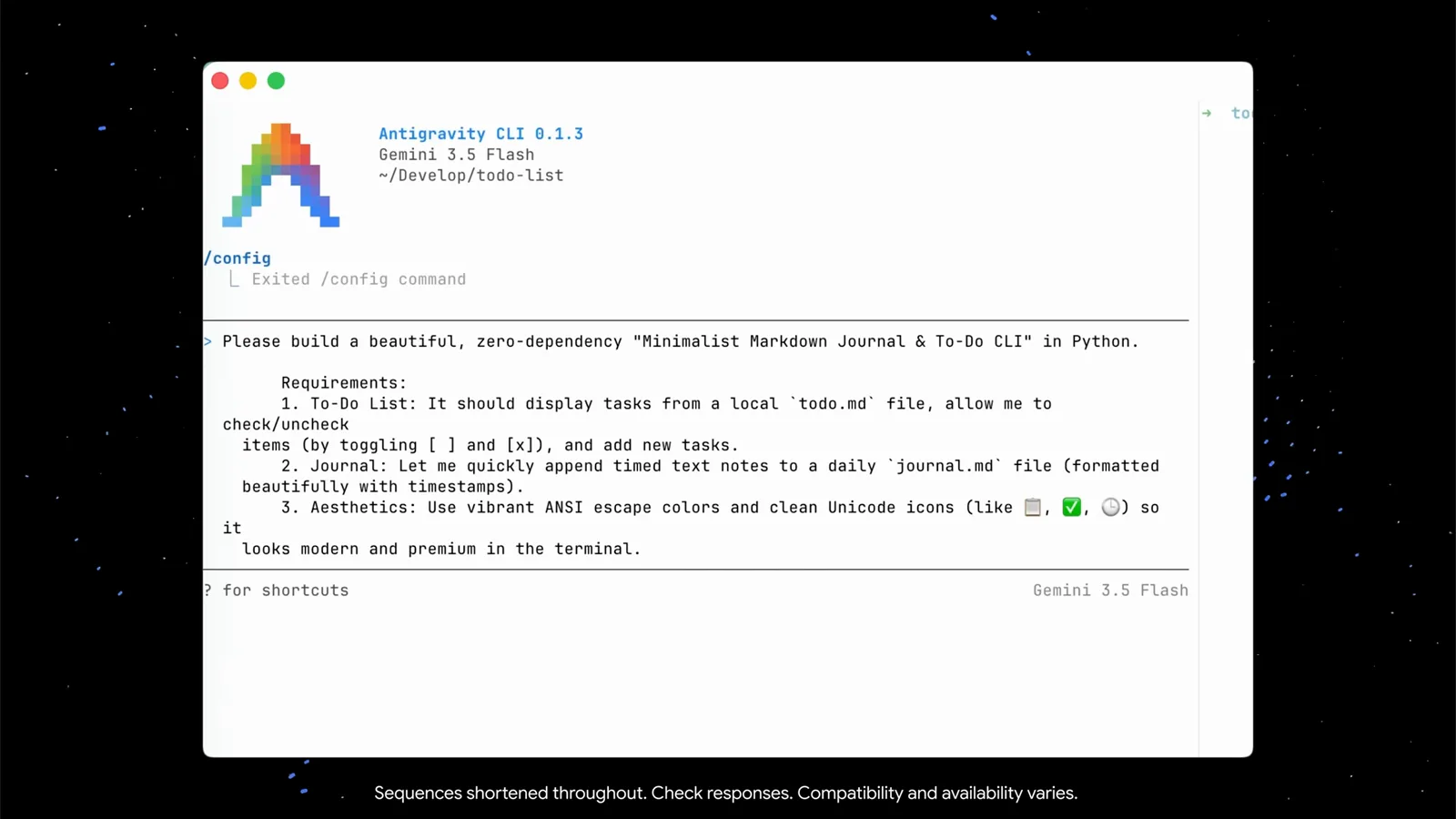
好的首条 prompt = 文件名 + 格式 + 长相,一次说清。跳到 0:43 观看 - 4
用 /btw 在干活途中跟 agent 对话
不用干等。agent 正在编译 jtodo.py、准备第一次原子 git commit 时,demo 敲了一句“/btw what are you doing?”——这是专门用来在不打断当前任务的前提下问问题的 slash 命令。agent 解释了计划(初始化工作区、搭好基础、提交),然后继续干活。顺便留意输入框下面的小贴士:ctrl+g 可以调出外部编辑器写长 prompt。
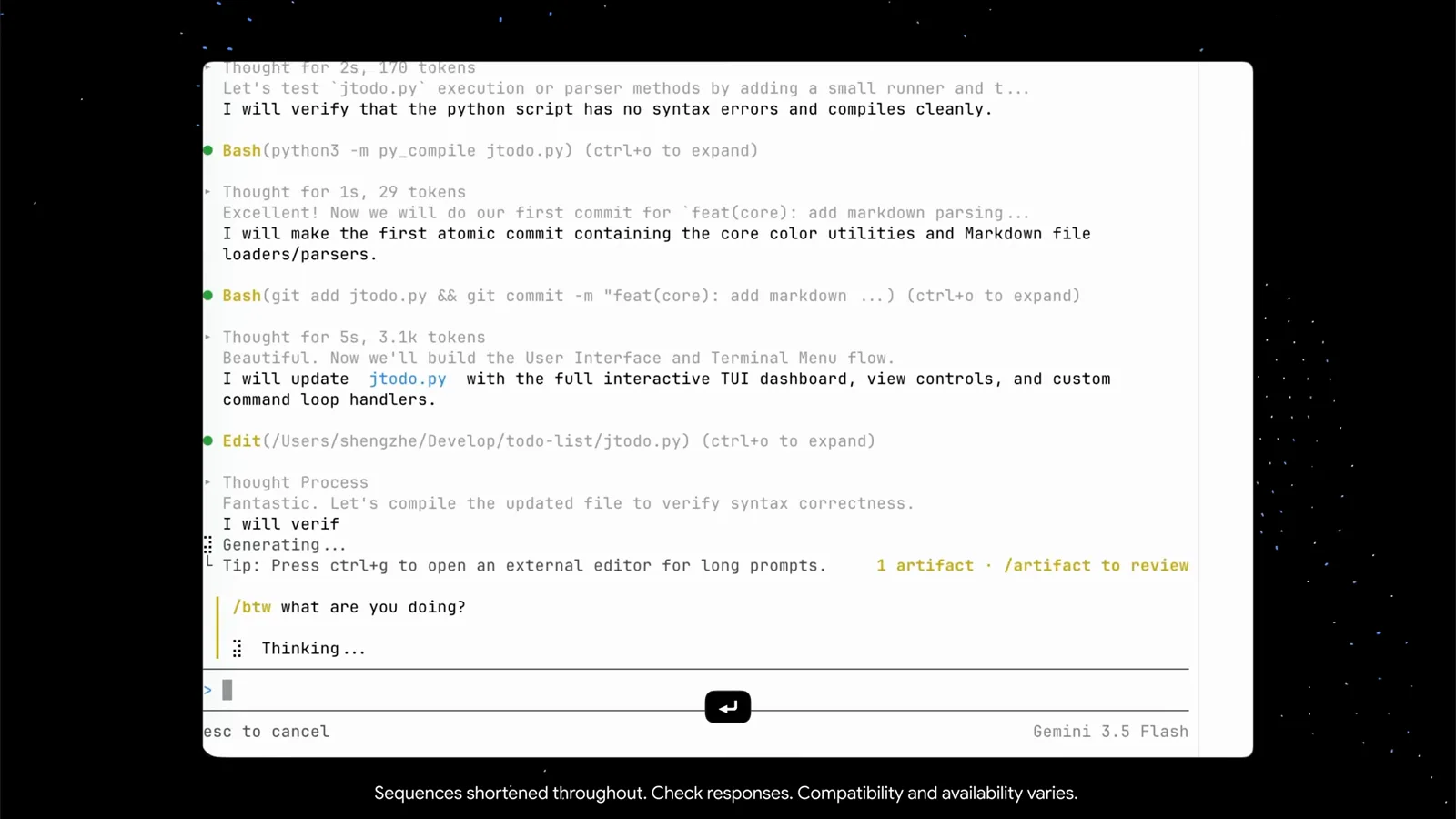
/btw 拿到进度汇报,但不动摇正在跑的任务。跳到 1:15 观看
审查 artifacts、diff 和跑起来的应用
- 5
盯着 token 面板看上下文消耗
上下文视图是一张圆点网格加一串真实数字:Gemini 3.5 Flash 用了 52.8k / 1.0M tokens(5.0%),并按 user messages、agent responses、tool calls、system prompt 和 tools、subagents、剩余空间逐项拆开。同一个视图还列出本场会话的 checkpoints(/rewind)和 agent 已写出的 artifact 文件——目前两个:implementation_plan.md 和 walkthrough.md。
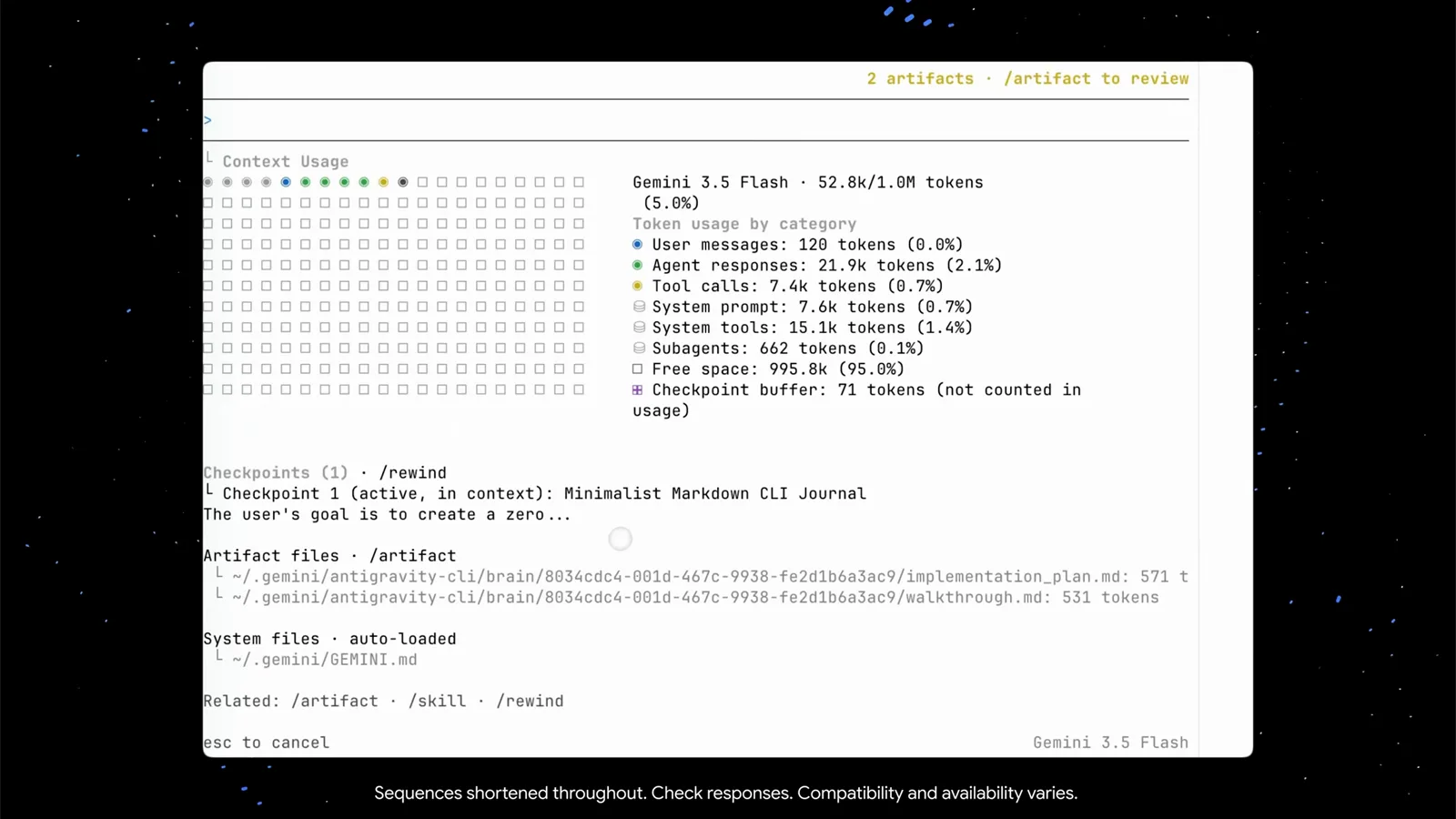
token 面板把上下文焦虑变成了一道算术题。跳到 1:40 观看 - 6
读 walkthrough artifact
打开 artifacts,walkthrough.md 会讲清楚 agent 做了什么:仓库结构(jtodo.py、test_jtodo.py、README.md、.gitignore)、它做的设计取舍,以及每日 journal 的运作方式。查看器有自己的快捷键——方向键滚动、pgup/pgdn 翻页、c 评论、esc 关闭。
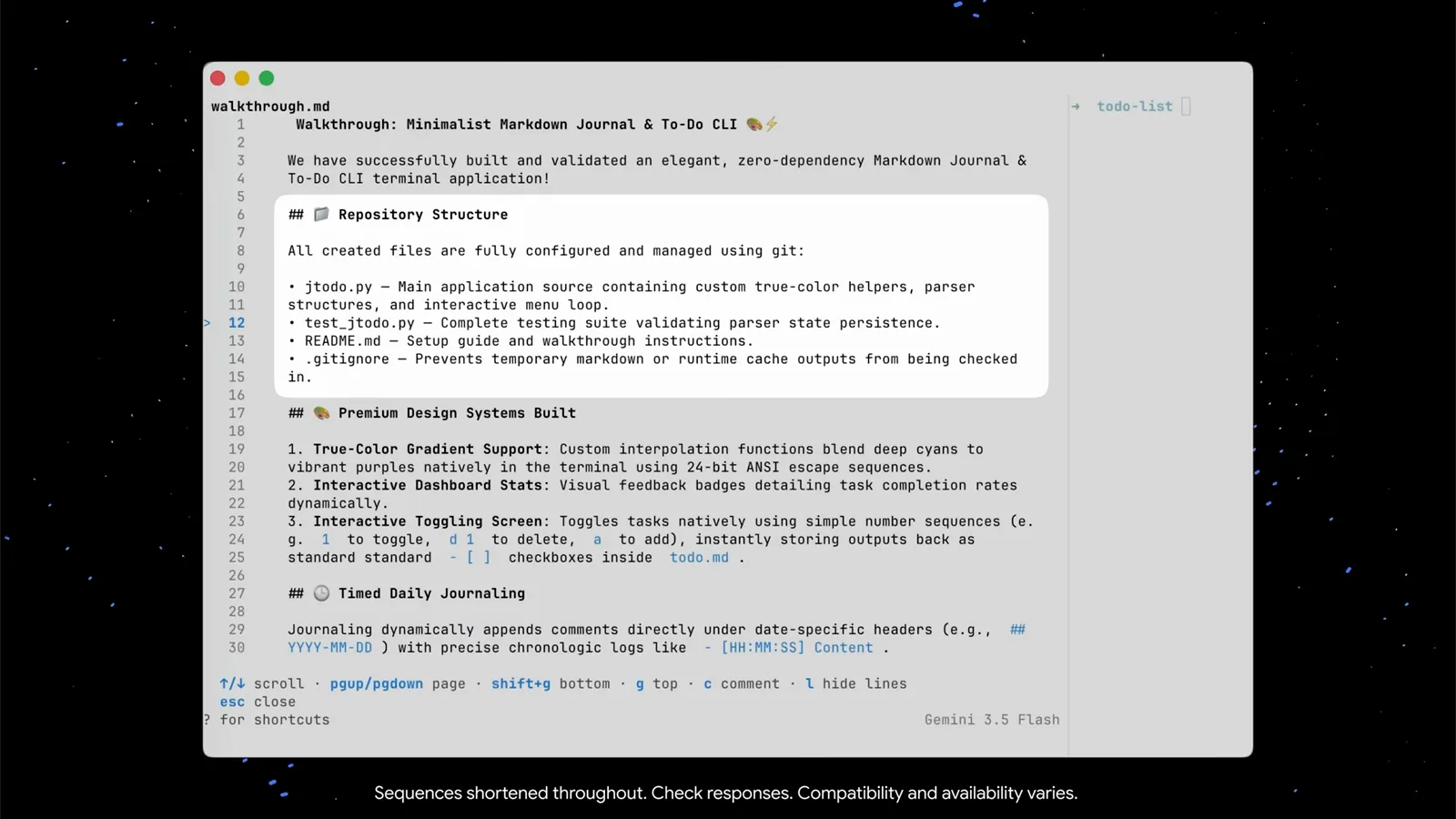
walkthrough.md 是 agent 交给自己的完工报告。跳到 1:57 观看 - 7
在“Action required”里审批 artifacts
Antigravity CLI 不是把文件一丢了事——它会找你要签字。一条“Action required (2 left)”横栏列出待审的 walkthrough.md 和新的 implementation_plan.md。底部快捷键一行全说清了:方向键选择、y/n 批准或拒绝、shift+a 全部批准、p 预览、esc 收工。除非你主动改设置,否则没有东西会被静默放行。
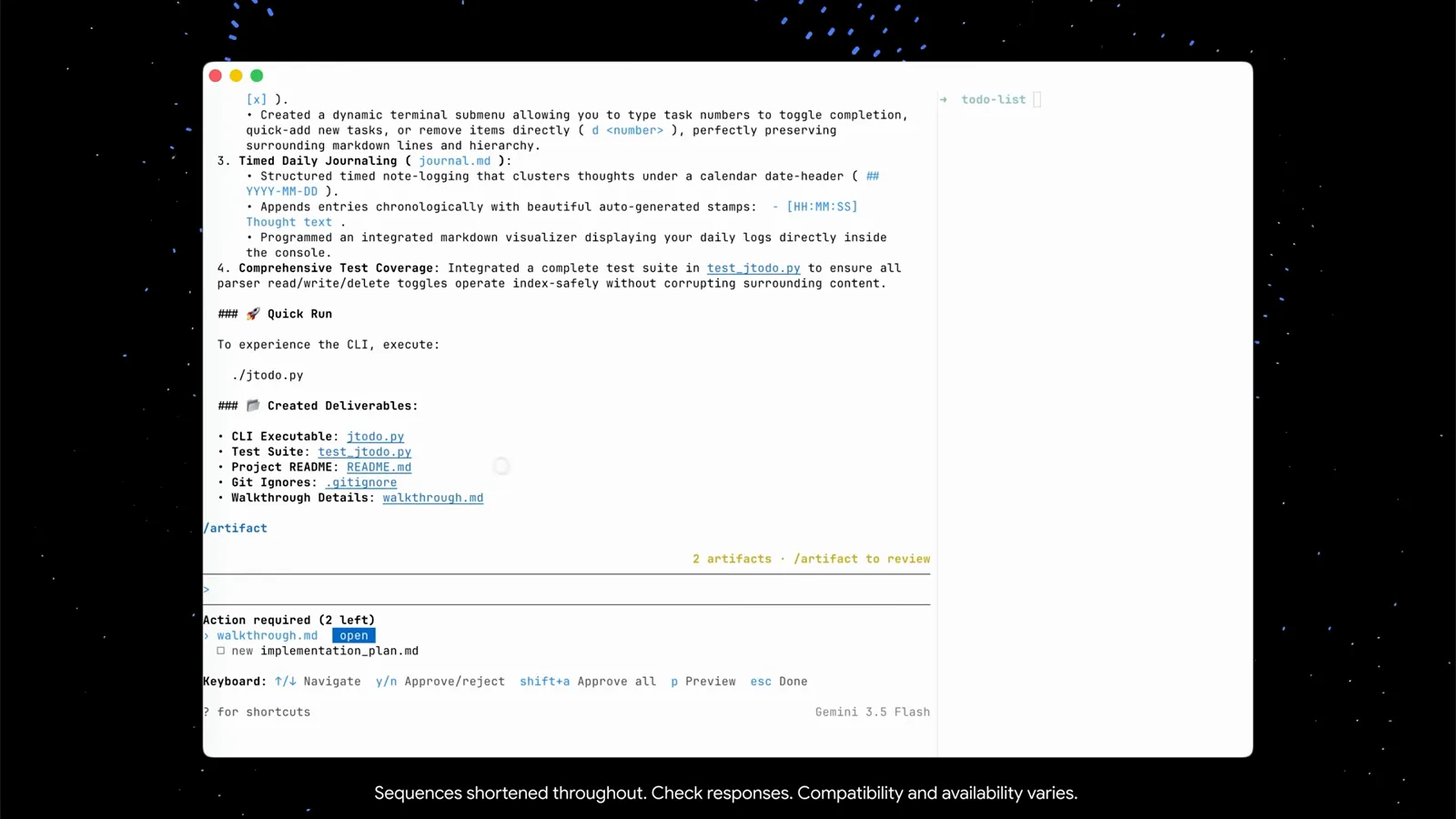
审批栏:逐个 y/n,shift+a 一键全批。跳到 2:15 观看 - 8
用 /diff 审查每一处改动
让 agent 改进应用的选项选择之后,demo 用 /diff 验收——“View uncommitted changes and per-turn diffs”。它读取你的 VCS(这里是 Git),按文件展示 agent 本轮改了什么。待办列表现在支持光标选择了,diff 也证明了改动仅此一处。
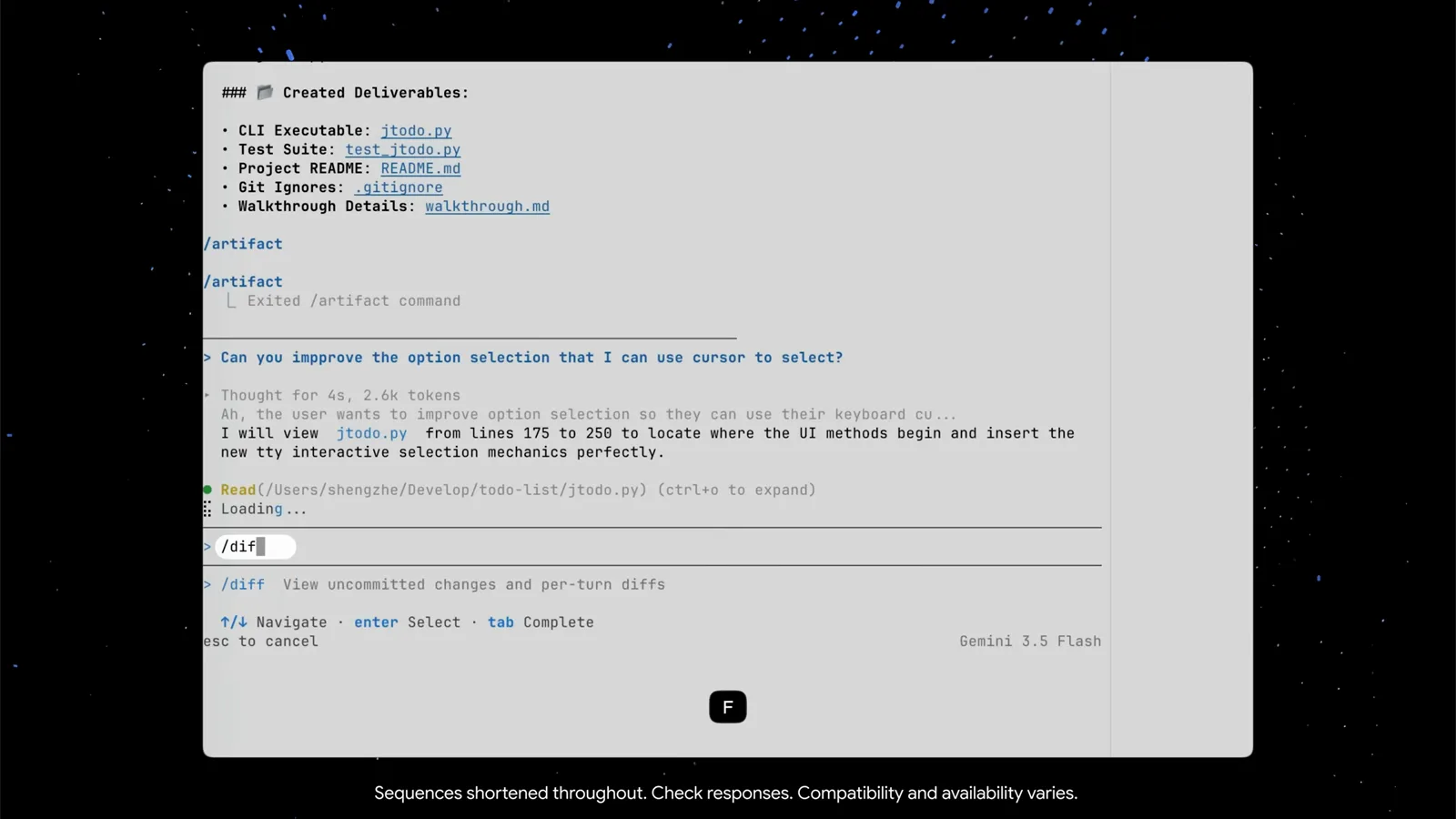
/diff 替你读 Git,改动一屏看尽。跳到 2:48 观看 - 9
把应用跑起来,继续迭代
在第二个终端面板——普通 shell,不属于 CLI 的一部分——demo 运行了 ./jtodo.py。成品菜单迎面而来:顶部是统计,下面依次是 View & Toggle To-Do Tasks、Quick-Add a To-Do Task、Write Daily Journal Entry、Read Today's Journal Entries、Exit Application。升级之后用上下方向键移动、Enter 确认。发现哪里不顺手?回到 agy 里敲下一条 prompt,循环继续。
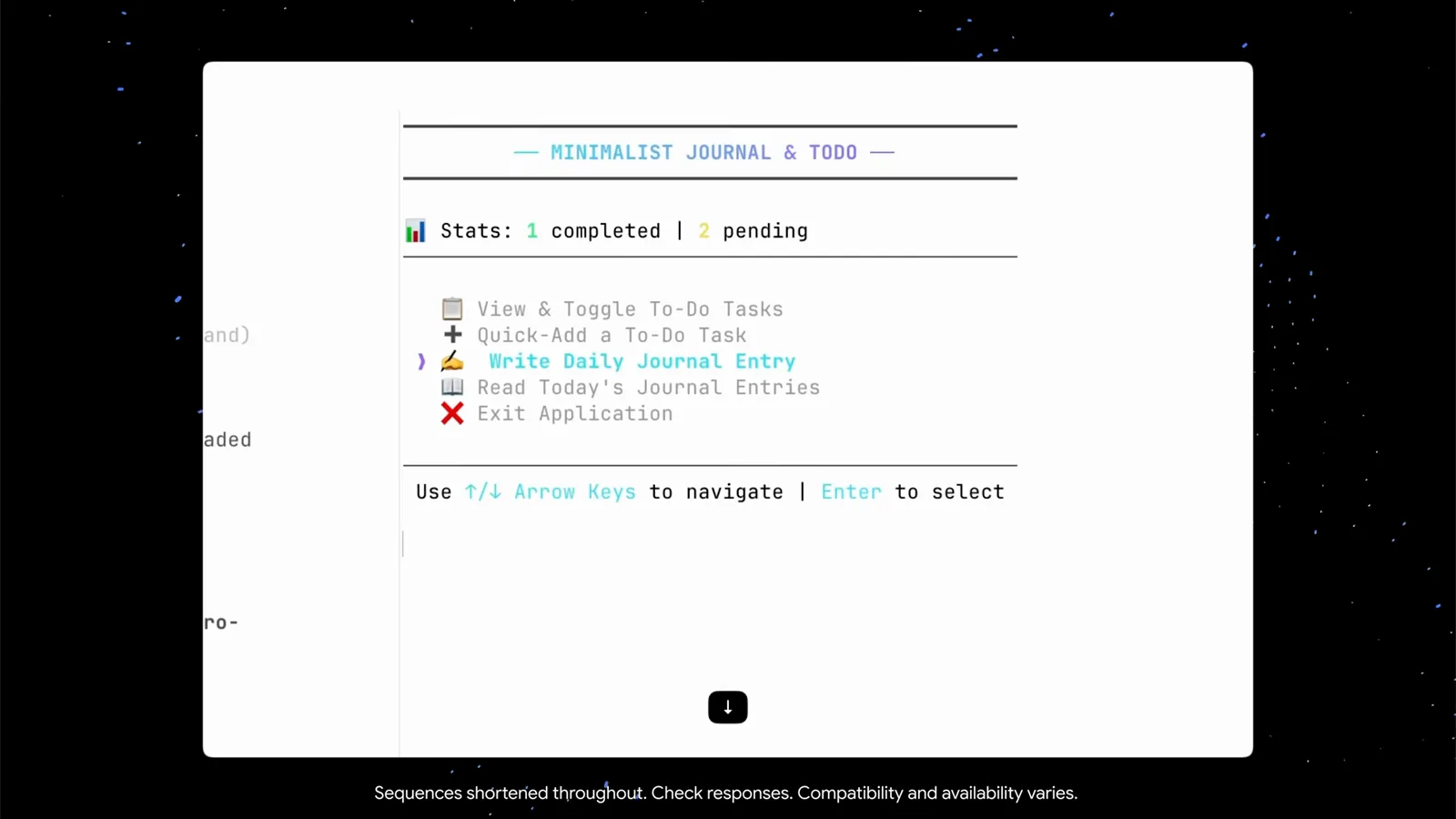
第二个面板里跑起成品应用——方向键移动,Enter 选择。跳到 3:08 观看
会话、子代理与权限
- 10
按 / 看命令,/help 看速查表
只敲一个 / 就会弹出完整的 slash 命令菜单——/add-dir、/agents、/artifact、/btw、/changelog 等 44 条,每条带一行说明。想学键盘操作就输入 /help:速查表分 general / commands / shortcuts 三个标签,ctrl+g 调编辑器、ctrl+l 清屏、ctrl+o 展开工具输出、shift/alt+click 选择并复制文本。
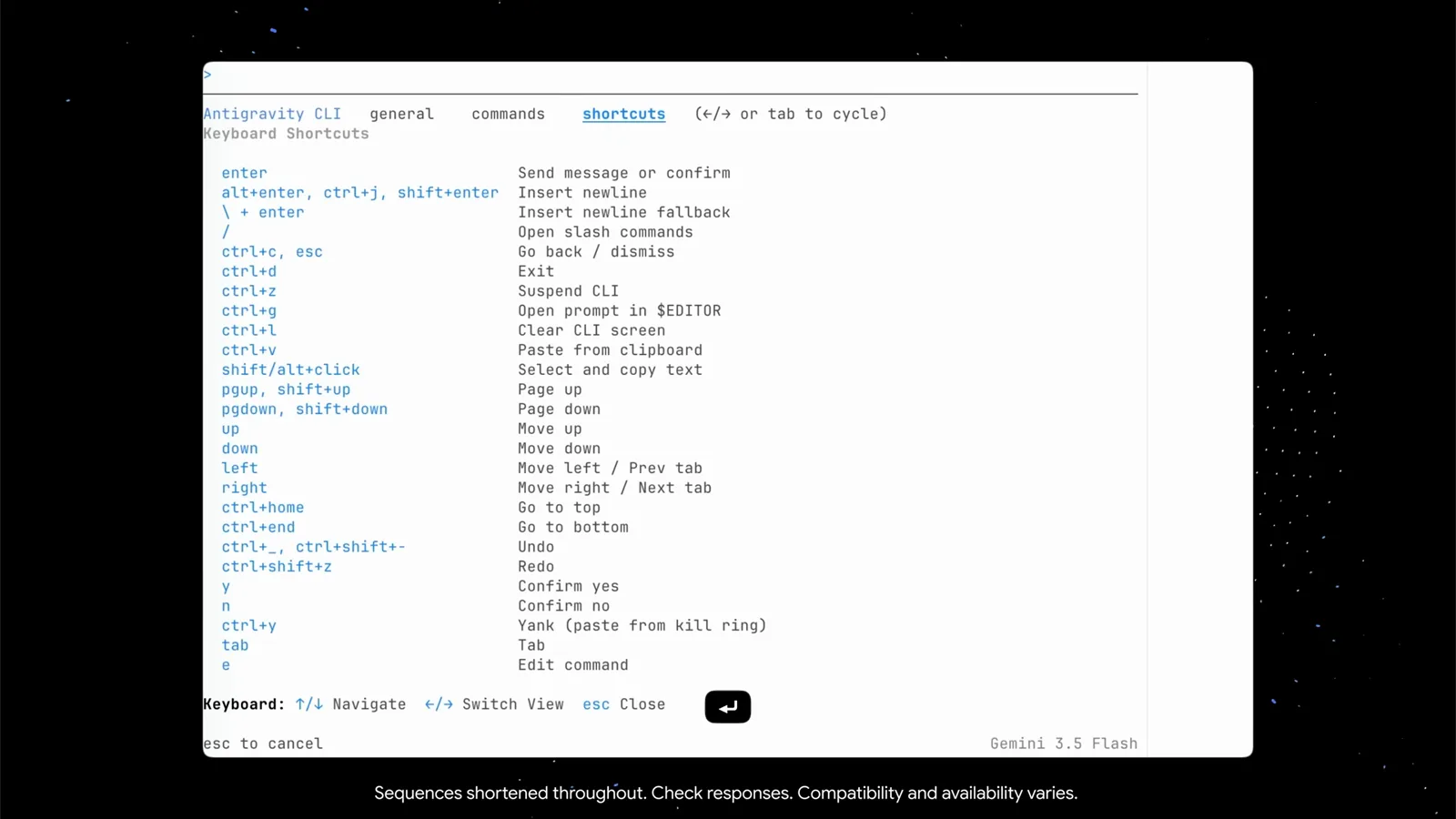
/help 的三个标签:常规信息、命令、快捷键。跳到 3:32 观看 - 11
关掉终端,会话还在
会话存在本地,而且 CLI 会明明白白告诉你怎么回来:底部打出“Resume: agy --conversation=8034cdc4… (or -c)”。agy -c 直接接续上一场会话、上下文原样保留;完整 conversation id 则用来指定某一场。关终端不再等于丢工作。
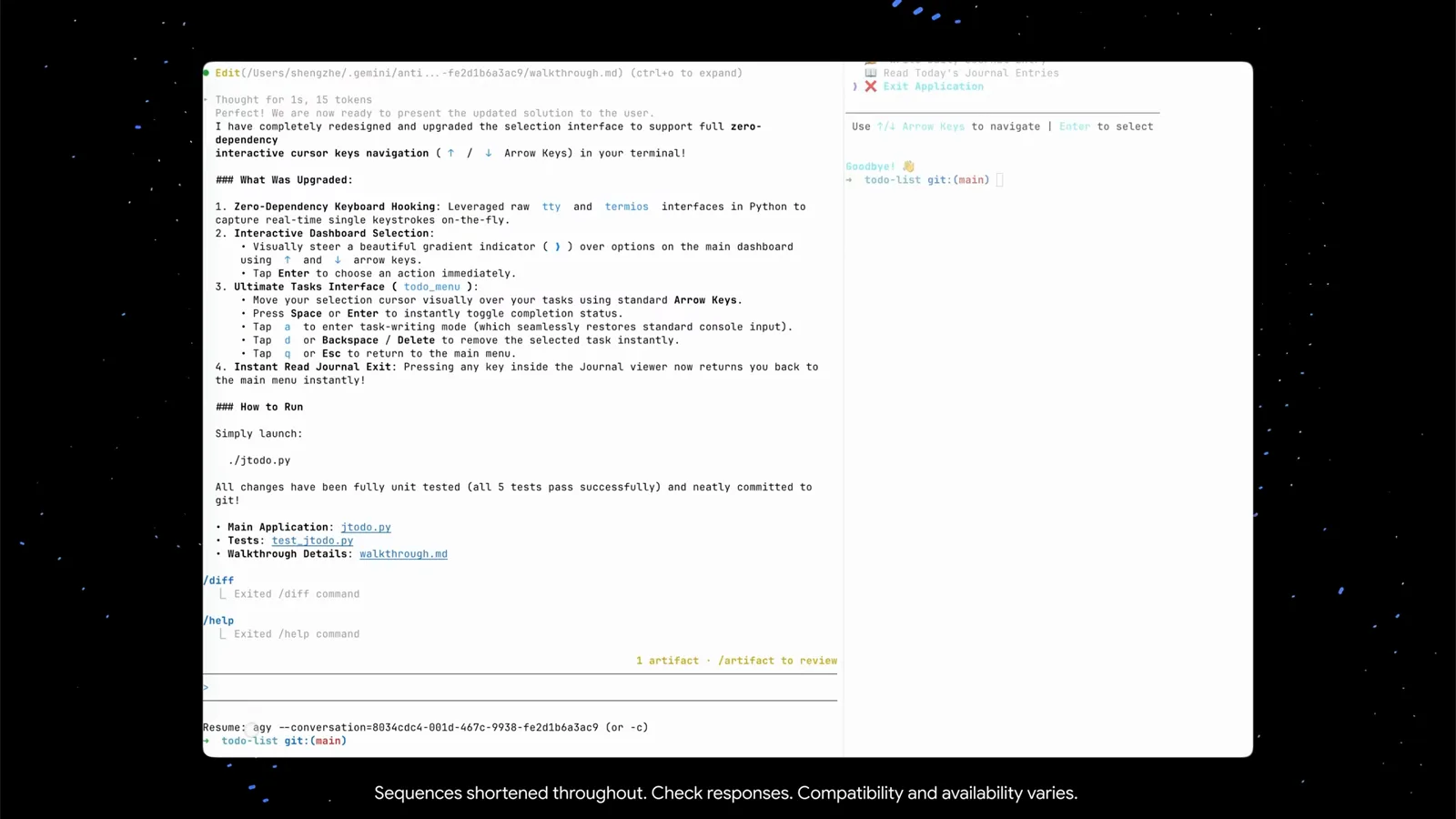
恢复提示直接打出 agy --conversation 的完整 id——嫌长就用 -c。跳到 3:42 观看 - 12
把调研派给子代理
没想法了?demo 就问了一句:“can you do research to improve the todo list?”主 agent 判断需要一个专职调研的子代理,自己拟好调研 prompt,然后发起一次 Agent 工具调用——“research: Markdown TUI Researcher”。状态栏切到“Gemini 3.5 Flash · 1 subagent(s)”。也可以用 /agents 命令显式调用子代理。
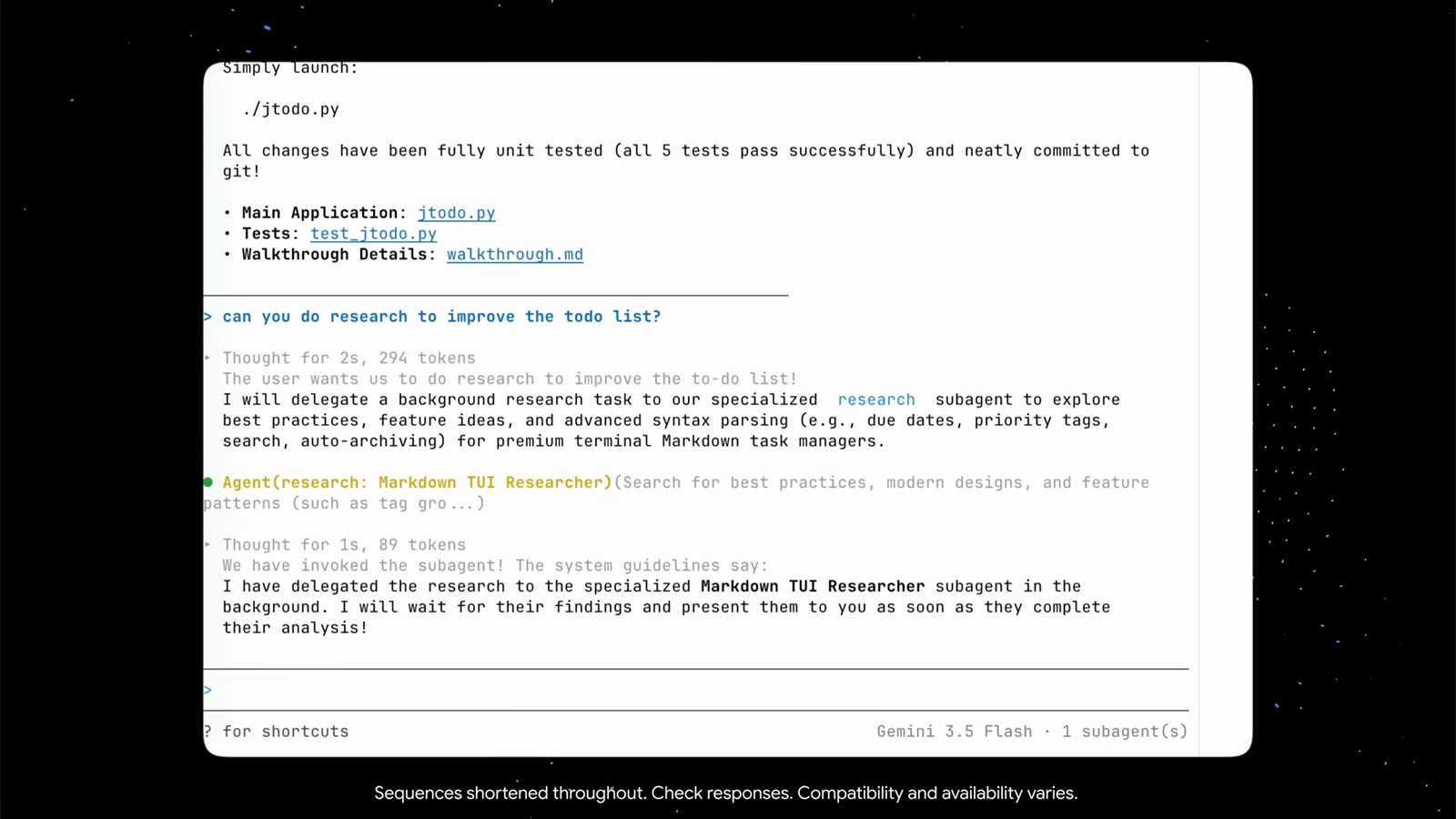
一句白话就够——子代理的任务书由 CLI 自己写。跳到 4:20 观看 - 13
在子代理视图里看它干活
进入子代理视图,先看头部:已运行 34 秒、11 个步骤、一个会话 id。下面是主 agent 拟好的 prompt、允许的工具(ListDir、Read、WebSearch),以及一条实时轨迹——列项目目录、读 jtodo.py、接着做了两次关于任务管理器设计模式的 web 搜索。按 esc 跳回主 agent,它会汇总调研结果并把最有价值的点落地实现。
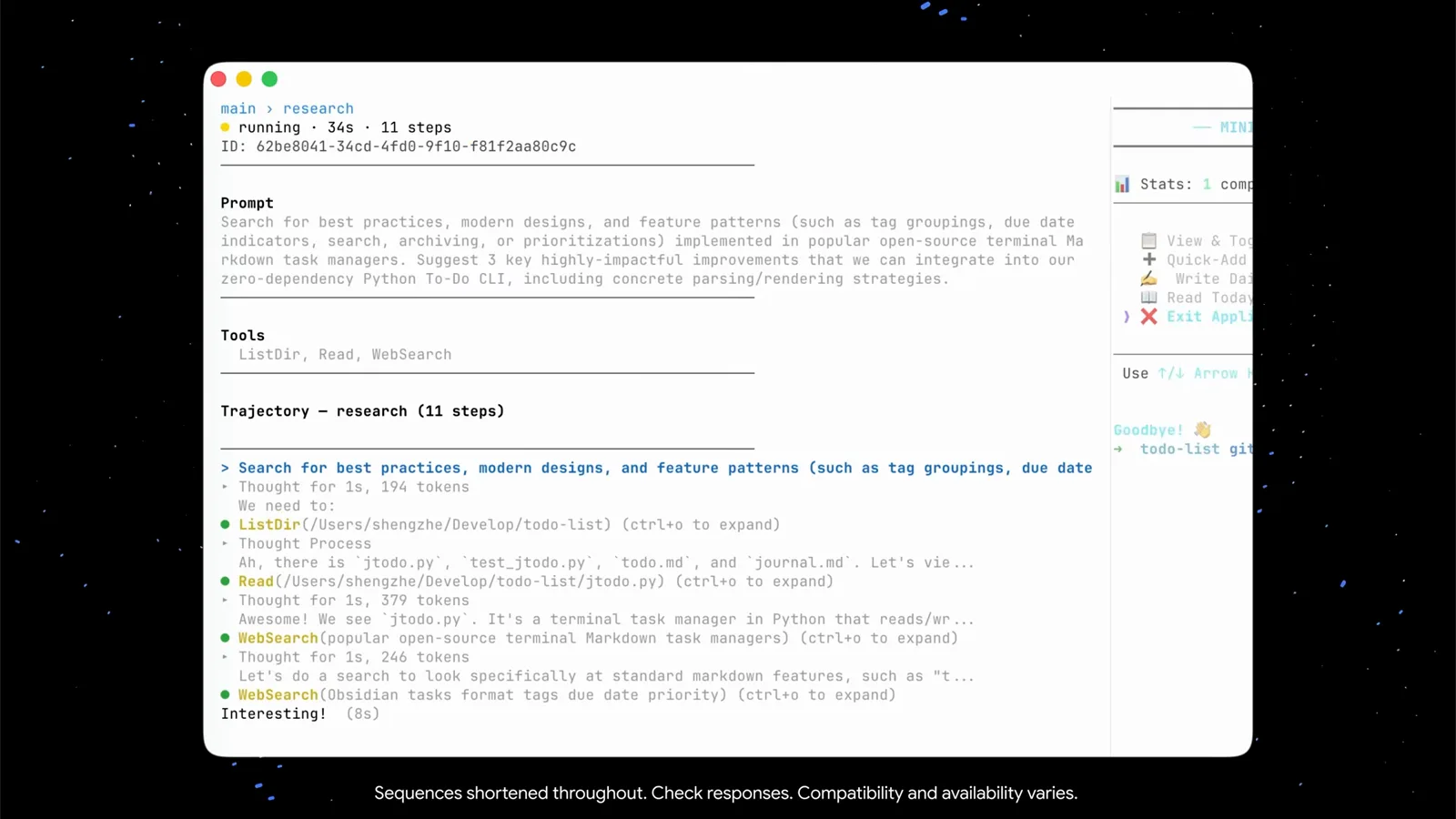
运行时长、步骤数、每一次工具调用,全部实时可见。跳到 4:43 观看 - 14
选你的自主档位:Tool Permission
回到 /config,Tool Permission 这一行就是自主程度旋钮,共三档。request-review——agent 行动前先问你(稳妥的默认档)。always-proceed——全程不打扰,demo 建整个应用用的就是这档。strict——每个动作都要先跟你确认。屏幕上写的是 request-review、always-proceed、strict;按项目选,随时可改。
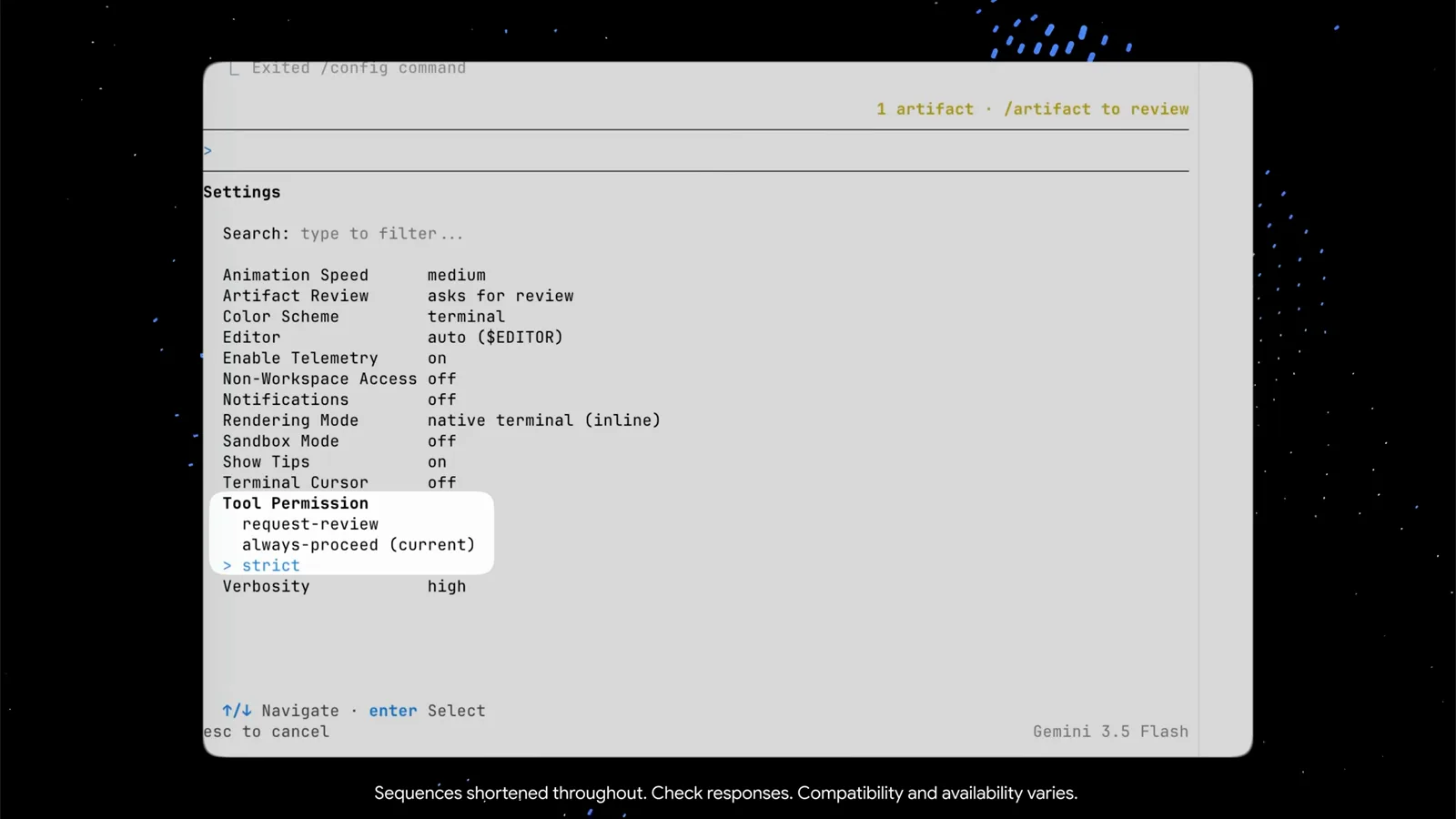
三档任选:request-review、always-proceed 还是 strict,你说了算。跳到 6:18 观看
Antigravity CLI 对比 Antigravity IDE
CLI 把完整的 Antigravity 体验搬进了终端,但两个界面各有所长。真正的差别在这几处:
- 1载体:agy 跑在你已有的任何终端里——SSH 远程、编辑器旁边的 tmux 面板、没有 GUI 的机器都行。IDE 是带内置浏览器的完整图形编辑器。
- 2渲染:CLI 可以选 native terminal (inline)——正常滚动缓冲,鼠标和复制粘贴照常——或 alt-screen 模式,整屏备用缓冲,更适合并行工作流。
- 3权限:CLI 的旋钮是 /config 里的 Tool Permission(request-review / always-proceed / strict);IDE 则以自己的方式在动作前请求批准。
- 4artifacts 和会话的思路两边一致——都要你审批的 plan 和 walkthrough、存在本地的会话——但 CLI 把它们放在 ~/.gemini/antigravity-cli/ 下,用 agy -c 恢复。
实用的分工:在 IDE 里打草稿、看应用实时渲染;把长时间自主任务——重构、调研、批量修改——丢给终端里的 agy,让它在旁边安静跑完。
Antigravity CLI 疑难与效率键
demo 里遇到的小状况,以及 CLI 自带的解法:
- 1长 prompt 在输入框里不好编辑?按 ctrl+g——Antigravity CLI 会把草稿放进你的 $EDITOR(demo 里是 auto),保存后带回。
- 2Bash(…)、Edit(…) 这类工具行被截断并标注“(ctrl+o to expand)”——在该行按 ctrl+o 展开完整命令和输出。
- 3任务中途关了终端?agy -c 接续上一场会话,或用 agy --conversation=<id> 指定某一场——会话都存在本地。
- 4agent 太冒进或太黏人?调 /config 里的 Tool Permission:request-review 每次都问,always-proceed 从不打扰,strict 事无巨细全确认。
- 5复制粘贴行为奇怪?在 native terminal (inline) 渲染下鼠标一切正常;/help 的快捷键表里也给了 shift/alt+click 作为选择复制的兜底。重度的并行场景可以换成 alt-screen 渲染。
还是没解决?CLI 里的“?”提示、/help 和 /changelog 是了解你手上版本能力的最快途径——CLI 迭代快,各版本文案会有出入。