
Codex not working: fix PATH, login, startup & stream errors
A diagnosis-first fix list for OpenAI Codex — "command not found" and the Windows "sh" error, stuck-on-loading startups, login loops, "stream disconnected before completion", and the /model switch that revives VS Code and Cursor sessions — every fix shown on a real recording.
Diagnose in this order
- "codex is not recognized" or "command not found" right after installing? The install is missing from PATH — and on Windows also install Git for Windows and add C:\Program Files\Git\bin, because Codex invokes sh at startup.
- Codex stuck on "What should we work on?" or refusing to start? Update to 0.162.1 or newer first — it fixes startup failures caused by background-server feature mismatches — then reset the cached state in your .codex folder.
- Login loop or "login not working"? Close Codex, delete the cached auth.json inside your .codex folder, relaunch and run codex login to sign in with ChatGPT again.
- "stream disconnected before completion"? Check status.openai.com, drop VPN or proxy, then switch model with /model and switch back — the recording revives a dead session in seconds.
- Broken inside VS Code or Cursor? The extension drives the same CLI — kill the terminal, reopen it, and use the /model picker when a model stalls mid-stream.
How To Fix Codex Stuck On Loading
Channel: GUMY Art1:25
OpenAI Codex docs — install, auth & troubleshooting
Docs: developers.openai.com/codex
Frames come from two clean screen recordings: the Windows stuck-on-loading repair above (GUMY Art), and the stream-disconnected fix inside VS Code (w_ntLum92GY by Shivesh). Four more videos — hUndefined's "sh" fix (ey8XJeloUWY), ZEROBRENE's after-update config reset (FzR7ZoET0Qg), PurpleCircuit's loading and status checks (Fk70XxkTHfg, YEMPT7eBka0) — supplied facts but were rejected as frame sources for facecams or burned-in captions. Each step deep-links to its exact second.
Video frames remain the property of their creators and are embedded here as step-by-step documentation with attribution and deep links.
The fix walkthrough
Install & PATH — the "not recognized" stage
- 1
Start from a healthy launch
Open your project in VS Code, open the integrated terminal and type codex. A healthy start prints the OpenAI Codex banner with the model line and your project directory, like the recording. If Windows answers "codex is not recognized" or macOS says "command not found", skip ahead: the install is missing from PATH, not broken.
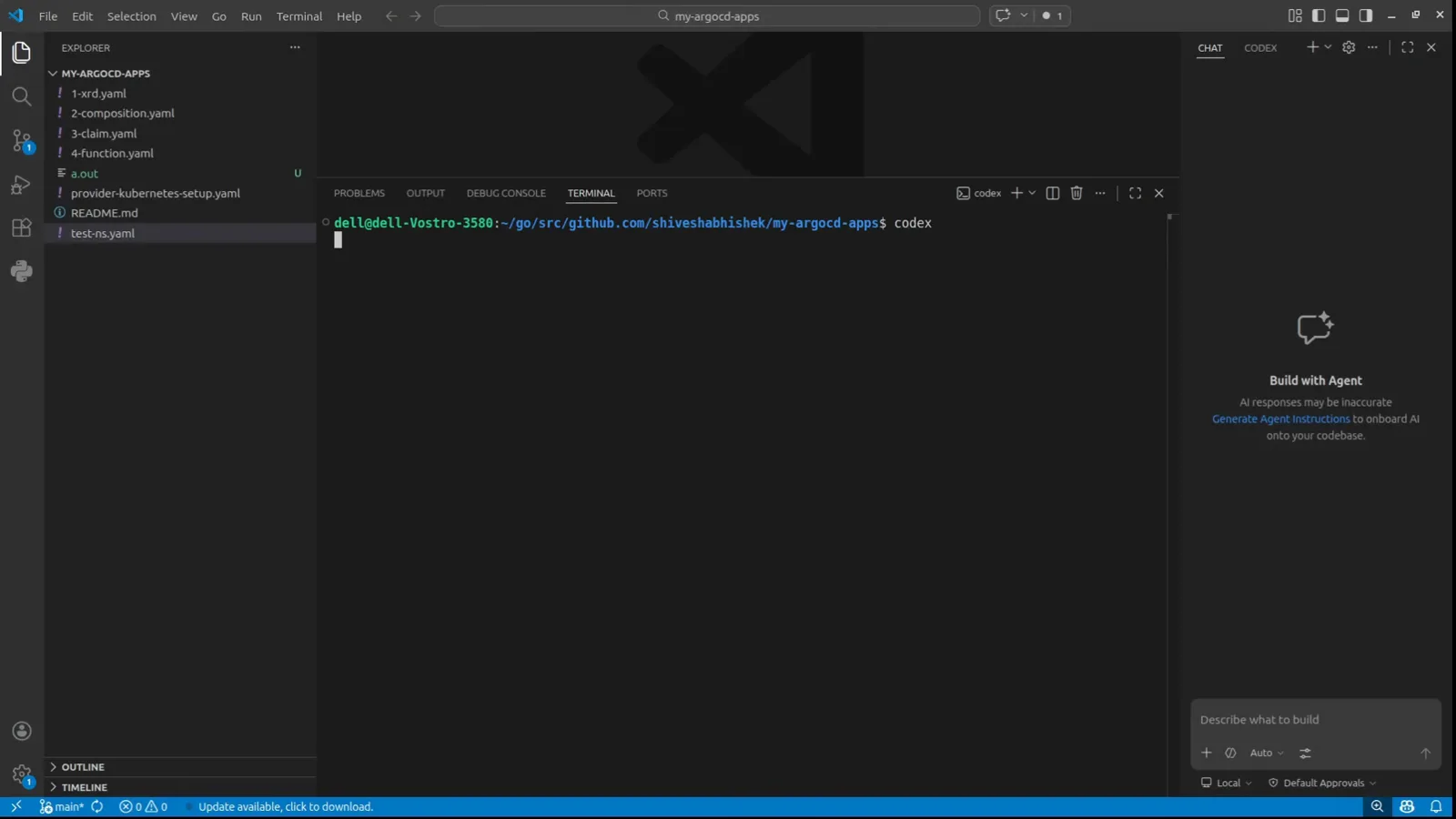
The codex command typed at a bash prompt in the VS Code terminalWatch at 0:28 - 2
Fix "sh is not recognized" on Windows
Codex invokes sh when it starts, and on Windows sh ships inside Git for Windows — install it from git-scm.com/downloads with the default options. Then press the Windows key, type environment, open "Edit the system environment variables", click Environment Variables, double-click Path, add a new entry C:\Program Files\Git\bin and confirm. Close Command Prompt completely and reopen it — PATH changes only reach new terminals — and codex will start.
Startup failures & stuck loading — the 0.162.1 stage
- 3
Recognize the stuck-loading state
The desktop app opens to "What should we work on?" and never finishes — the prompt stays greyed out and tasks won't submit, even though your plan shows in the corner. This is the stuck state from the recording: it comes from cached state in your .codex folder, not from OpenAI's servers, which is why reinstalling the app alone never fixes it.
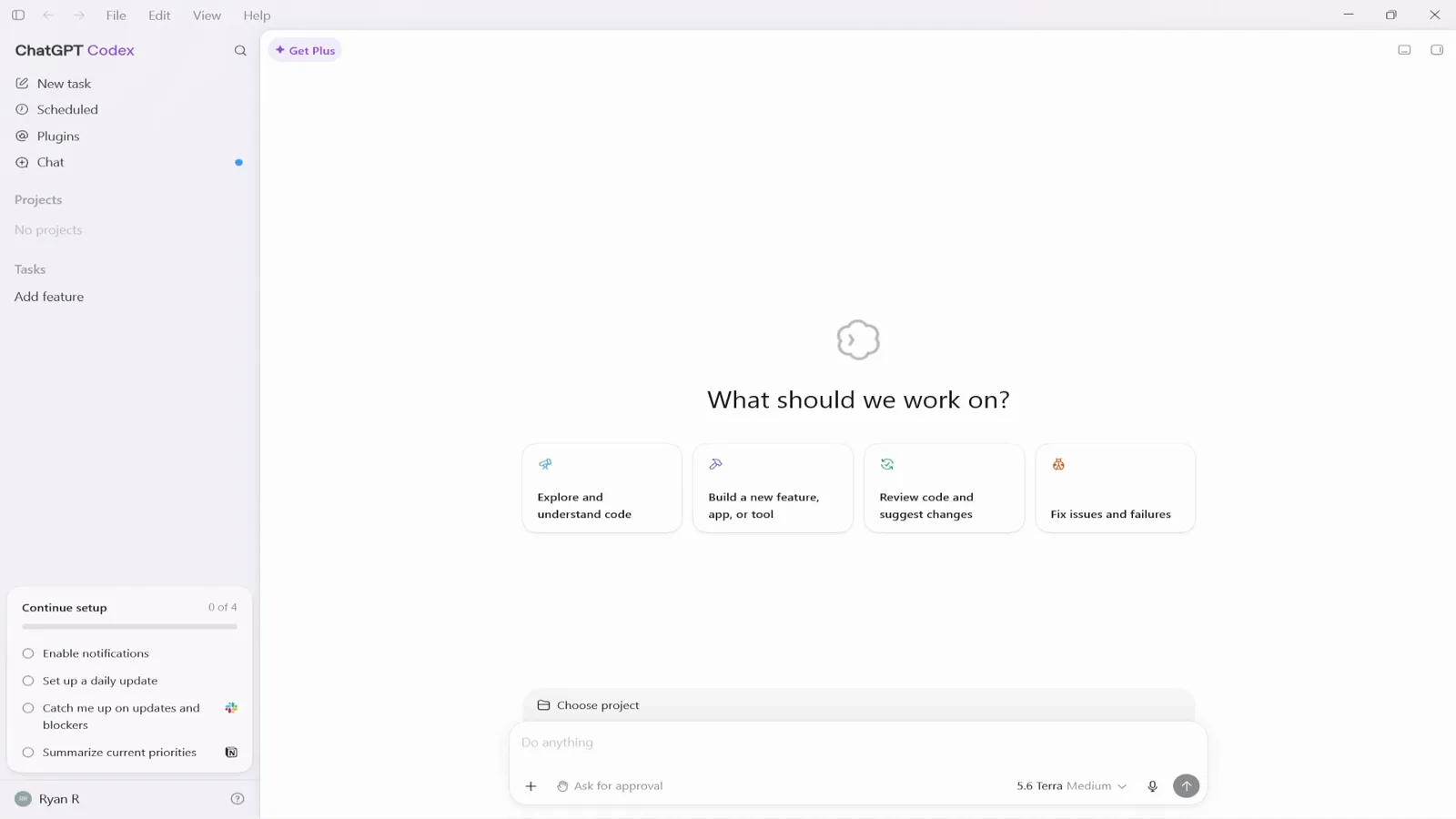
The ChatGPT Codex app frozen on its What should we work on? homeWatch at 0:00 - 4
Update to 0.162.1 before anything else
Stable 0.162.1 (October 9, 2026) "fixed startup failures caused by differences between a running background server's feature settings and CLI defaults" — compatibility checks now apply only to explicit command-line feature overrides — plus a TUI crash on multi-line asynchronous questions. Run codex --version; if you see an "Update available!" banner like the recording's 0.114.0 -> 0.116.0, reinstall with curl -fsSL https://chatgpt.com/codex/install.sh | sh (or npm install -g @openai/codex) and try again.
Login & auth — reset the cached credentials
- 5
Close everything, then open This PC
Quit Codex and make sure it is not running in the background — close VS Code too if the extension was attached. In File Explorer walk to This PC → Local Disk (C:) → Users, like the frame. On macOS the same folder lives at ~/.codex (Finder: Go → Go to Folder).
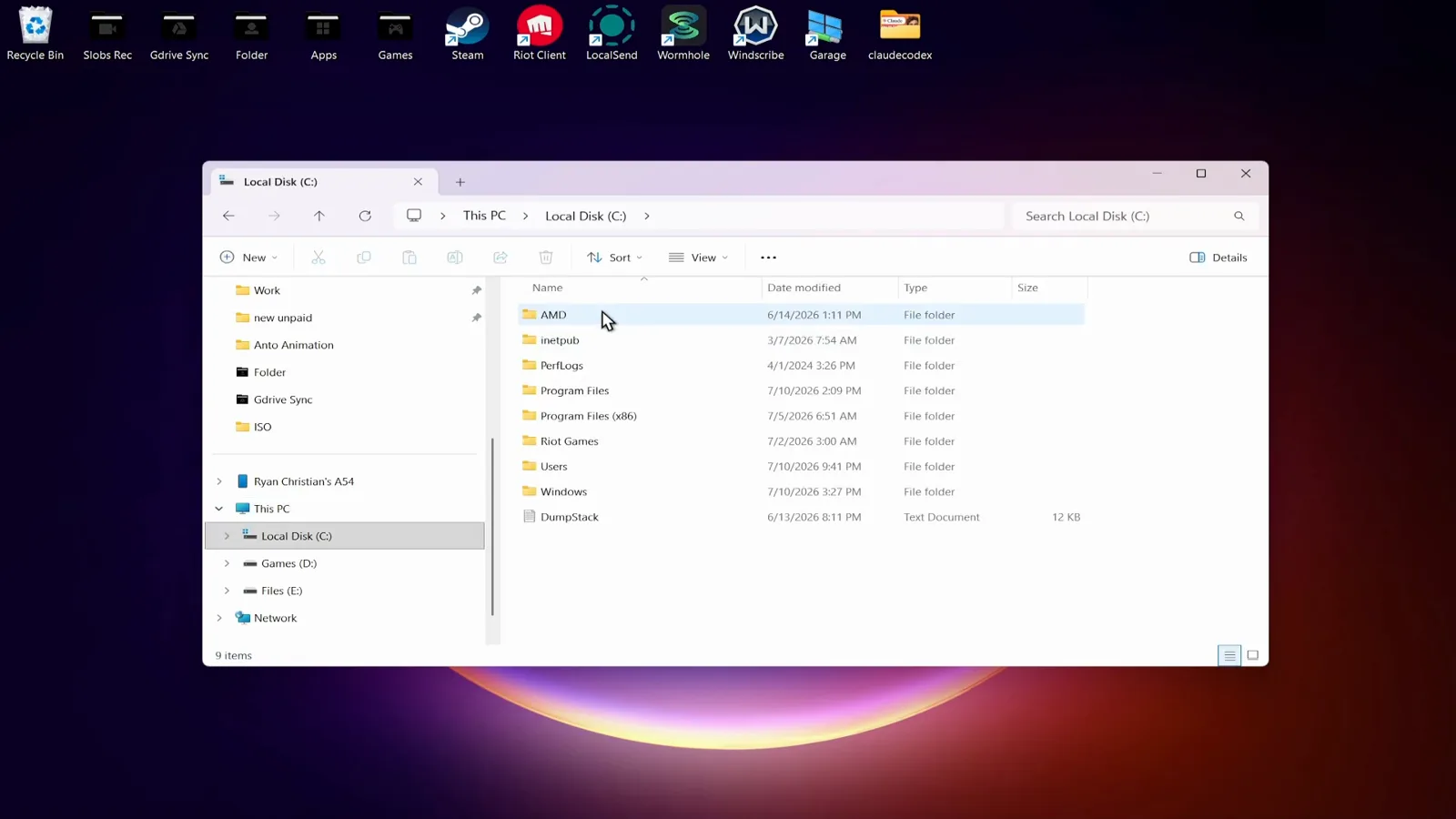
File Explorer at Local Disk (C:) with the Users folder in viewWatch at 0:26 - 6
Open your .codex folder
Inside Users open your account folder (the recording shows ryanc), then .codex. This is Codex's home: auth.json holds the cached ChatGPT credentials, config.toml your settings, sessions your transcripts, and the sqlite files your logs and history. When Codex freezes during boot, one of these state files — usually auth.json — is the reason.
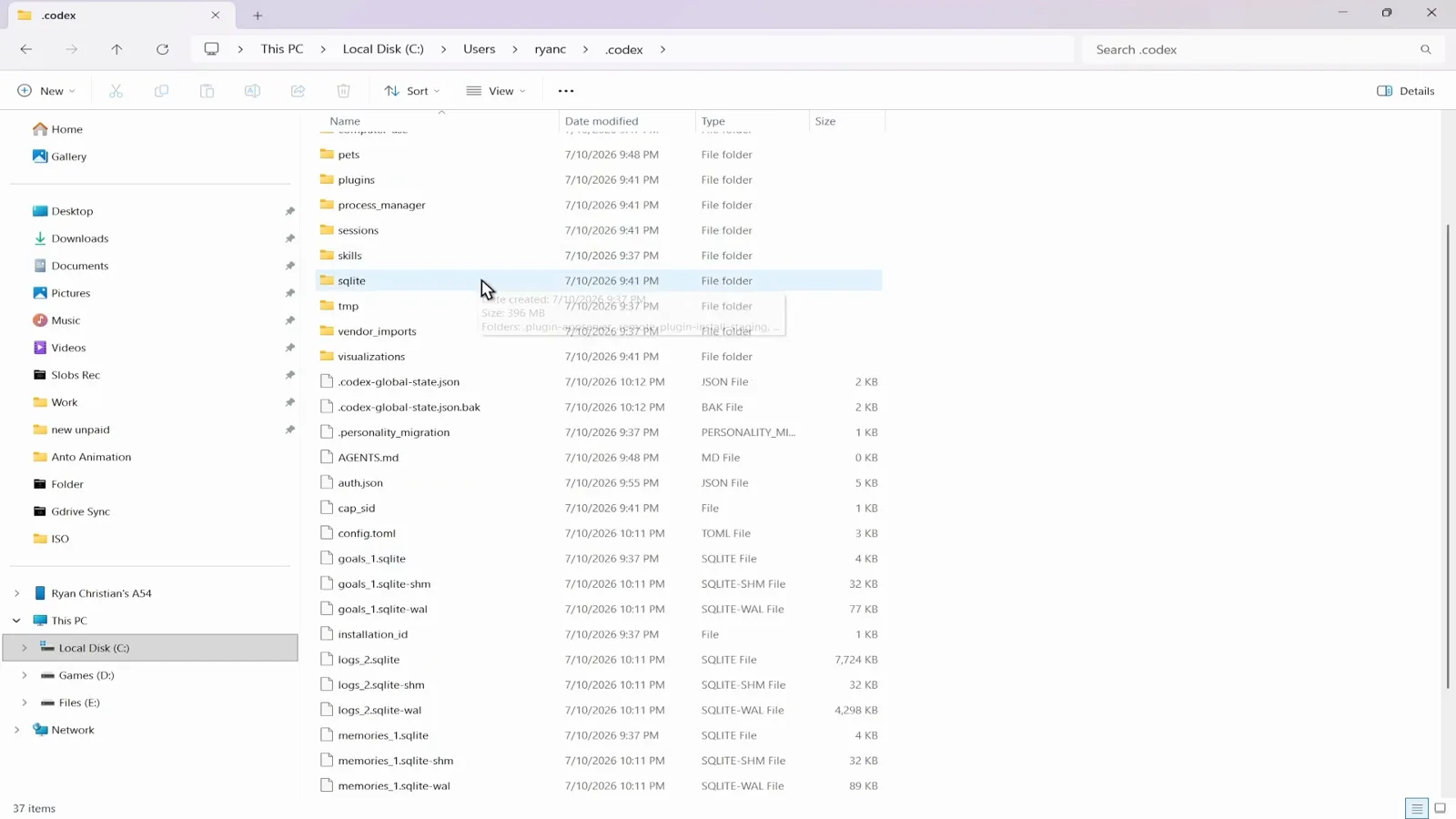
Inside .codex: auth.json, config.toml, sessions and the sqlite logsWatch at 0:36 - 7
Delete auth.json to reset the login
Click auth.json — the status bar should read "1 item selected" — and delete it. The credentials file is exactly what "codex login not working" circles around: a truncated or half-refreshed auth.json keeps the app stuck during boot or bounces you back to sign-in. Deleting it is safe; Codex simply asks you to sign in again.
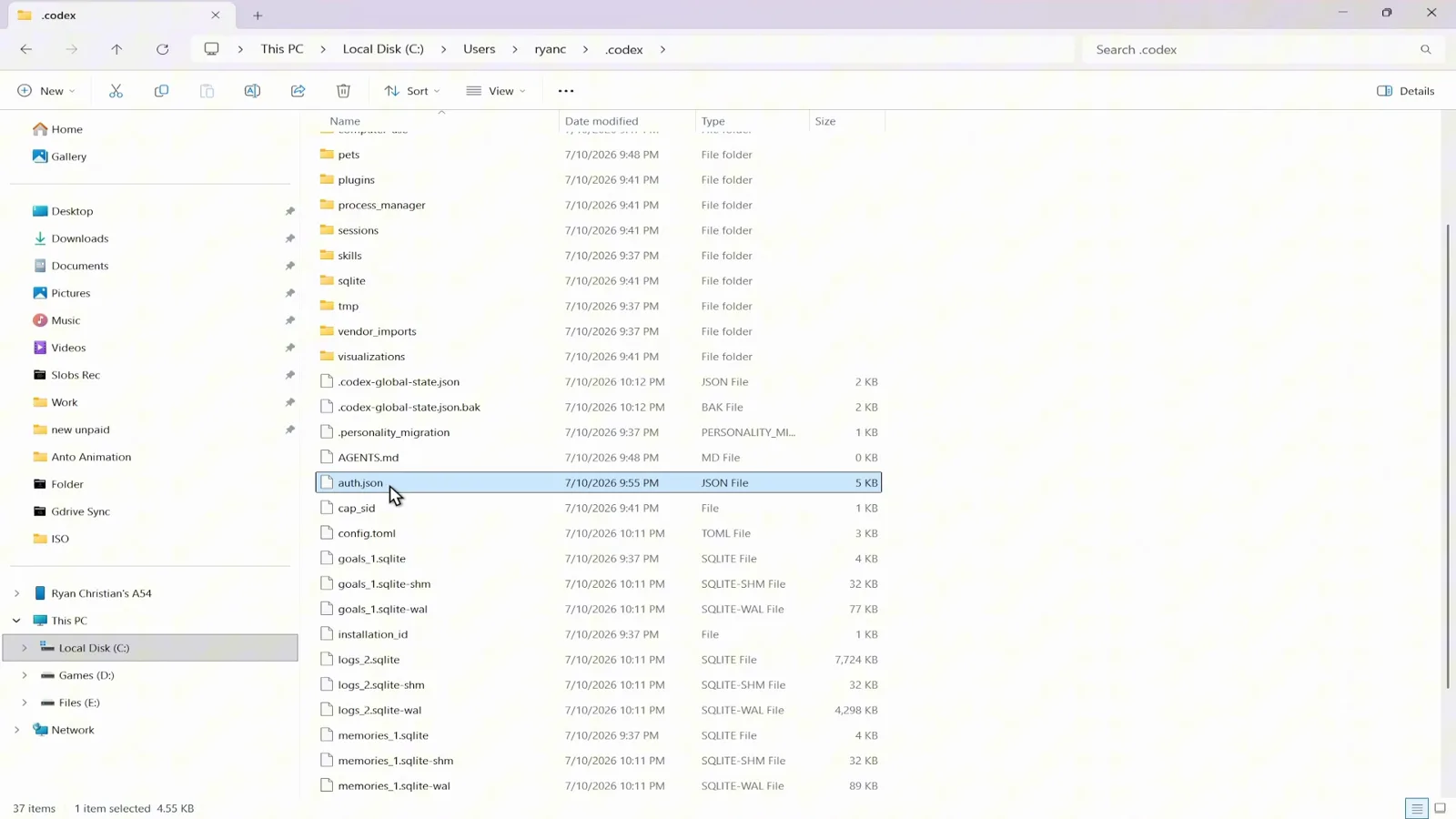
auth.json selected in the .codex folder, ready to deleteWatch at 0:40 - 8
Relaunch and sign in with ChatGPT again
The listing now shows 36 items instead of 37 — auth.json is gone while config.toml and sessions survive. Start Codex again, choose Sign in with ChatGPT, and run codex login status in a terminal; it should report "Logged in using ChatGPT". If the app still hangs, restart the computer once — the recording's author needed that on Windows.
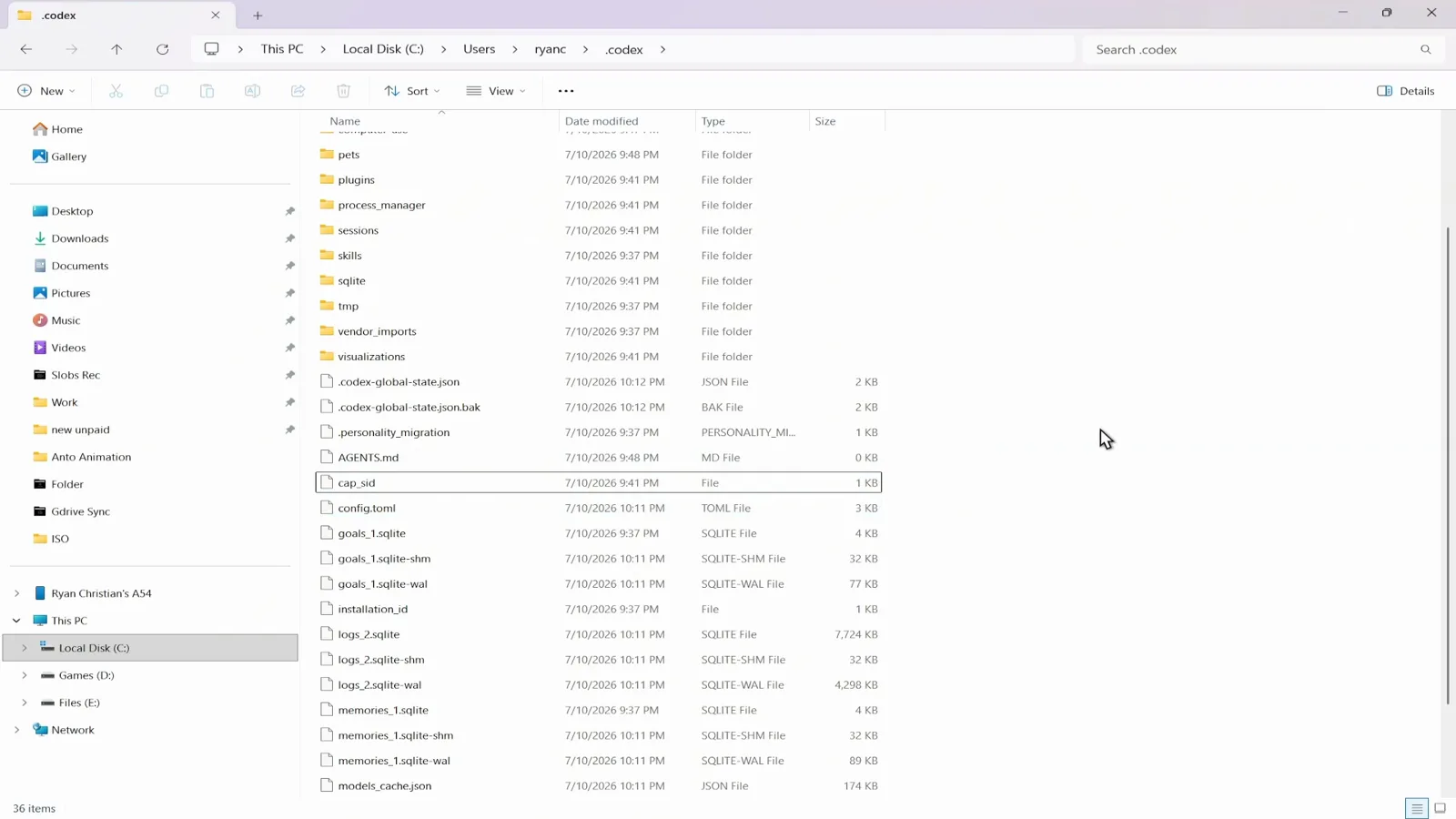
The .codex listing at 36 items after the auth.json resetWatch at 0:46
Network errors — "stream disconnected before completion"
- 9
Read the stream-disconnected error properly
When a request dies mid-stream, Codex prints "Falling back from WebSockets to HTTPS transport. stream disconnected before completion. An error occurred while processing your request" with a request ID — the frame shows it in the editor and in the TUI at the same time. It is usually transient: check status.openai.com for an outage, disconnect a VPN or proxy that can break the stream, then simply retry.
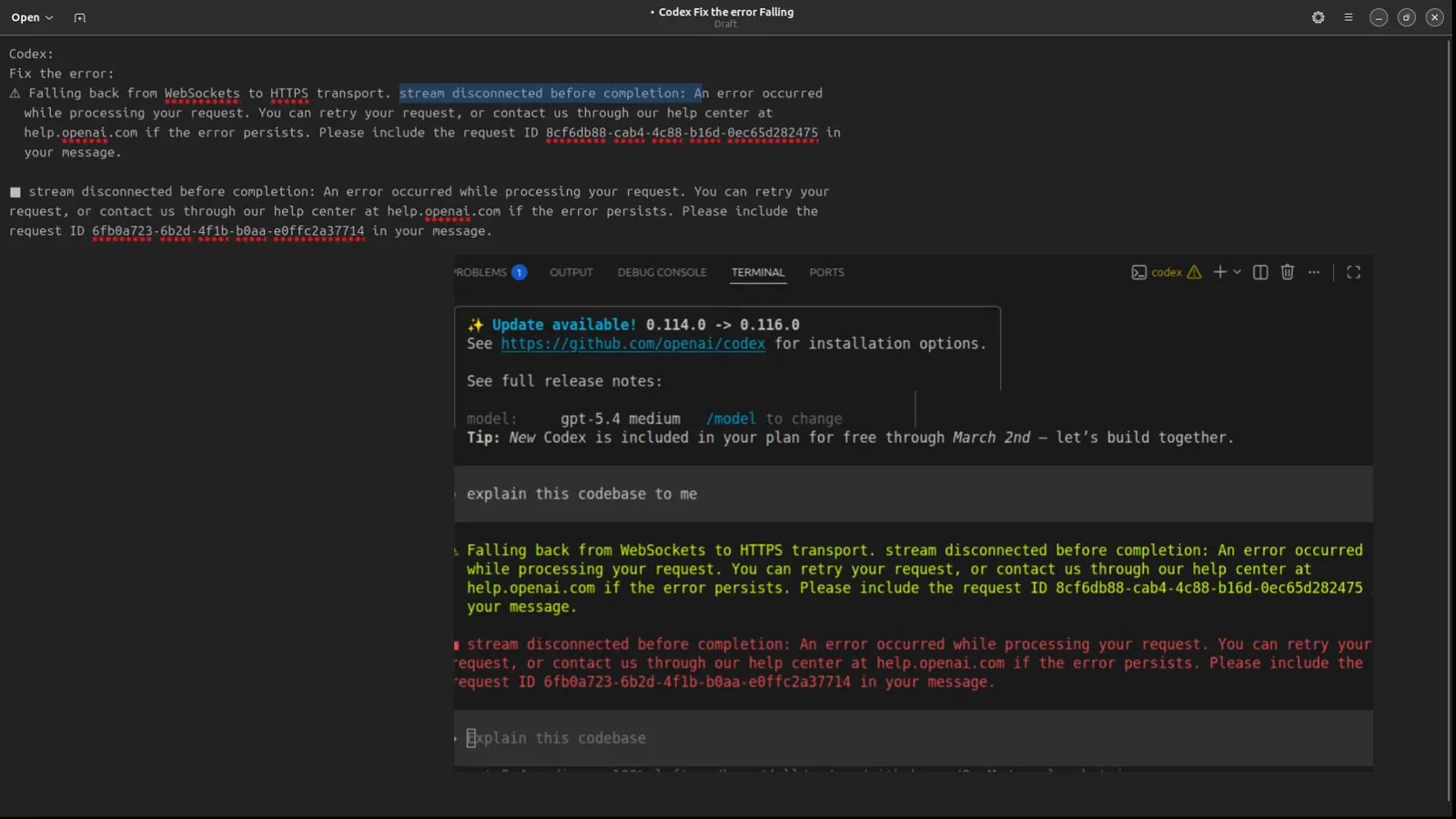
The stream disconnected before completion error, pasted for Codex to fixWatch at 3:00
In VS Code & Cursor — the /model switch
- 10
Switch models with /model
If retries keep failing, open the /model picker in the Codex TUI — the recording lists gpt-5.4, gpt-5.4-mini, gpt-5.3-codex, gpt-5.2-codex and the gpt-5.1 variants. Pick any other model (the recording moves from gpt-5.4 to gpt-5.2-codex). The same picker works in the VS Code and Cursor terminals, which makes it the fastest fix for "codex not working in VS Code" reports.
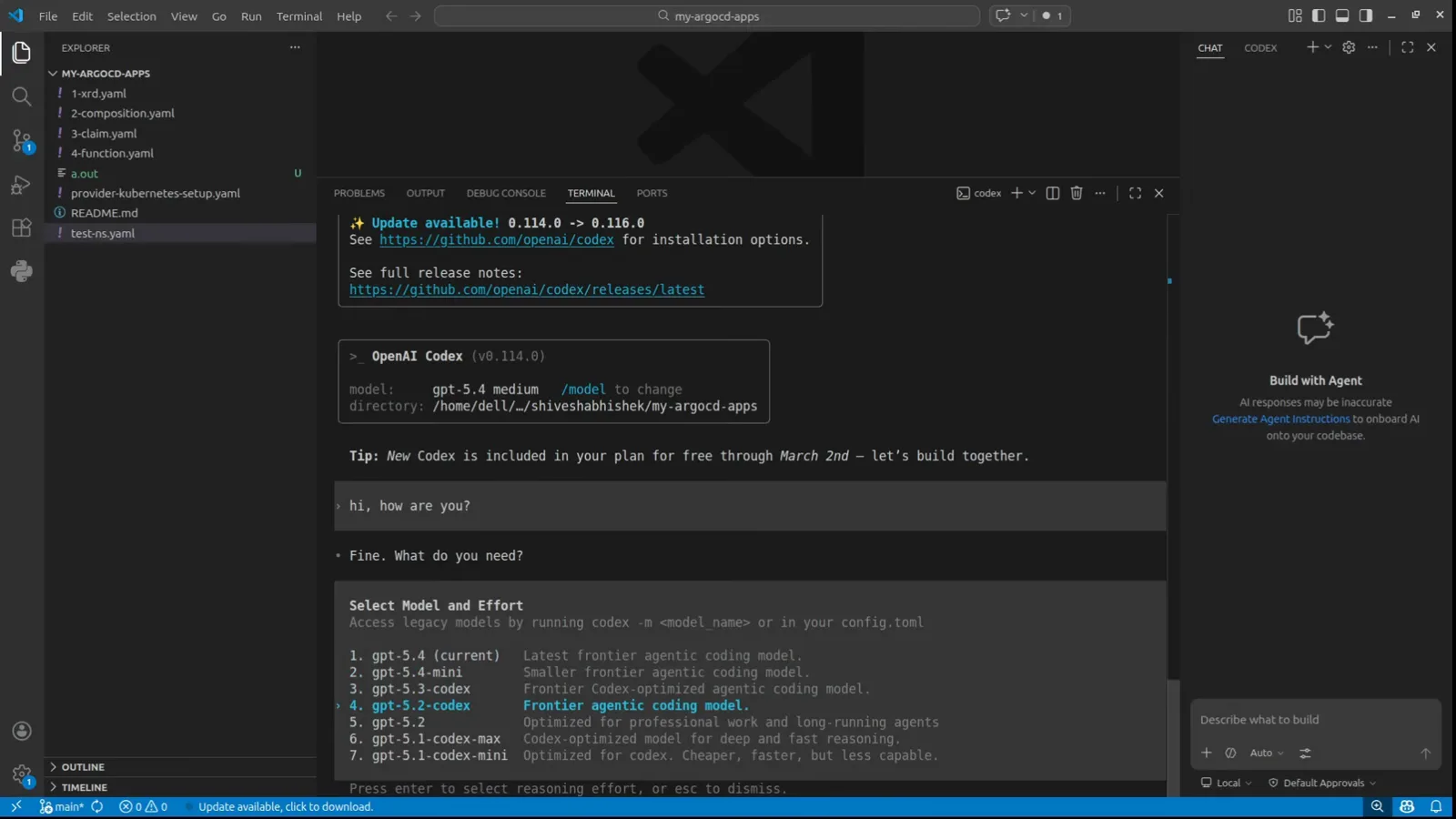
The /model picker open in Codex v0.114.0 inside VS CodeWatch at 2:20 - 11
Re-ask, then switch back
The TUI confirms "Model changed to gpt-5.2-codex medium" and the status line reads gpt-5.2-codex medium · 100% left. Send your prompt again — the recording's session streams normally right after — and once the request completes you can /model back to your preferred model. This switch-away-and-back is the community fix for the intermittent stream errors.
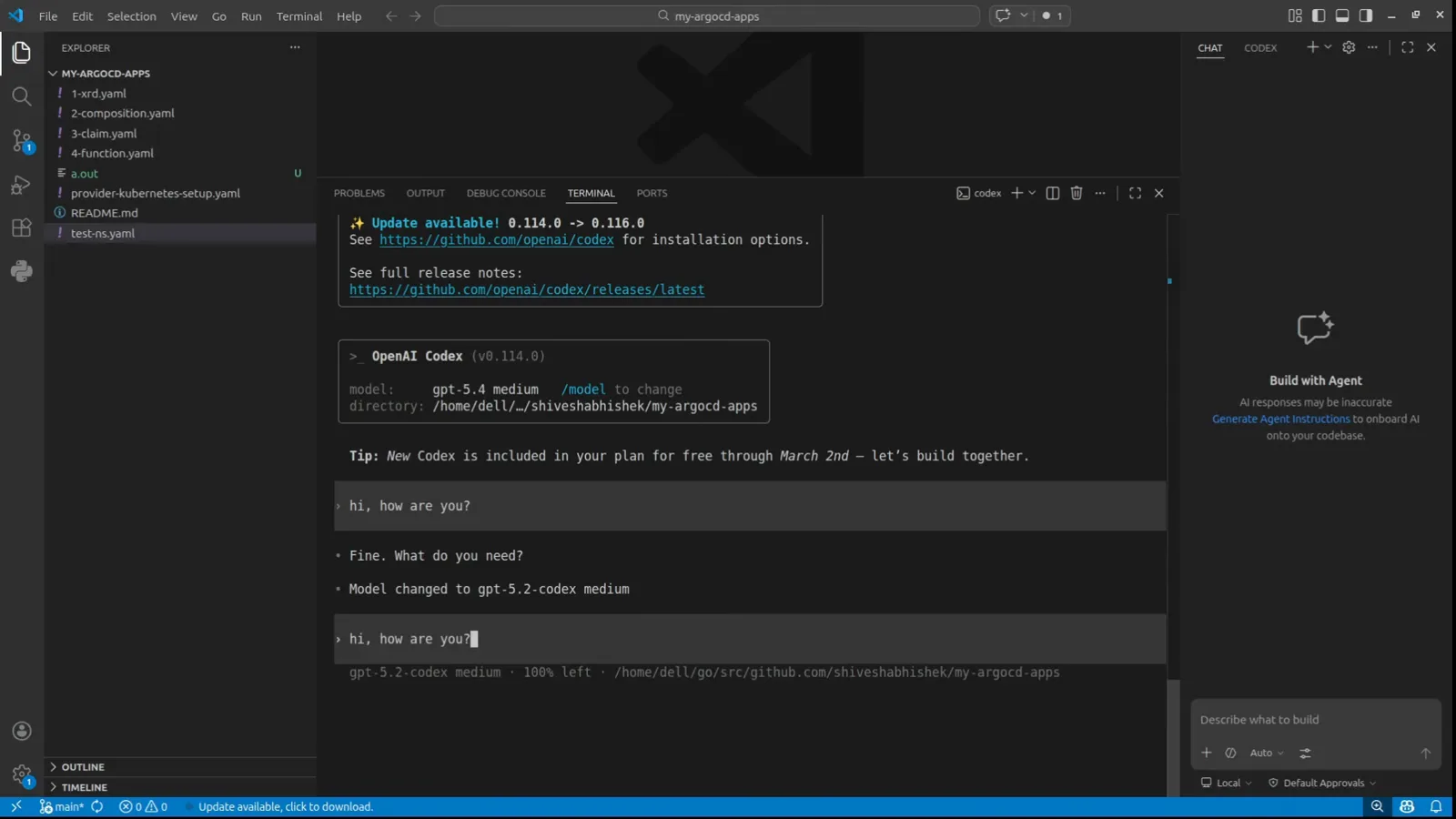
"Model changed to gpt-5.2-codex medium" confirmed in the TUIWatch at 2:24
Windows & mac quick checks
- 12
Platform quick checks for Windows and mac
On Windows, keep Git for Windows installed (the sh fix) and repair the Microsoft Visual C++ redistributable if Codex still won't start after an update — both are documented Windows fixes. On macOS and Linux, run codex --version in a fresh terminal to confirm PATH and reinstall with the official script when in doubt. Both platforms: when "codex not working today" spikes, status.openai.com tells you within seconds whether it is you or OpenAI.
Still broken? The after-update checklist
Most "codex not working after update" reports land in one of these buckets. Work them in order — they start with the state files this page showed you and end with the release notes worth reading.
- 1Corrupted config from an update: a config.toml written during a bad update breaks every launch. Close Codex, then remove (or rename) %USERPROFILE%\.codex\config.toml in an administrator PowerShell — Codex writes a fresh one on the next start. Red error text from an already-run command is harmless.
- 20.162.1 startup failures: before this stable release (October 9, 2026), Codex could refuse to start when a running background server's feature settings differed from CLI defaults. The fix ships in 0.162.1 — "compatibility checks now apply only to explicit command-line feature overrides" (#52648) — so updating is the fix, not a config edit.
- 3Multi-line TUI crash: 0.162.1 also "fixed a TUI crash when asynchronous questions contain multiple lines, preserving line breaks and complete hyperlink destinations" (#51866). If Codex crashed on pasted multi-line prompts, 0.162.1 ends it.
- 4Outage vs local: "codex not working today" or "right now" usually means OpenAI, not you — the status page banner lists Codex outages explicitly, and a fully operational status page is what fixed looks like.
- 5Update banner ignored: the TUI prints "Update available! 0.114.0 -> 0.116.0" with the release-notes link — a version that old misses months of stream and login fixes. Reinstall from the banner's URL or the install script.
- 6Still nothing: capture codex --version plus the newest file in ~/.codex/log (Windows: %USERPROFILE%\.codex\log), include the request ID from the stream error, and take the session transcript from ~/.codex/sessions when you file an issue on github.com/openai/codex.
Worked in order — update, state reset, login reset, stream retry, model switch — these cover nearly every "codex not working" report filed this month. When nothing helps, the request ID plus the newest log file is what maintainers ask for first.