
Claude Code auto mode: the classifier, tiers and every switch
How Claude Code's auto permission mode decides: the shift+tab switch, the client-side and server-side classifier with its Sonnet 5 default, CLAUDE_CODE_AUTO_MODE_MODEL from 2.1.302, the tier order, permissions rules, managed autoMode.environment lists, and the 3-block and 20-block circuit breakers — on frames from the official walkthrough.
Auto mode at a glance
- Auto mode is a permission mode: Claude runs without routine prompts, and before actions like shell commands or network requests run, a background classifier checks that they align with your request.
- Switch with shift+tab (auto sits last in the default → acceptEdits → plan cycle), run claude --permission-mode auto, or answer "Yes, and switch to auto mode" on a Bash prompt (2.1.247+). Since 2.1.283 new interactive sessions start in auto on all plans.
- Decisions run in order: your allow/ask/deny rules first, then read-only actions and working-directory edits auto-approved, then everything else goes to the classifier — a second model, defaulting to Claude Sonnet 5.
- Pin the classifier with CLAUDE_CODE_AUTO_MODE_MODEL (2.1.302+) or choose server-side vs client-side review with CLAUDE_CODE_AUTO_MODE_SERVER; an unavailable classifier model makes checks fail and actions get denied.
- Guardrails: 3 consecutive or 20 total classifier blocks pause auto mode and resume prompting, deny rules still apply inside auto mode, and permissions.disableAutoMode removes the mode entirely.
How auto mode works with Claude Code
ChannelClaude5:42
Permission modes — Claude Code documentation
Docscode.claude.com
Frames come from Anthropic's own auto-mode walkthrough — full-screen animated cards only; every talking-head segment was skipped. Facts are cross-checked against the official permission-modes, permissions and auto-mode-config documentation plus the 2.1.302 changelog entry that introduced CLAUDE_CODE_AUTO_MODE_MODEL.
Video frames remain the property of their creators and are embedded here as step-by-step documentation with attribution and deep links.
Enable and configure auto mode step by step
Step 1 — Turn auto mode on
- 1
See what auto mode replaces
In default mode, routine work means prompt after prompt: an npm run build asks for Bash approval, a docs fetch asks for network approval. Auto mode replaces those routine prompts with a background classifier — before actions such as shell commands and network requests run, a second model checks that they align with your request. Ask rules and deny rules still apply; it is the routine yes/no traffic that disappears.
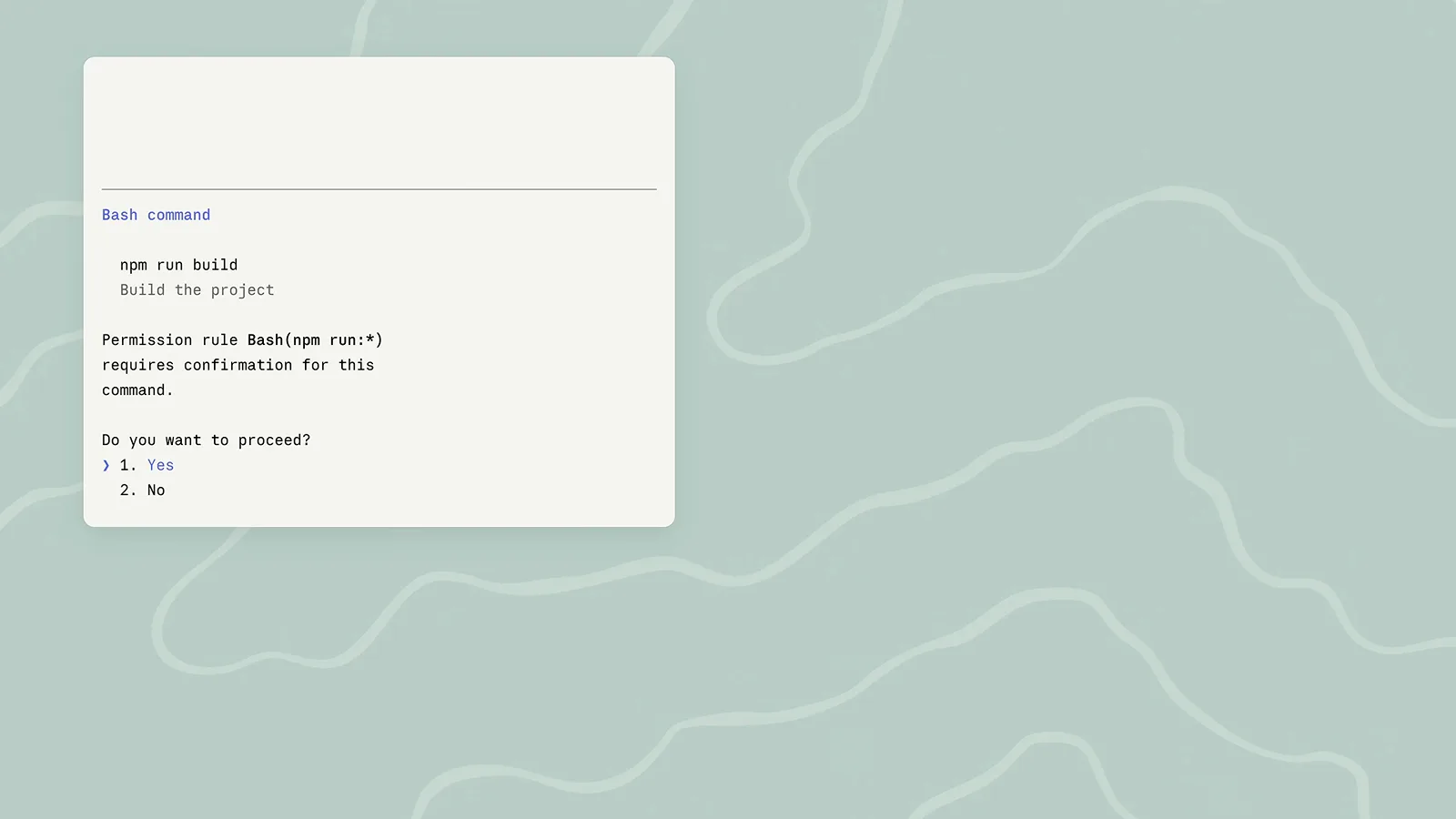
The prompt cards auto mode replaces: an npm run build Bash approval and a fetch approval, each waiting on a Yes/No answer. - 2
Switch modes with shift+tab
shift+tab cycles permission modes during a session: from auto, one press lands on default and the cycle runs default → acceptEdits → plan, with optional modes slotted in after plan — bypassPermissions first and auto last. The footer always names the active mode. Three more routes exist: the "Yes, and switch to auto mode" option on a Bash prompt (2.1.247+), the claude --permission-mode auto flag (works with -p), and permissions.defaultMode — which only takes effect for "auto" from user-level ~/.claude/settings.json, a --settings file or managed settings, never from project .claude/settings.json.
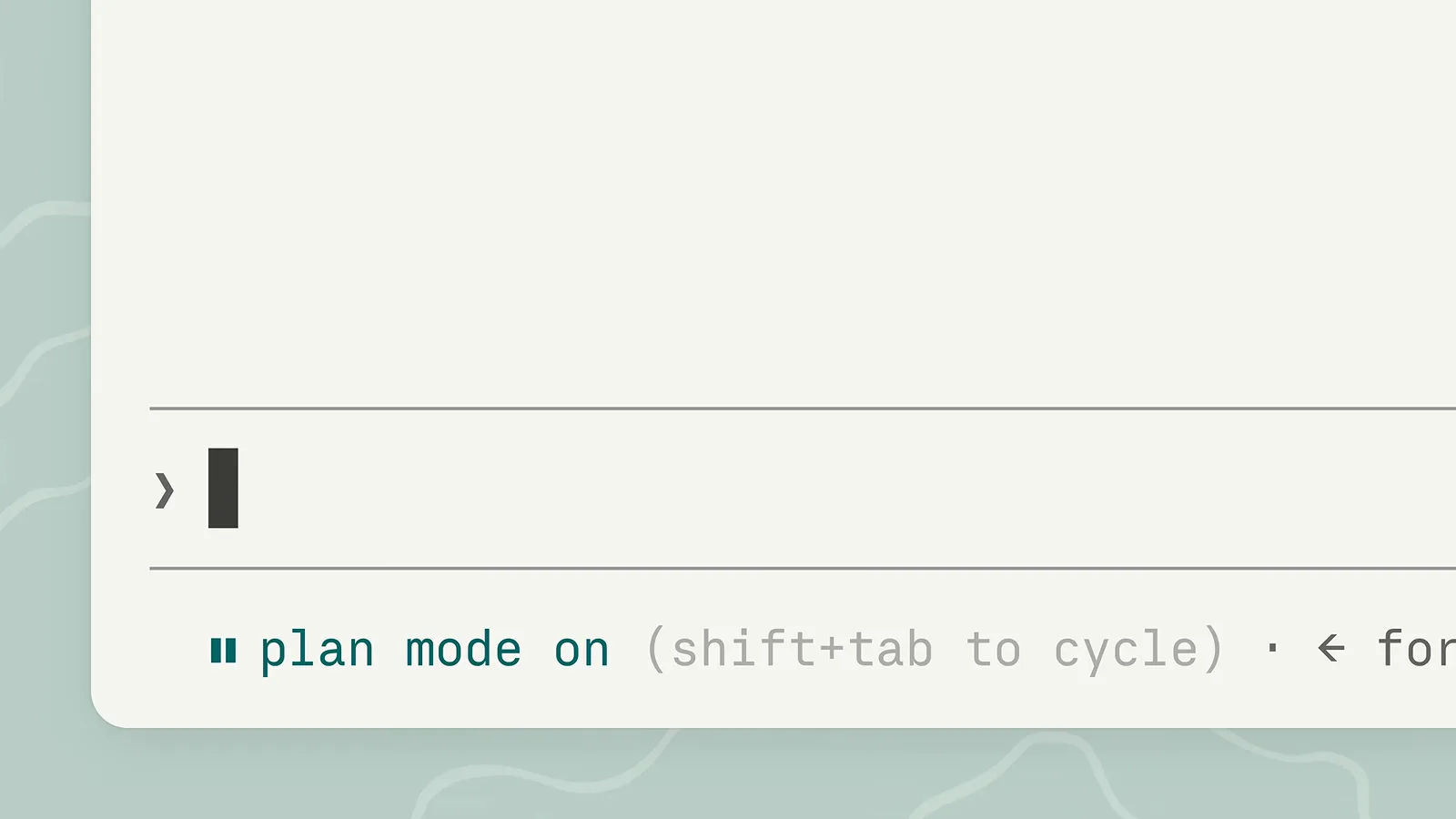
The input footer naming the active mode with the shift+tab to cycle hint — auto sits at the end of the cycle. - 3
Know the default: sessions start in auto
Since Claude Code v2.1.283, new interactive sessions start in auto mode on all plans (earlier builds granted it to Pro/Max/Team only; HIPAA configurations fall back to Manual from 2.1.285+). A session under auto shows the mode in its footer and runs its work — here, a "Tidy up local branches" task on Fable 5 — while the classifier reviews each action in the background. /status lists an Auto mode server entry when the server-side check is active.
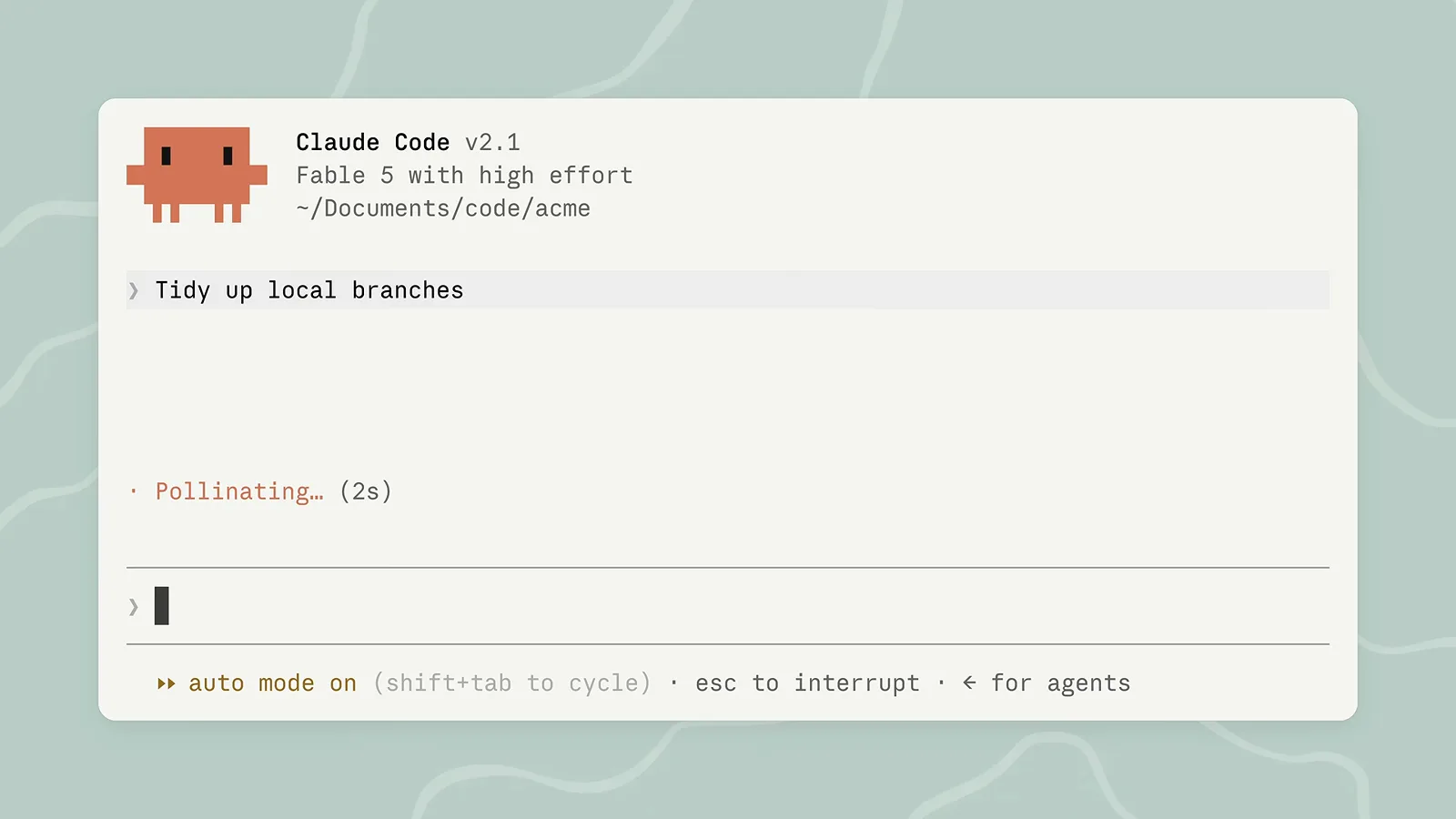
A Claude Code v2.1 session running under auto mode: the Tidy up local branches task on Fable 5 with the auto mode on footer.
Step 2 — How the classifier decides
- 4
Learn the decision order: rules, tiers, classifier
Every action walks the same path. Your rules answer first: deny blocks, ask prompts, allow passes. Read-only actions and working-directory edits are auto-approved without the classifier. Everything else lands in the tier split — read-only, in-project writes, everything else — where routine actions skip the classifier and the rest reach the classifier diamond, which ends in Approve or Deny.
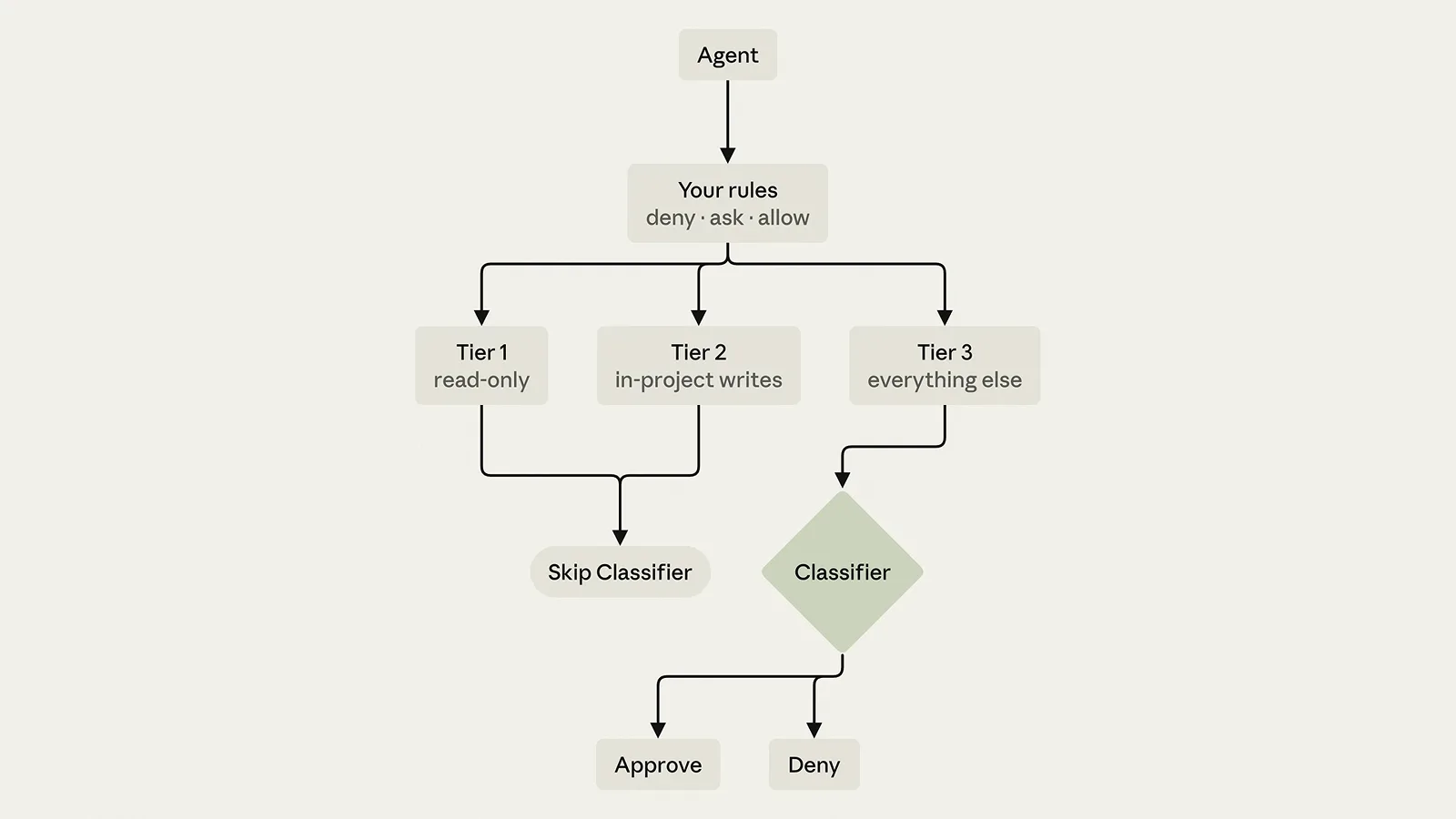
The decision diagram: your deny/ask/allow rules route Agent actions through Tier 1 read-only, Tier 2 in-project writes and Tier 3 into Skip Classifier or the Classifier diamond. - 5
See what the classifier actually reads
The classifier does not get your transcript. Requests are stripped of tool results, so hostile file or page content cannot manipulate it directly — what arrives is your request plus the action to judge. In the recorded example, a rate-limit question collapses to two rows: WebSearch("acme API rate limits") and WebFetch(docs.acme.com). That is the entire surface the classifier evaluates.
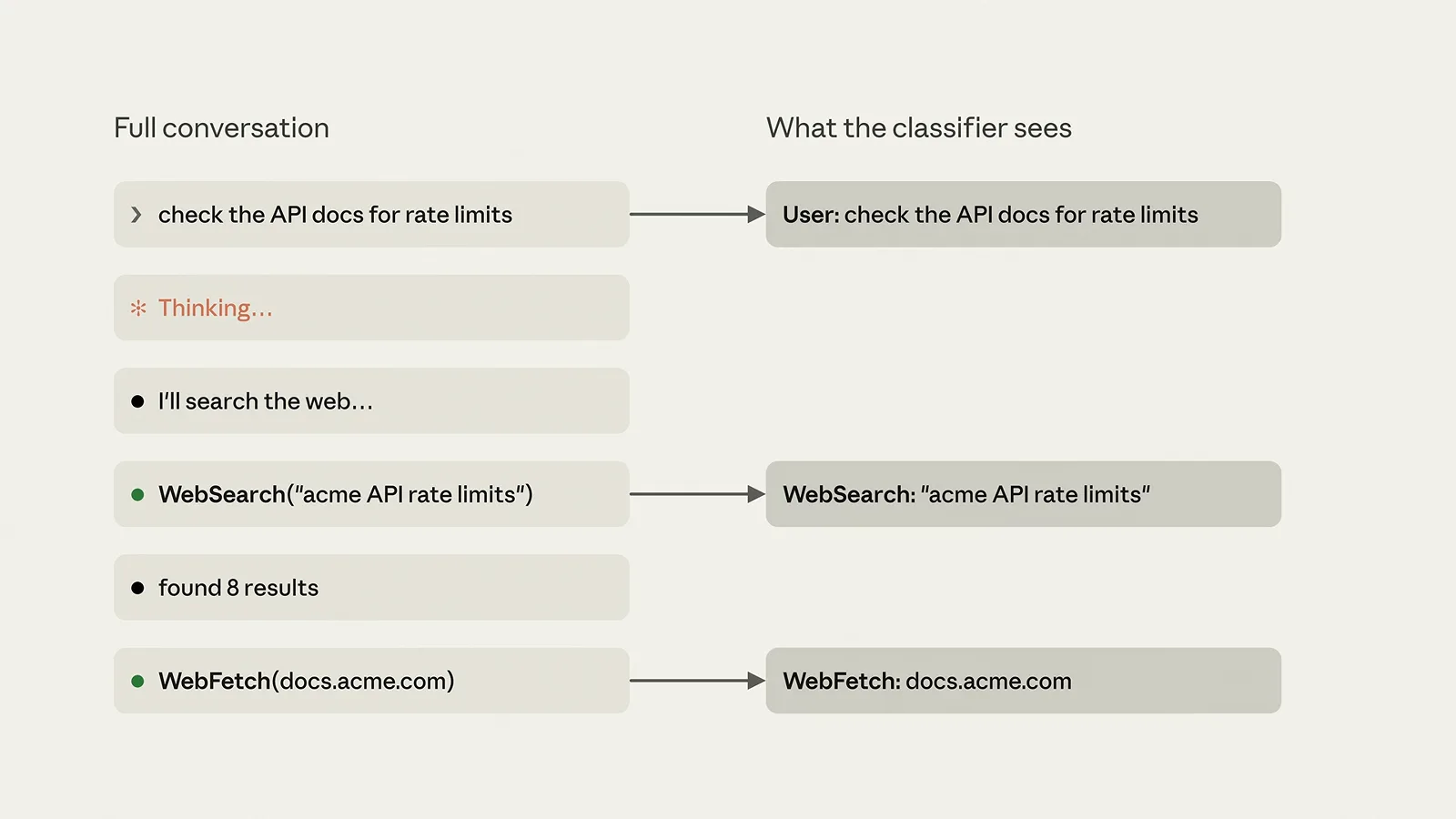
The classifier-visibility strip: the full conversation reduced to the WebSearch and WebFetch calls the classifier evaluates. - 6
Why look-alike commands get different verdicts
The classifier judges the action, not the vibe. In the second strip, git branch -d old-login deletes a local branch — routine. Its twin, git push origin --delete old-login, deletes a branch on the remote — exactly the kind of action the tier split hands to the classifier instead of waving through. Expect classification on anything that leaves the machine or touches shared state, even when it reads like the same cleanup.
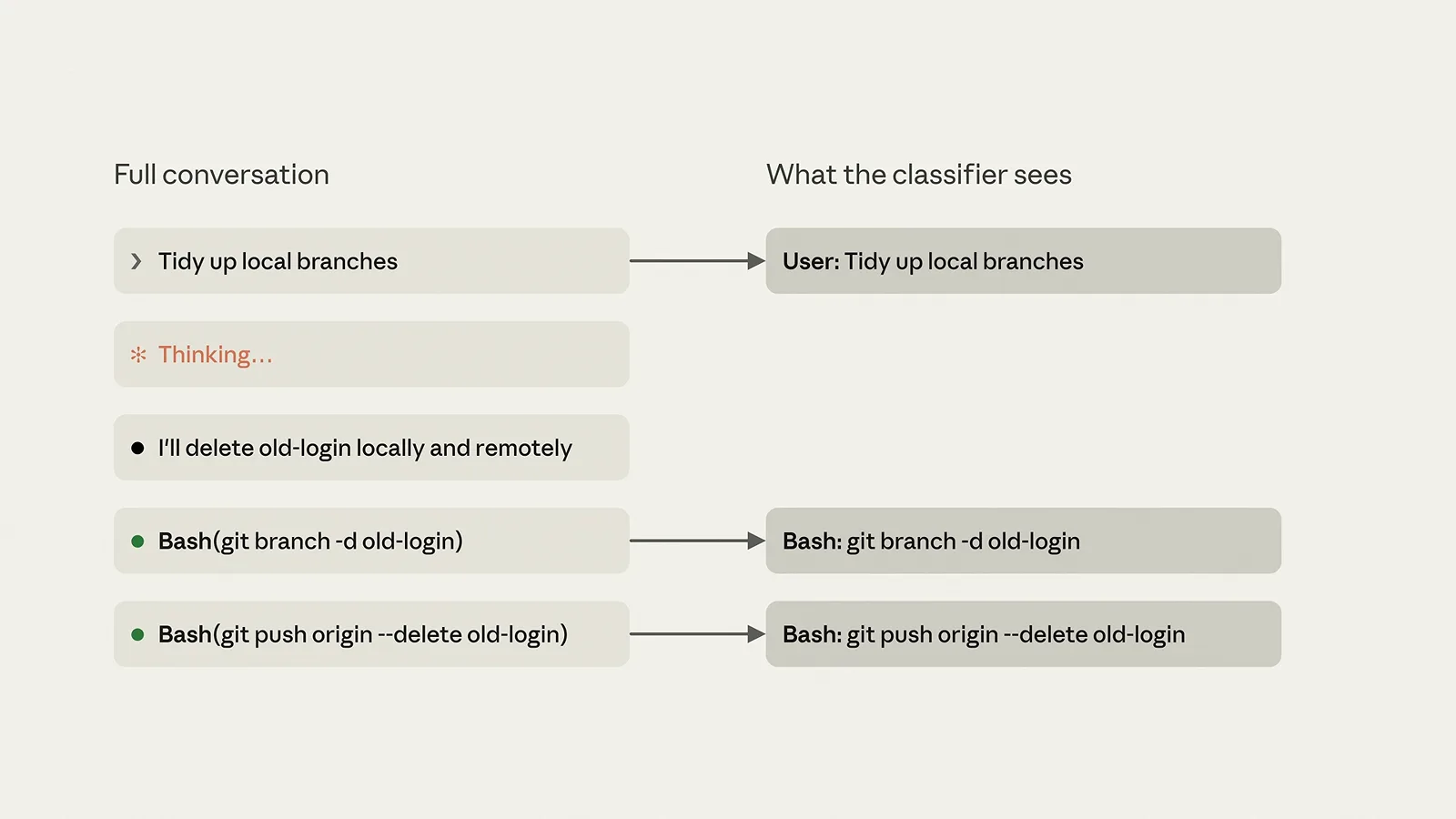
The git twins: local branch deletion stays routine while git push origin --delete is surfaced to the classifier.
Step 3 — Rules and the classifier model
- 7
Choose server-side or client-side review
The classifier runs in one of two places. Server-side: Claude Code asks the session's model server to check the action as part of its request — /status shows the Auto mode server entry. Client-side: Claude Code sends its own classifier requests, used when the server gives no verdict or a proxy drops review results. Control it with CLAUDE_CODE_AUTO_MODE_SERVER=1 (server) or =0 (always client-side); if the server gives no verdict, Claude Code denies the action rather than running it unreviewed.
- 8
Pin the classifier model (2.1.302+)
The classifier defaults to Claude Sonnet 5; a session already running on Sonnet 4.6 uses 4.6, and ANTHROPIC_DEFAULT_SONNET_MODEL is honored. From 2.1.302, CLAUDE_CODE_AUTO_MODE_MODEL forces a specific classifier — for example "env": undefined in ~/.claude/settings.json. Two failure modes to know: an unavailable model makes checks fail and actions get denied, and excluded or unsupported models (Opus 5, Sonnet 5.5, Opus 5.5) silently fall back to the default. Debug with claude --permission-mode auto --debug-file classifier-debug.log and search classifier_request_started.
- 9
Write the rules the classifier defers to
Rules answer before the classifier ever runs, so put hard boundaries there. The recorded managed-settings.json shows the shape: deny: ["Bash(curl *)", "Read(./.env")], ask: ["Bash(git push *)"], allow: ["Bash(python:*)"] — commented in the video as overly broad. An ask rule like Bash(git clean *) still prompts even in auto mode, and read-only Bash commands can wait for the classifier's review rather than prompting. Tighten allow rules; the classifier is a backstop, not an excuse for Bash(*).
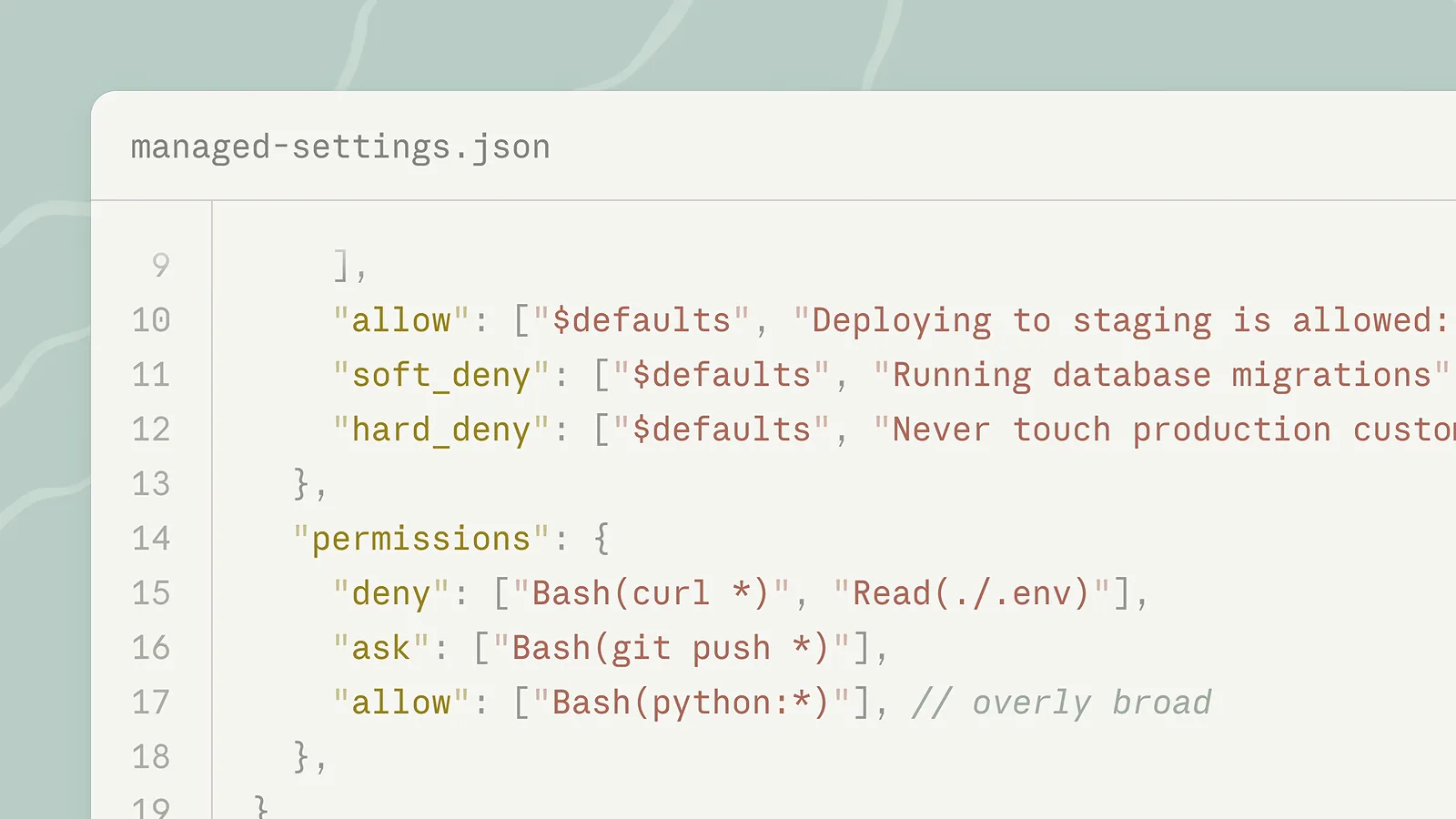
The permissions block: deny curl and .env reads, ask on git push, allow python — with the overly broad allow flagged.
Step 4 — Managed config and guardrails
- 10
Configure autoMode.environment for teams
In managed settings, autoMode.environment tells the classifier what counts as trusted context: the recorded card lists "Source control: github.com/acme and all repos under it", "Trusted cloud buckets: s3://acme-builds" and "CI server: ci.acme.internal". With $defaults alongside, your entries extend the built-in list instead of replacing it. This is the admin-side answer to classifier prompts that fire on your own infrastructure — name the repos, buckets and services your team actually uses.
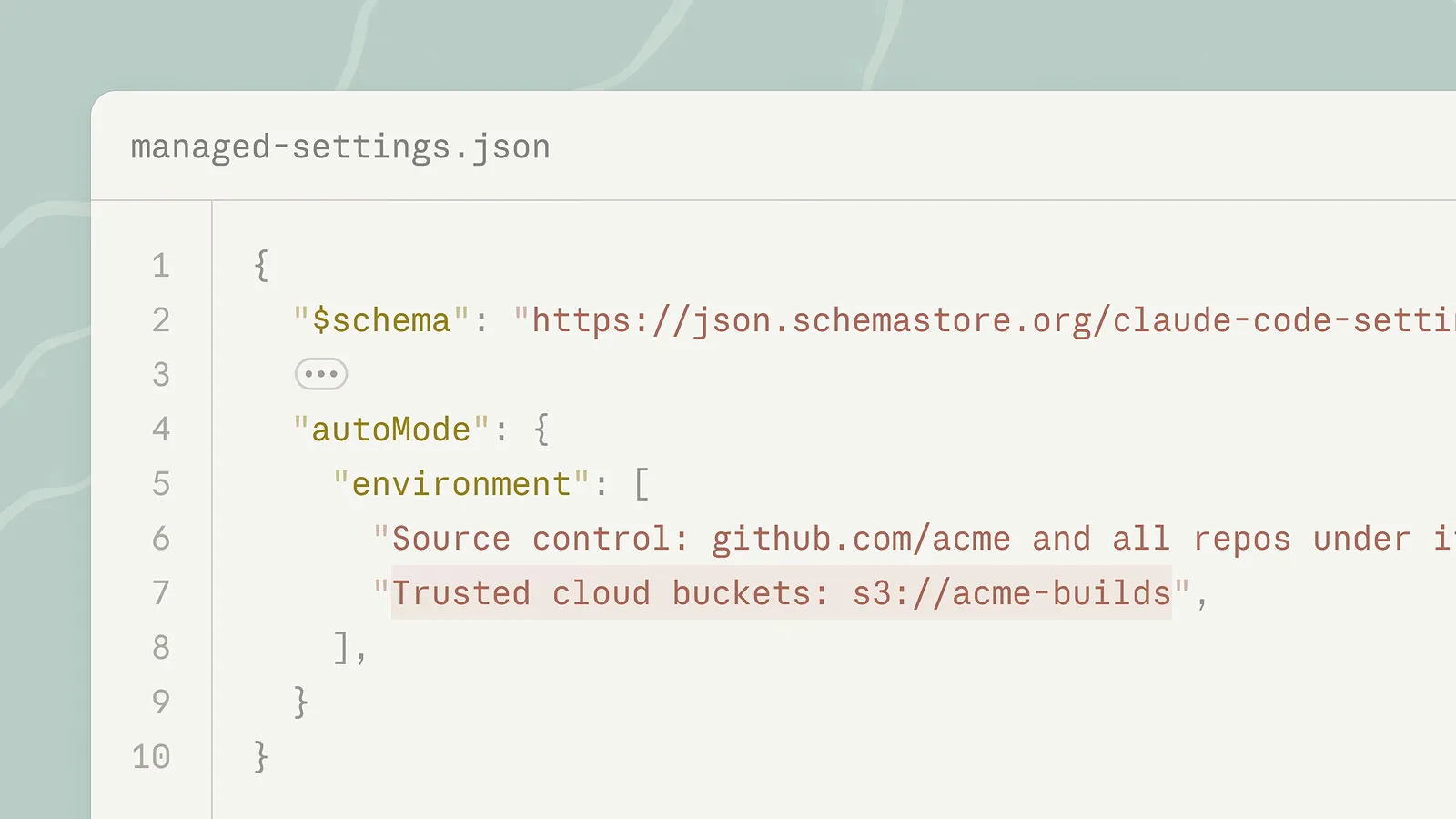
The autoMode.environment card: trusted source control on github.com/acme, the s3://acme-builds buckets and the ci.acme.internal CI server. - 11
Layer allow, soft_deny and hard_deny
Beyond environment, managed settings carry three rule lists: "allow" ([$defaults, "Deploying to staging is allowed"]), "soft_deny" ([$defaults, "Running database migrations"]) and "hard_deny" ([$defaults, "Never touch production custo..."]). Allow patterns stop the one-action-at-a-time approvals; soft denies route to the classifier with a bias against; hard denies end the question. Inspect the full built-in lists any time with claude auto-mode defaults, which prints them as JSON.
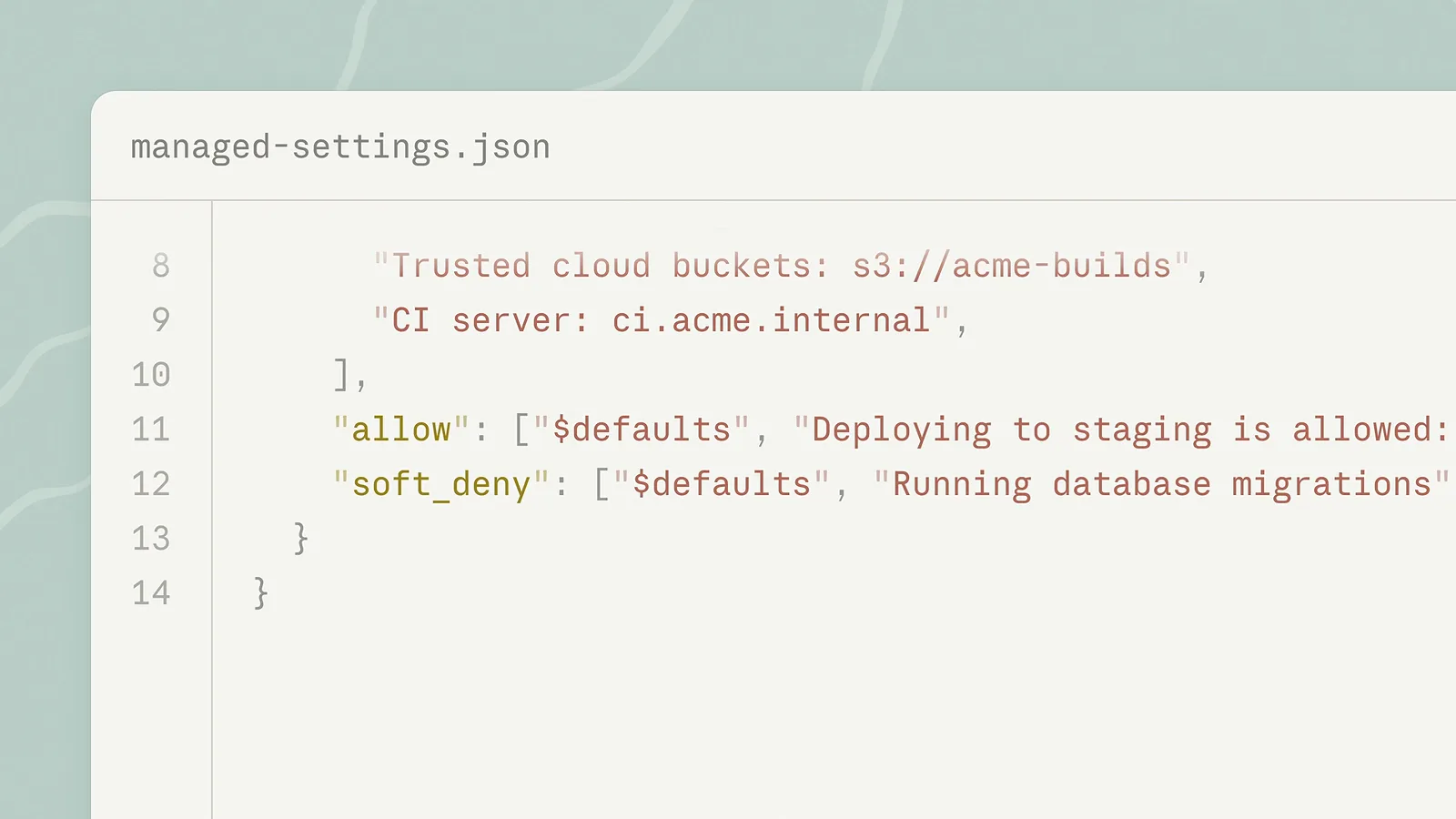
The layered lists: allow for staging deploys, soft_deny for database migrations, hard_deny for production data. - 12
Know the circuit breakers
Auto mode pauses itself: 3 consecutive classifier blocks or 20 total blocks resume normal prompting, and neither number is configurable. Words act as signals too — "don't push"-style statements become block signals, and stated approvals can clear a block when they name the action and its specifics. To remove the mode entirely, set permissions.disableAutoMode to "disable" in managed settings; a running session leaves auto mode and says so. And remember: deny rules still win inside auto mode.
The classifier model, in detail
The classifier is the piece people misconfigure most, because its defaults are invisible until something gets denied. The behavior below is documented across the permission-modes and auto-mode-config pages and the 2.1.302 changelog:
- 1Default model: Claude Sonnet 5. A session already running on Sonnet 4.6 uses Sonnet 4.6 instead, and ANTHROPIC_DEFAULT_SONNET_MODEL is honored.
- 2Pinned override: CLAUDE_CODE_AUTO_MODE_MODEL (2.1.302+) runs the classifier on a full model ID — an unavailable model makes checks fail and actions are denied, so set a model your plan actually serves.
- 3Silent fallback: excluded or unsupported classifier models (Opus 5, Sonnet 5.5, Opus 5.5) do not error — the default classifier model is used instead.
- 4Two runtimes: server-side review rides the session's model requests (CLAUDE_CODE_AUTO_MODE_SERVER=1); client-side requests are the fallback (=0), used when the server gives no verdict or a proxy drops review results.
- 5No unreviewed runs: if neither path returns a verdict, Claude Code denies the action — auto mode never runs an action that needed review without one.
- 6Verification: claude --permission-mode auto --debug-file classifier-debug.log records classifier_request_started entries, and /status shows whether the Auto mode server is active.
This is also where the "auto mode not available for this model" reports come from: availability depends on plan, organization, model and provider, and a pinned classifier model that your provider does not serve turns every check into a denial. Fix the variable or remove it — the session model itself does not need to change.