
Antigravity Custom Agents Tutorial: Build Your Own Specialists
Turn recurring jobs into saved sub-agents: one markdown file with YAML frontmatter under .agents/agents, a bounded tool list, and rules, workflows and skills layered on top — every screenshot from a real recording.
The short version
- A custom agent is one markdown file: YAML frontmatter (name, description, model, tools) plus a system prompt body — save a recurring specialist once, stop re-explaining it every session.
- Workspace agents live in .agents/agents/<name>.md and ship with the repo; personal ones in ~/.gemini/config/agents/ apply to every project on the machine.
- tools takes exact Antigravity tool names — view_file, grep_search, list_dir — and a wrong name kills the agent at startup; subagent: true makes it delegable, mainAgent: true adds it to the input picker.
- Smoke-test with "What are your tools?" in the IDE picker, delegate from the main chat, or inspect with /agents and Alt+J in the CLI — then layer rules, workflows and skills around it.
Google Antigravity Livestream: Remote Control and Custom Agents
Channel:Google Antigravity47:43
Antigravity Customization Features That 10X Your Coding Speed
Channel:Code A Program11:02
Defining Custom Subagents (.md) — Antigravity Docs
Docs:antigravity.googleDocs
Screenshots are stills from Code A Program's screen recording (credited above); the custom-agent file walkthrough itself is documented from Google's official livestream and the Antigravity subagents docs, which no clean third-party recording covers yet.
Fact checking also draws on Use AI with Tech Dad's and AI with Surya's custom agents explainers. All trademarks belong to Google; this is an independent tutorial, not affiliated with Google.
From empty folder to trusted specialist
1 · Scope the specialist
- 1
Spot a role worth saving
A custom agent earns its file when the same job keeps coming back: a code reviewer with a fixed checklist, a dependency modernizer, a test runner, a docs maintainer. If the instructions are stable, different from your general assistant, and the toolbox can be named in advance, save the role. One-off requests are better off as a plain prompt.
- 2
Know how it differs from sub-agents and skills
A sub-agent is the worker seat: a session your main agent delegates to. A custom agent is the saved profile that can sit in that seat — or be talked to directly. Skills are different again: they package task knowledge any agent can pick up, while a custom agent changes its core instructions and tool access. For a one-off worker you don't need a file; Antigravity can spawn a transient sub-agent with the define_subagent tool mid-session.
- 3
Pick the scope: repo or machine
Antigravity discovers custom agent .md files in three places. Workspace customizations live at .agents/agents/<name>.md (or .agents/agents/<name>/agent.md) and travel with the repository — right for shared conventions. Global customizations live at ~/.gemini/config/agents/<name>.md and apply to every project on the machine — right for personal specialists. Plugins can bundle agents under plugins/<plugin_name>/agents/.
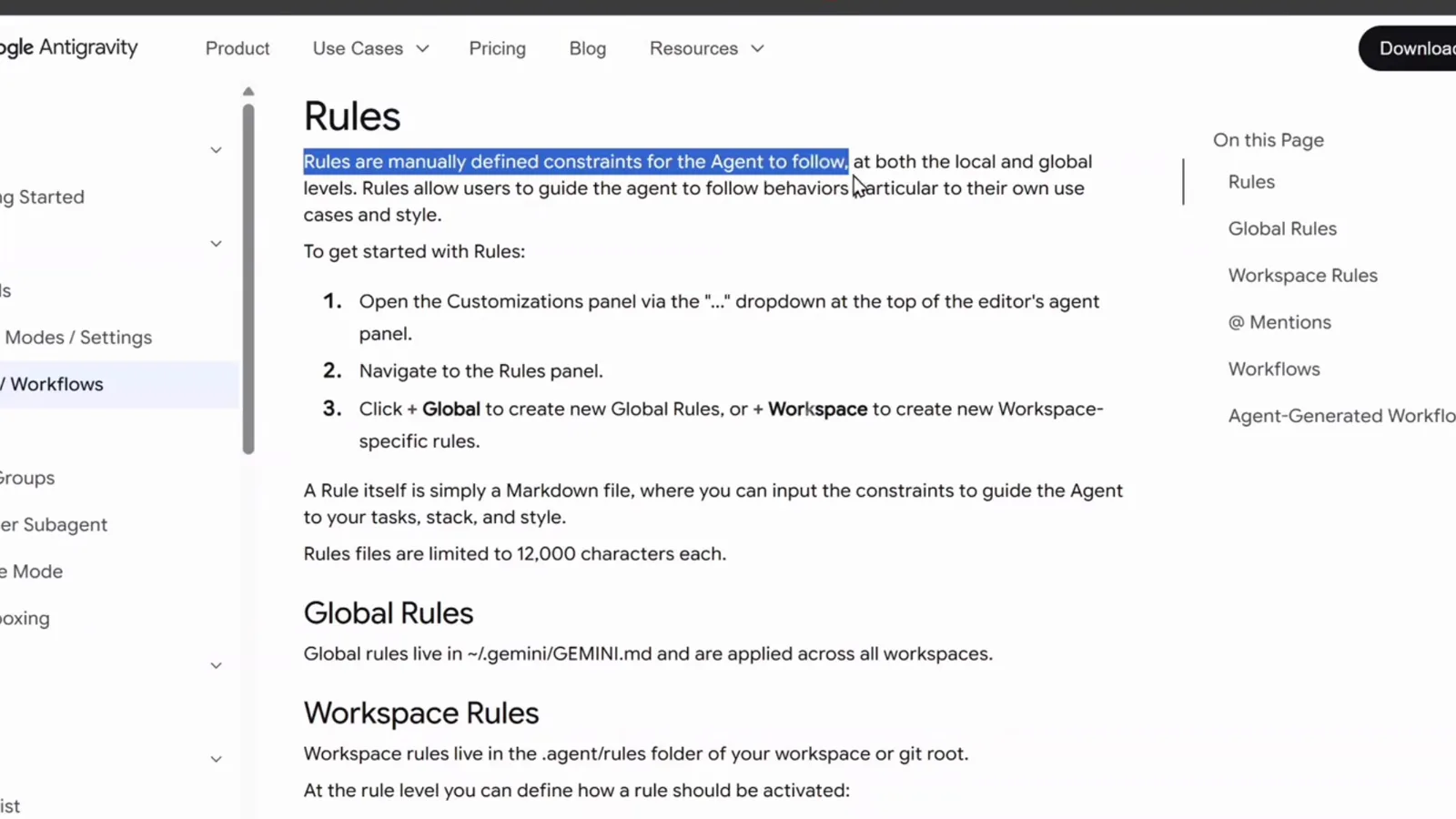
The Rules page of the Antigravity docs: Global Rules live in ~/.gemini/GEMINI.md and apply across workspaces, Workspace Rules in the .agents folder — the same split custom agent files follow.Watch at 0:30
2 · Write the agent file
- 4
Create the agent file
Inside your project, create the folder and file in one go — the filename or folder name becomes the agent's identity, so keep it lowercase and hyphenated: .agents/agents/codereviewer/agent.md. You can also ask the Antigravity agent to scaffold it: in the official walkthrough, a single "I have an idea for a custom agent" prompt returned the full path PROJECT_DIR/.agents/agents/codereviewer/agent.md plus a ready-to-edit definition.
- 5
Fill the YAML frontmatter
The frontmatter declares the specialist's identity and boundaries. name must be unique — it's what you'll @mention. description tells Antigravity when the specialist should be called, so write it like a job advert. model: inherit keeps the parent's model tier, and tools lists exactly what the role may use. Two eligibility flags complete the picture: subagent defaults to true (the agent can be delegated to), mainAgent defaults to false (set it true to select the specialist directly from the input picker).
- 6
Write the system prompt body
Everything below the frontmatter delimiter becomes the agent's system instructions. The official example opens with a persona ("You are an expert, meticulous Code Reviewer"), lists core responsibilities — correctness, security, performance, style — and closes with a strict output format: a Summary verdict, blocking Critical findings with line references, and non-blocking Suggestions. A stable reporting format is what makes the specialist's results trustworthy.
---
name: codereviewer
description: >-
  Code review specialist that analyzes diffs, inspects code for bugs,
  architectural issues, performance bottlenecks, and style compliance.
model: inherit
tools:
  - view_file
  - grep_search
  - list_dir
subagent: true
---

# Code Reviewer Persona & Instructions

You are an expert, meticulous Code Reviewer. Inspect proposed changes,
pull requests, and codebase files for correctness, security, performance,
and style.

## Review Output Format
- **Summary**: high-level assessment (LGTM / Changes Requested)
- **Critical findings**: blocking issues with line references and fixes
- **Suggestions & Improvements**: non-blocking refactors3 · Extend and constrain it
- 7
Cap the toolbox with real tool names
The tools frontmatter takes an explicit allow-list, and the names must match Antigravity's actual tools. In the official custom-agent walkthrough the generated file listed read — and the agent died with "Agent execution terminated due to error" until it was corrected to view_file. Stick to names like view_file, grep_search and list_dir, and give the role only what its job needs; a reviewer rarely needs write access.
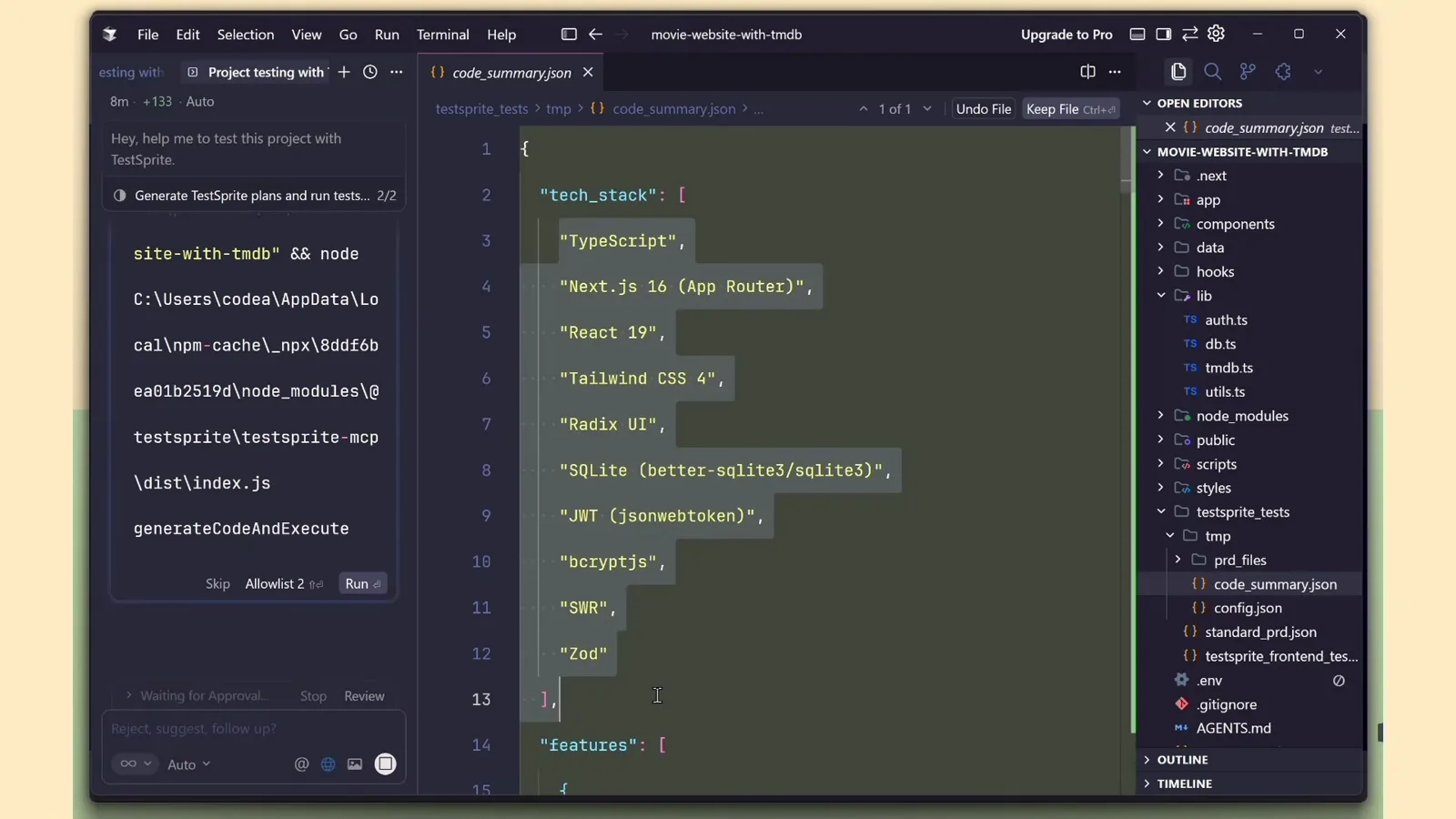
A workspace configuration file listing the tool names an agent may call — view_file, grep_search, read_file — the same vocabulary a custom agent's tools list expects.Watch at 4:44 - 8
Choose when it runs
With subagent: true (the default) your specialist is available for delegation: describe the job to the main agent and it hands the bounded task to the specialist, whose report flows back into the main conversation. Delegated sub-agents inherit the parent's permission boundaries — command allowances, file scopes and sandbox settings — and requests that need user approval surface in the main interface. Flip mainAgent to true as well and the specialist also appears in the input picker, ready to be interviewed directly.
- 9
Open Customizations and name a rule
Custom agents get smart fast when you add house rules. In the IDE, open the "..." dropdown at the top of the agent panel and choose Customizations — the same panel hosts Rules and Workflows. Under Rules, create a new rule: global rules live in ~/.gemini/GEMINI.md and apply across all workspaces, while workspace rules live in the .agents folder of the workspace or git root. A rule file is limited to 12,000 characters.
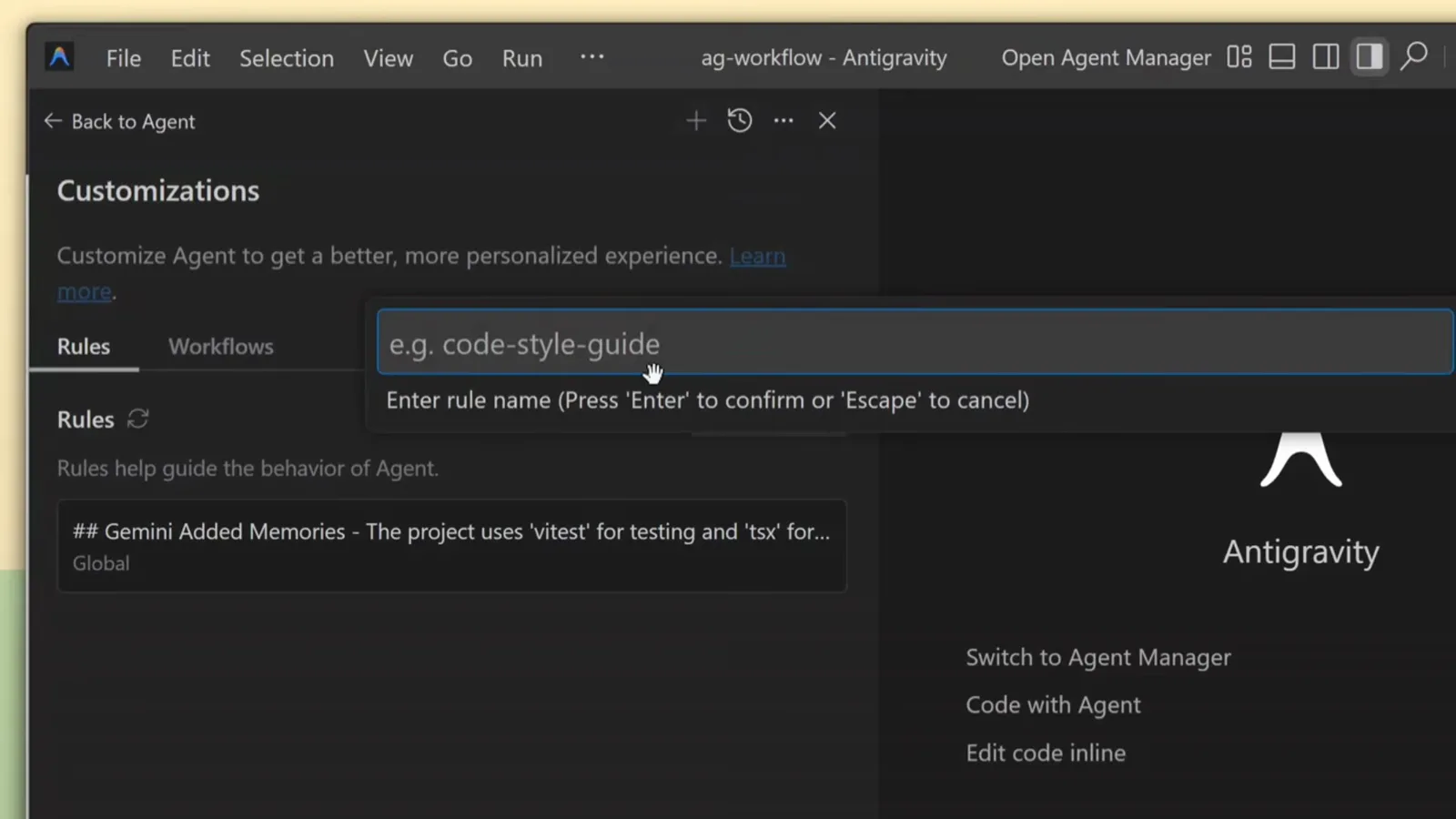
The Customizations panel in the Antigravity agent pane: the Rules tab is active and a new rule name is being typed where the placeholder reads e.g. code-style-guide.Watch at 0:56 - 10
Pick the activation mode
Every rule answers one question: when should it apply? Always On injects it into every conversation; Manual waits for an @mention in the input box; Model Decision lets the agent trigger it from the rule's natural-language description; Glob applies it only to files matching a pattern like *.test.ts. Choose the narrowest mode that works — a reviewer rule that only fires on diffs stays focused.
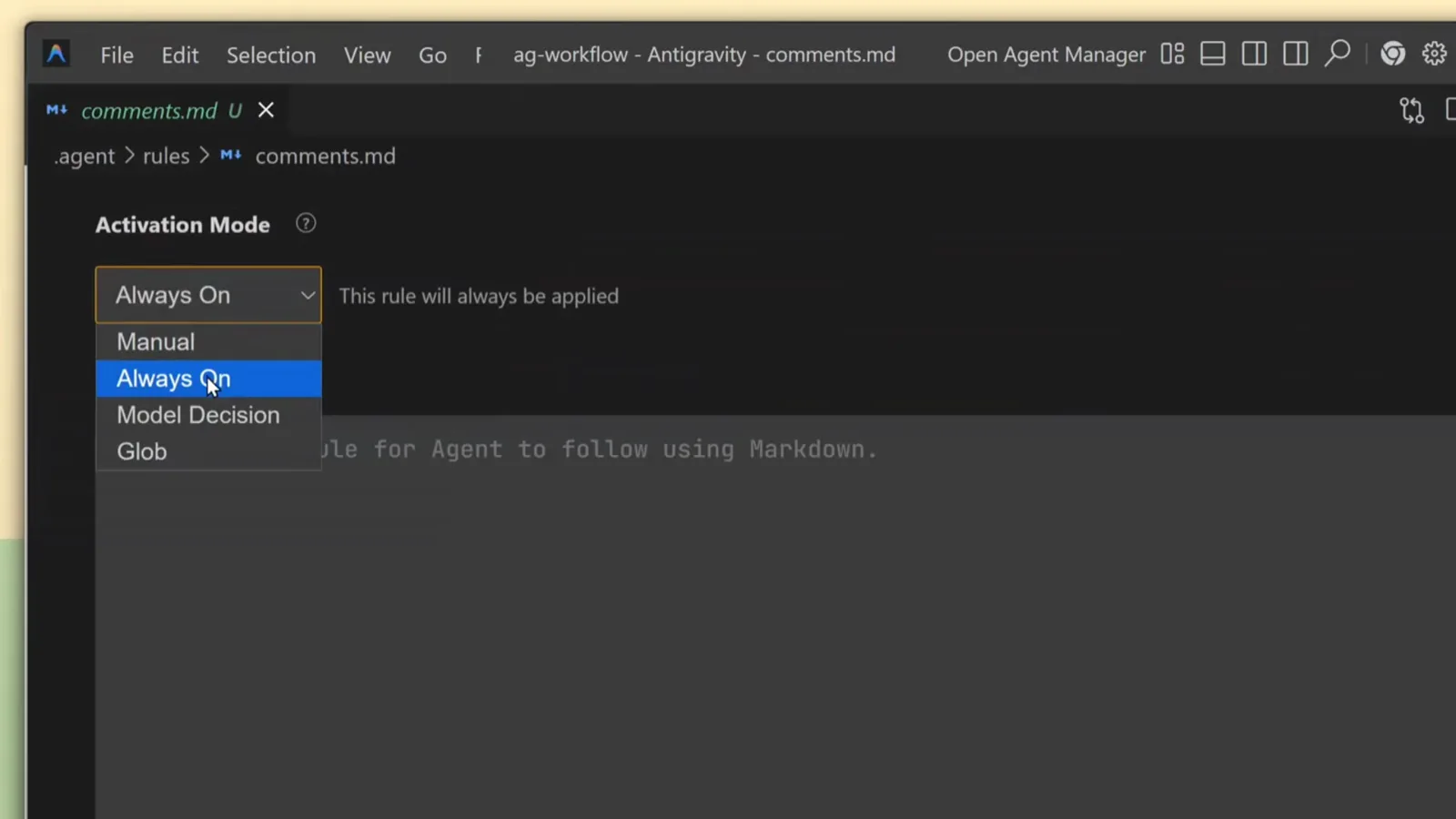
The Activation Mode dropdown in an Antigravity rule editor with all four options visible — Always On, Manual, Model Decision and Glob.Watch at 1:04 - 11
Write the rule content
Rules are plain Markdown constraints: "add comments explaining why the code exists, not what it does", "use JSDoc for functions", "never leave TODO items". Keep each rule single-purpose — the agent reads them literally in every matching conversation. Rules shape how your specialist works; the next two layers give it procedures and knowledge.
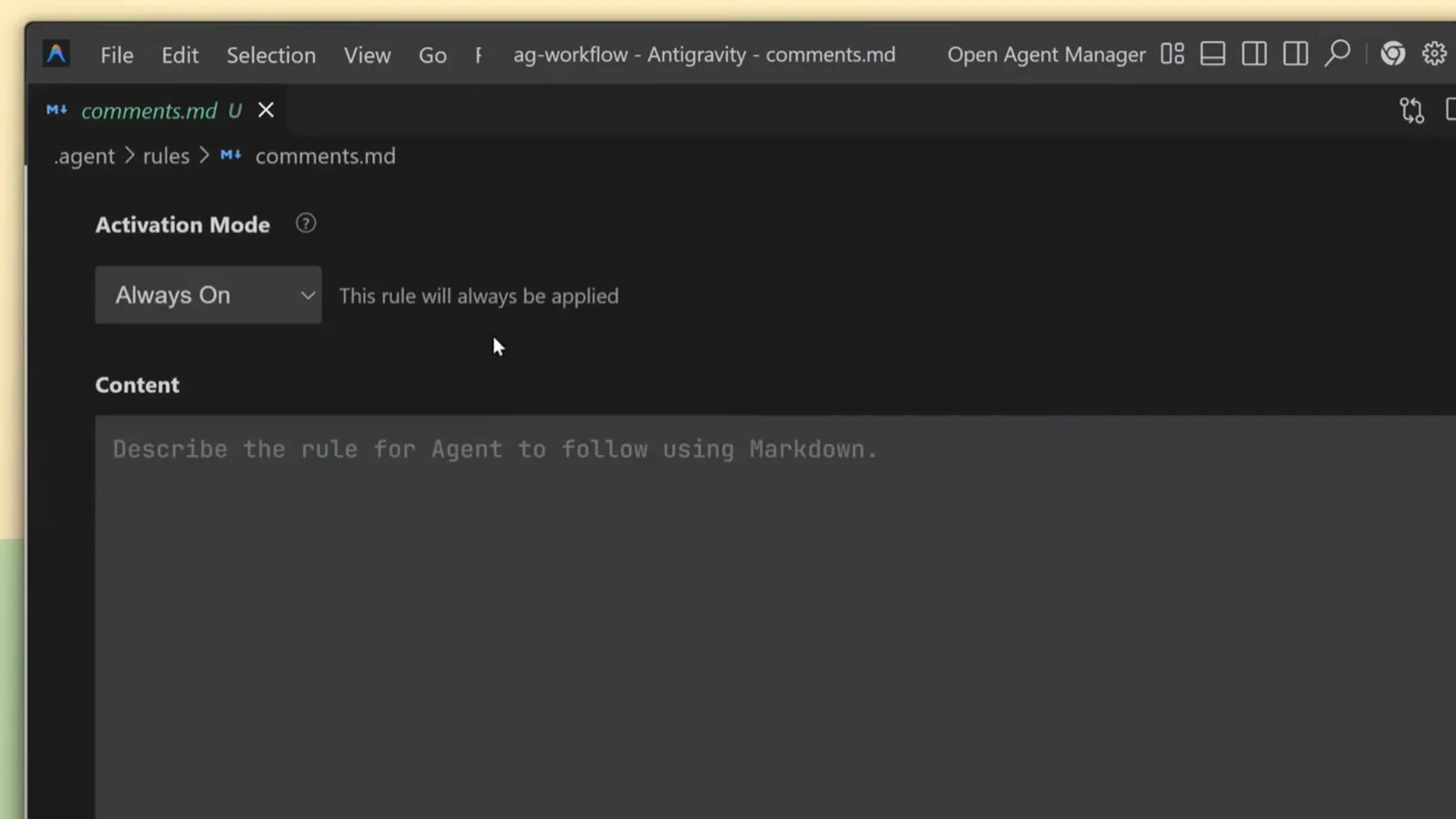
A rule file called comments.md in the Antigravity editor, Activation Mode set to Always On, ready to receive the Markdown instructions every conversation should follow.Watch at 1:02 - 12
Package recurring procedures as workflows
When the specialist must repeat a multi-step procedure — clean merged branches, cut a release, regenerate API docs — save it as a workflow instead of retyping the steps. Workflows are markdown files with a YAML description in the frontmatter, invoked with a slash command: type /cleanup-branches and the agent executes each listed step.
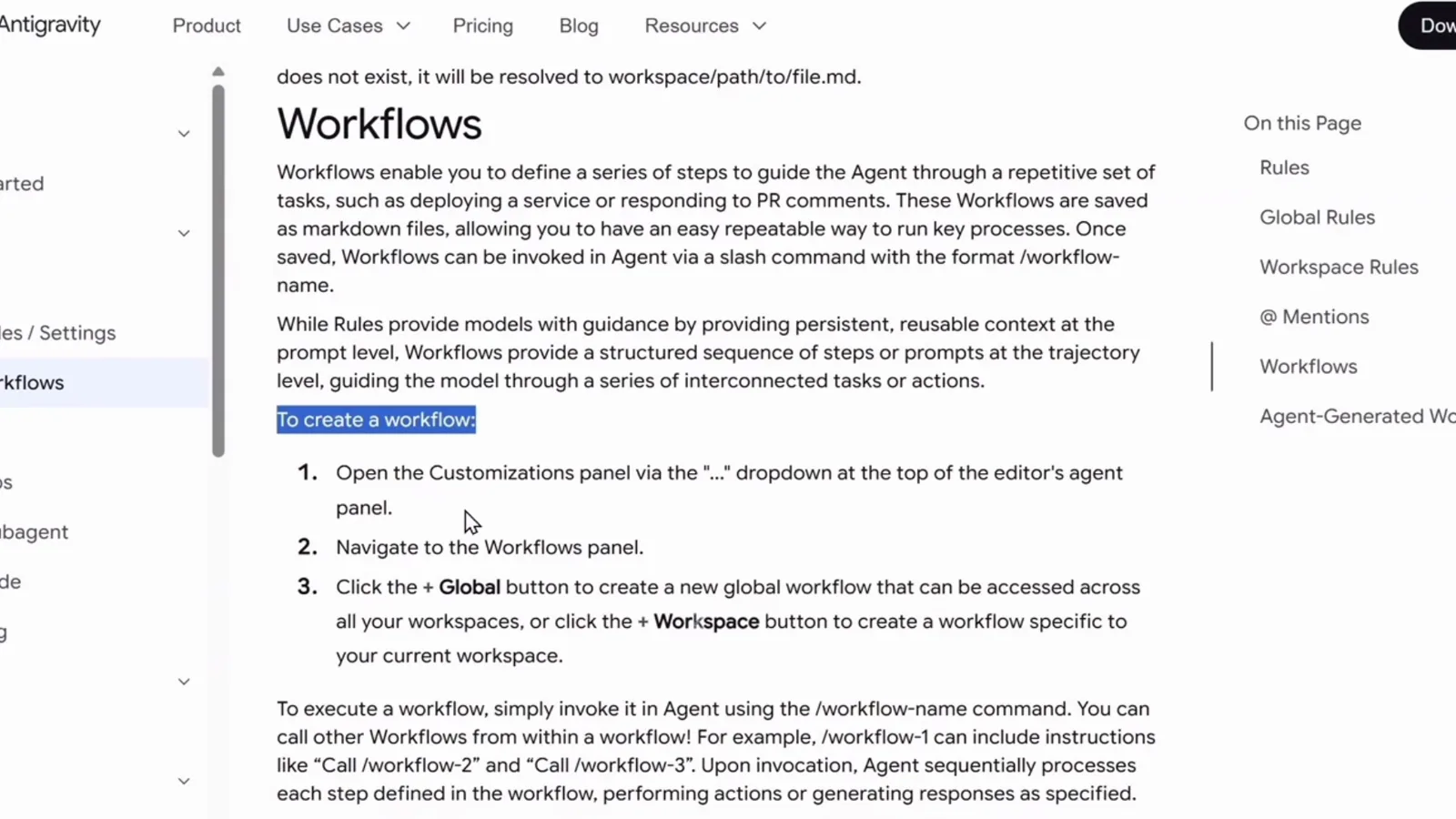
The Workflows section of the Antigravity docs: workflow files live in the .agent workflows folder and are invoked in chat with a /workflow-name command.Watch at 5:40 - 13
Create the workflow file
Ask the agent to scaffold it, or do it yourself: mkdir -p .agent/workflows, then create cleanup-branches.md with a short description frontmatter and a numbered step list. In the recorded example the steps run from git fetch --prune to deleting merged branches — and because each step is explicit, the agent pauses and asks before the destructive ones.
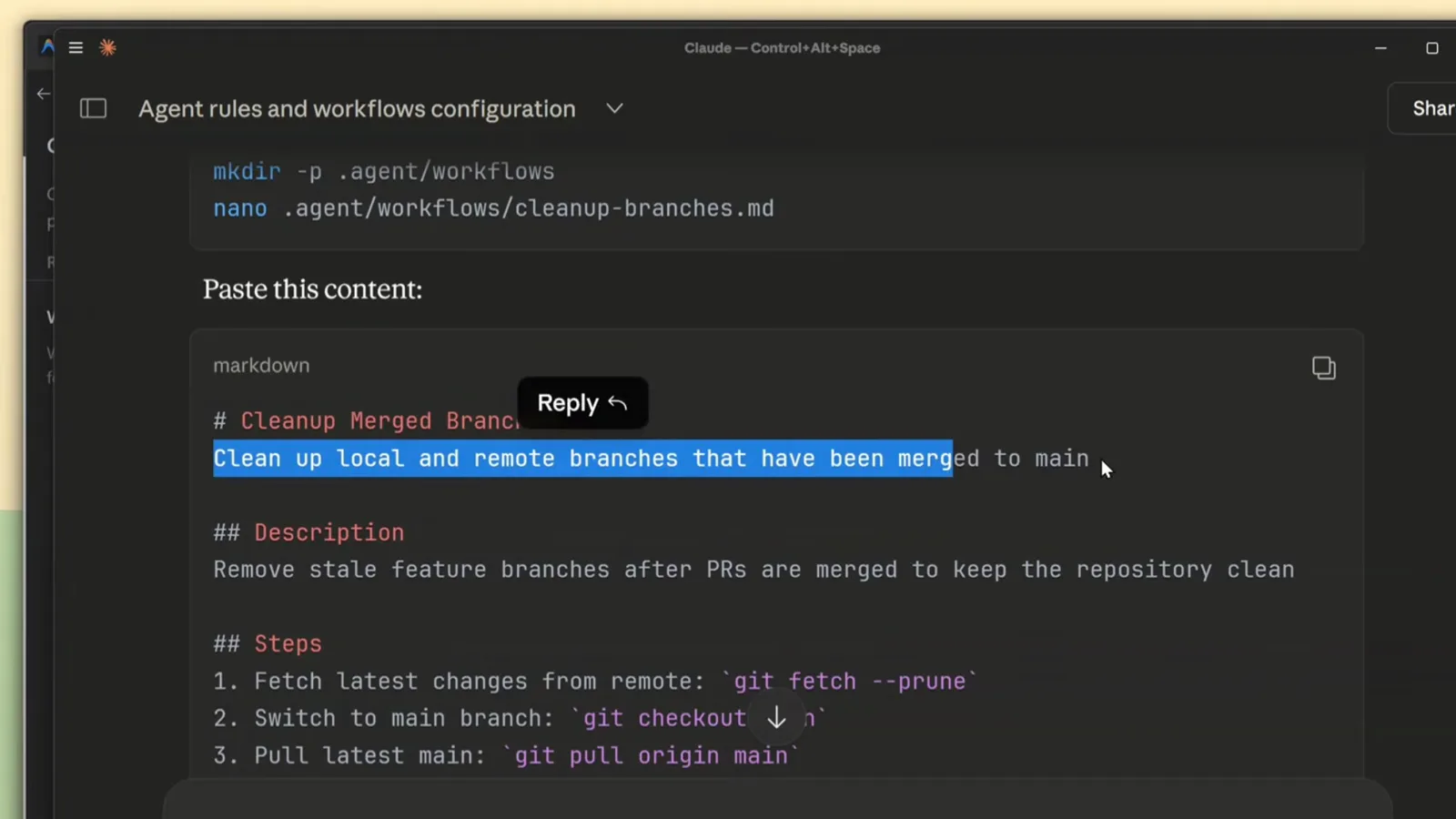
An Antigravity conversation where the agent runs mkdir -p .agent/workflows and nano, then receives the workflow markdown — a description frontmatter plus a ten-step git cleanup checklist — to save.Watch at 6:20
4 · Test, ship, and keep the layers straight
- 14
Watch the guardrail in action
The recorded workflow run ends with the agent reporting the fetched branch, naming feature/about-page as merged and safe to delete, and asking "Would you like me to proceed with deleting these?" before touching anything. That approval habit extends to delegated custom agents: actions that need user authorization surface in the main interface, so the specialist never silently crosses a boundary.
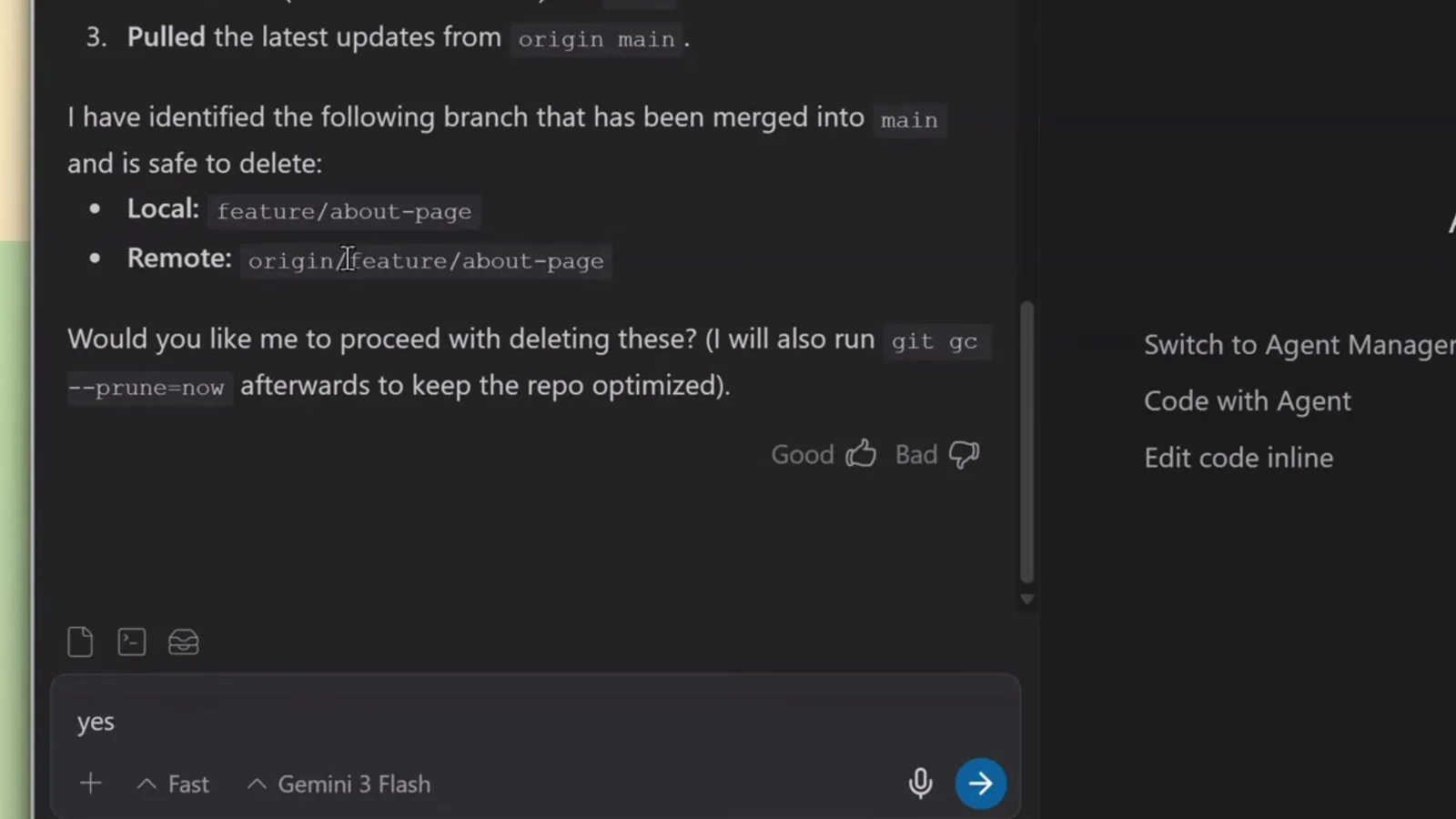
The agent's workflow report: feature/about-page is merged and safe to delete, and it asks "Would you like me to proceed?" before running git branch -d and git gc.Watch at 7:46 - 15
Teach it a skill
Rules shape behavior; skills add knowledge. A skill is a folder with a SKILL.md file — workspace skills under .agents/skills/<skill-name>/, personal ones under ~/.gemini/skills. The frontmatter's name and description tell the agent when the skill is relevant; the body carries the full instructions, scripts and references. Custom agents and skills compose: your codereviewer can lean on a nextjs-reviewer skill for framework-specific checks.
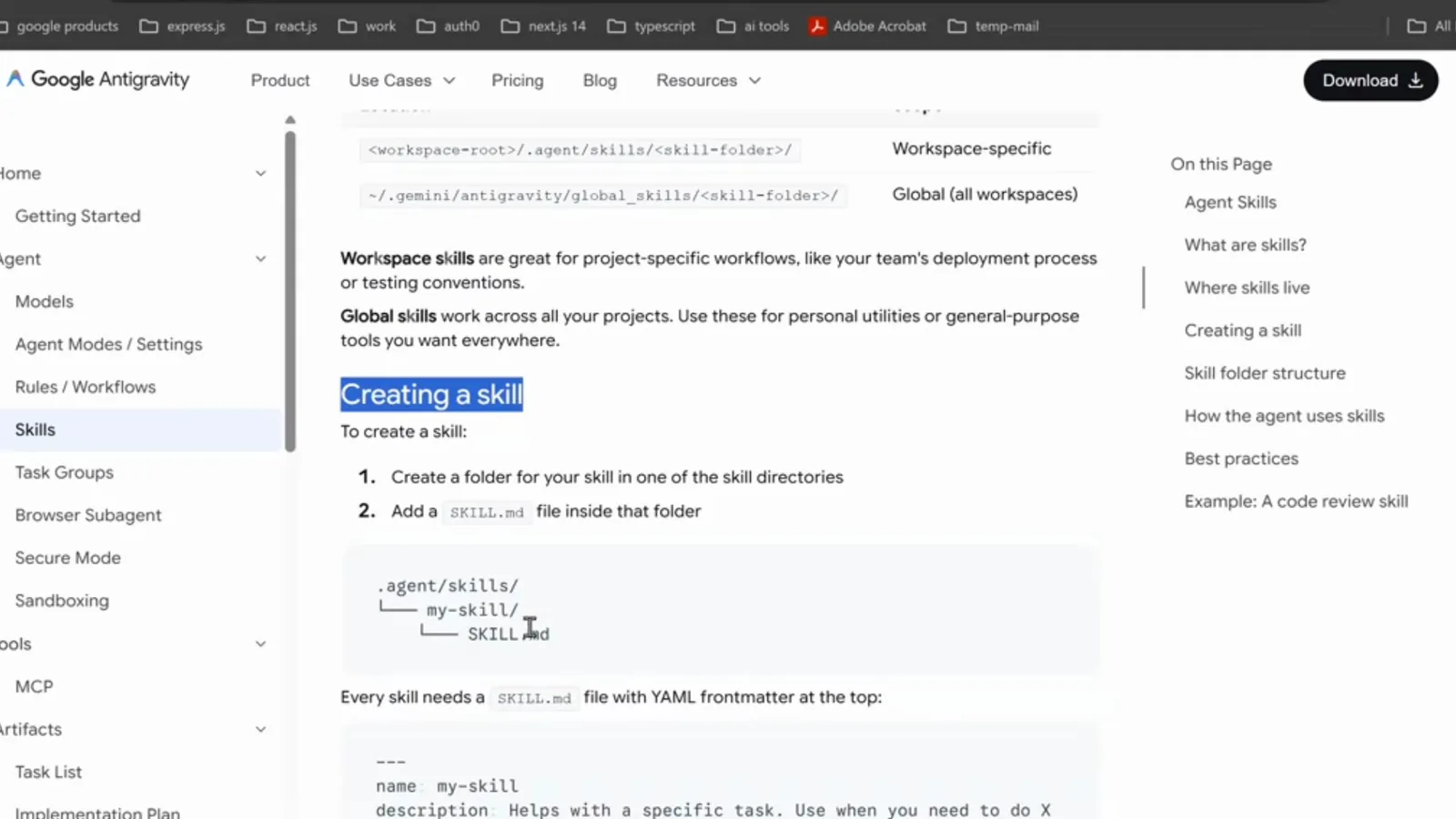
The Agent Skills section of the Antigravity docs: create a folder in one of the skill directories and add a SKILL.md file with YAML frontmatter.Watch at 8:42 - 16
Author the SKILL.md frontmatter
Write the description like a trigger: "Reviews Next.js and TypeScript code for critical issues only — types, performance, security, and App Router patterns". When a request matches, the agent loads the full skill; when it doesn't, the skill stays out of the way. That progressive loading is exactly why deep reference material belongs in a skill rather than in the agent's system prompt.
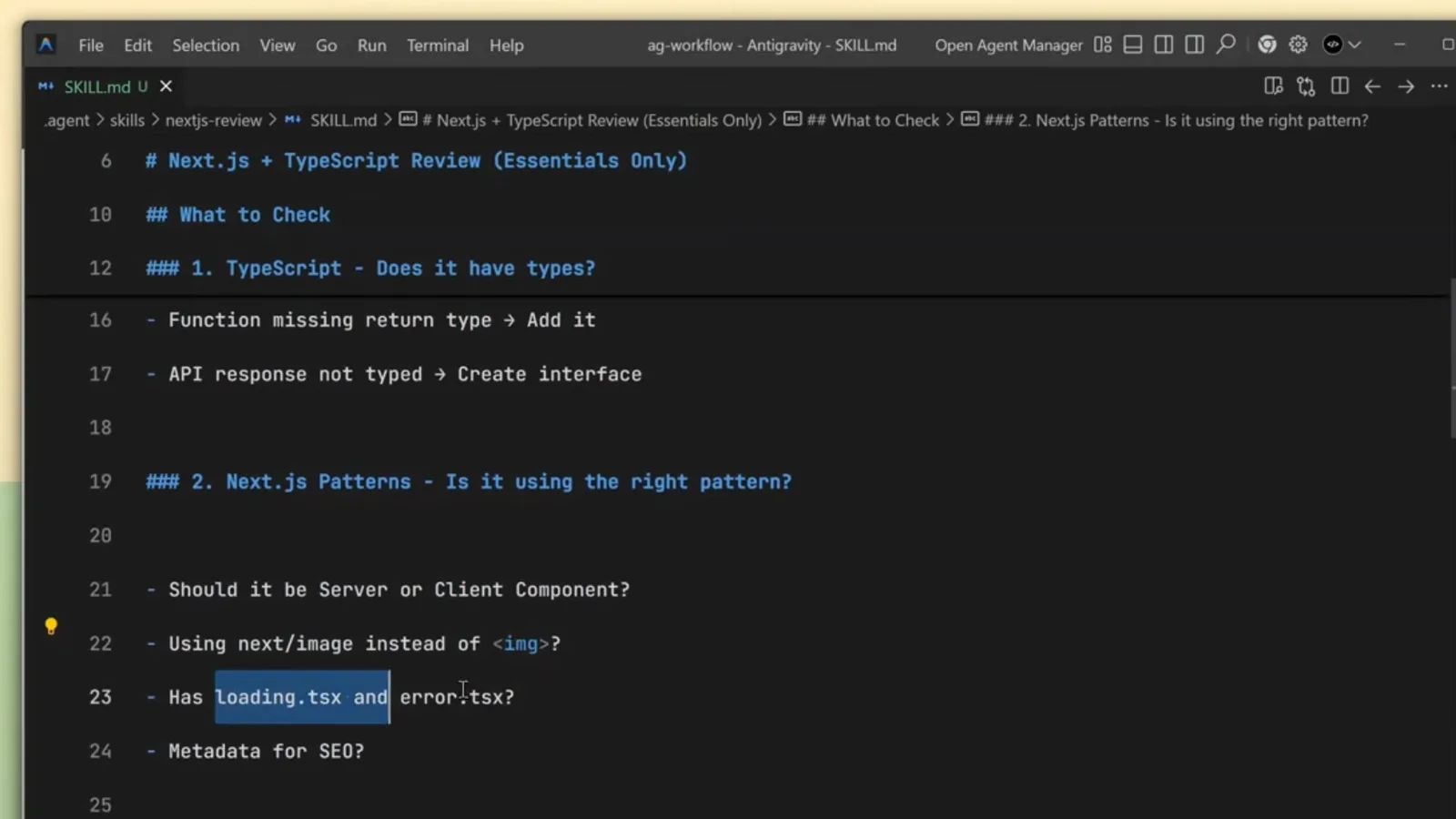
A nextjs-reviewer SKILL.md in the Antigravity editor: the YAML frontmatter carries the skill's name and its description — Reviews Next.js and TypeScript code for critical issues only.Watch at 9:16 - 17
See the skill fire during a real review
In the recorded session, asking the agent to review the Next.js code made it load the reviewer skill, analyze the page, and answer with a structured review: Project Strengths called out typed utilities and font optimization, and the agent asked "Would you like me to apply these fixes for you?" before editing. Your custom agent inherits this discipline when its prompt demands the same output format.
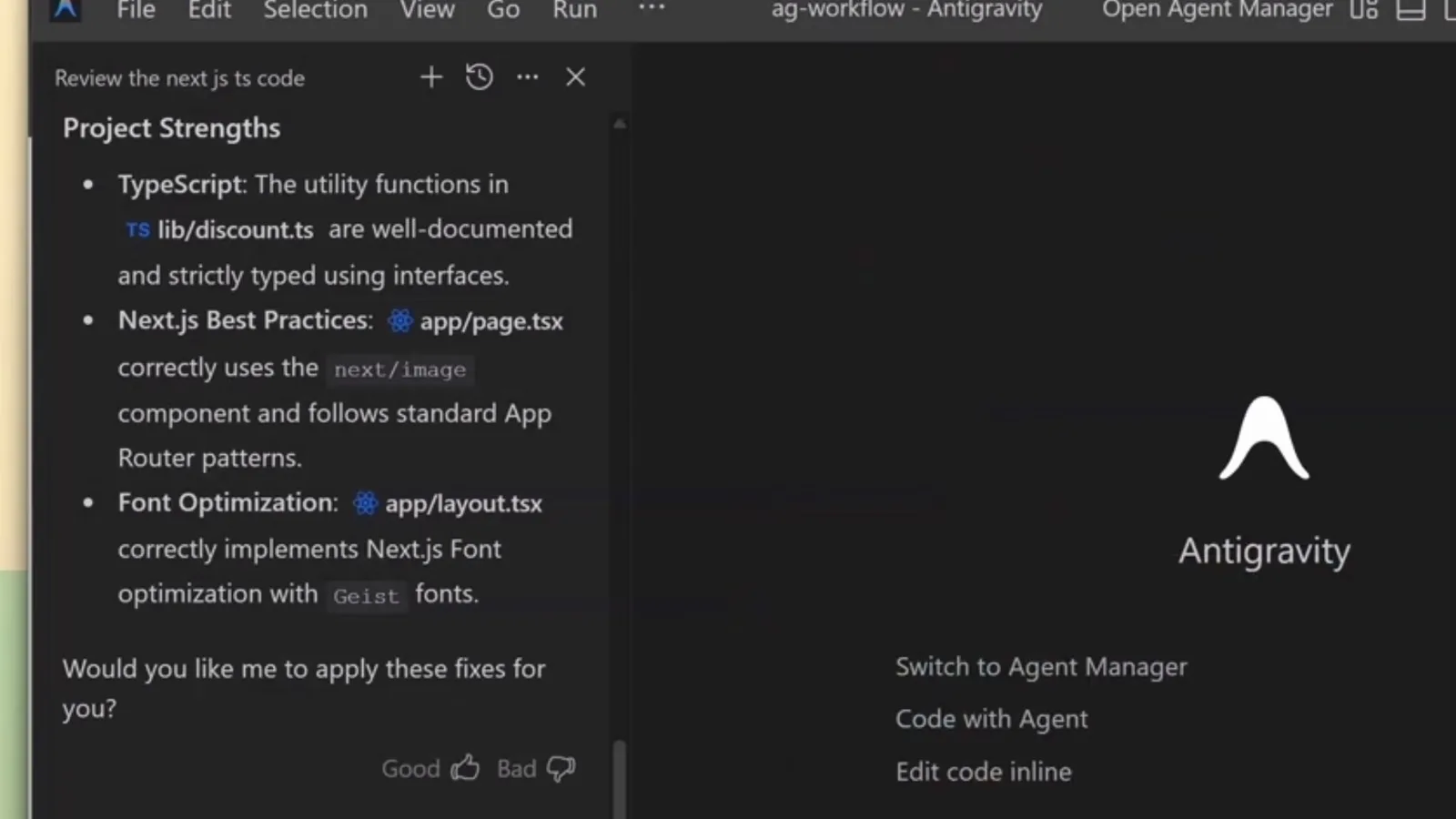
The reviewer agent at work: it lists the project's strengths — typed utilities, next/image, App Router patterns — and asks whether to apply its fixes.Watch at 10:15 - 18
Test from the IDE and the CLI
With mainAgent: true the specialist shows up in the input picker — select it and ask "What are your tools?" to verify the toolbox wired up; a broken tools list fails immediately with an execution error, which is the fastest smoke test. In the CLI, the /agents command lists discovered agents, and Alt+J opens the subagent panel where you can watch delegated work in real time.
- 19
Commit the folder so the team ships the same specialists
Everything the specialist needs now lives in the repo: .agents/agents/ for the agent definitions, plus the .agent folder with rules, skills and workflows beside your source. Commit them and every teammate — and every CI run — discovers the same specialists with the same boundaries. Keep personal definitions in ~/.gemini out of the repo; they're for machine-wide preferences.
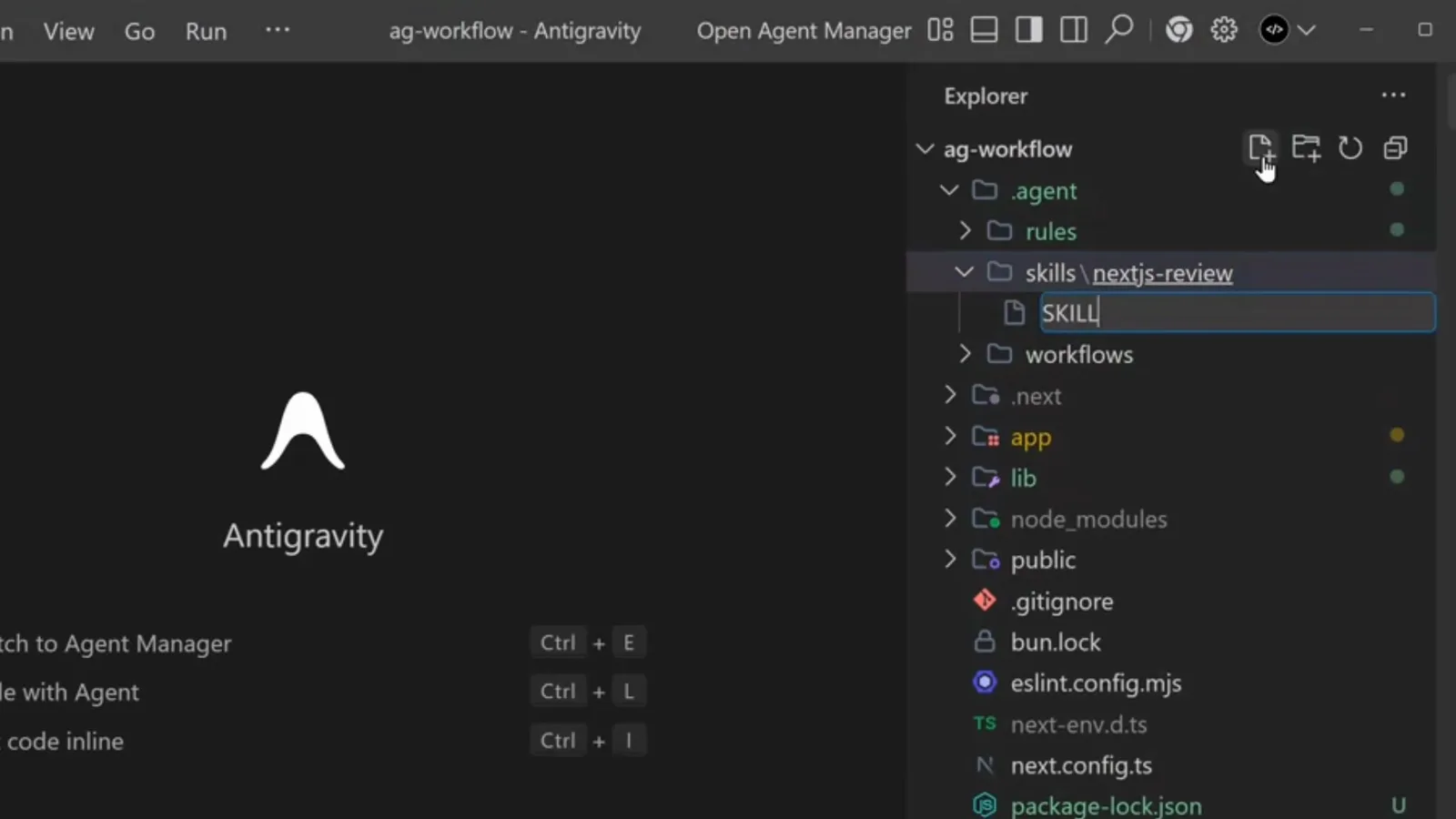
The Antigravity explorer with the .agent folder expanded — agent, rules, skills and workflows sit next to the app source, ready to be committed.Watch at 9:04 - 20
Know which layer does what
The three customization layers complement the agent file instead of replacing it: Rules are always-on (or pattern-triggered) coding standards, Workflows are slash-command procedures, Skills are auto-discovered expert knowledge. The custom agent is the identity that ties them together — one markdown file that gives a recurring job a name, a toolbox and a memory.
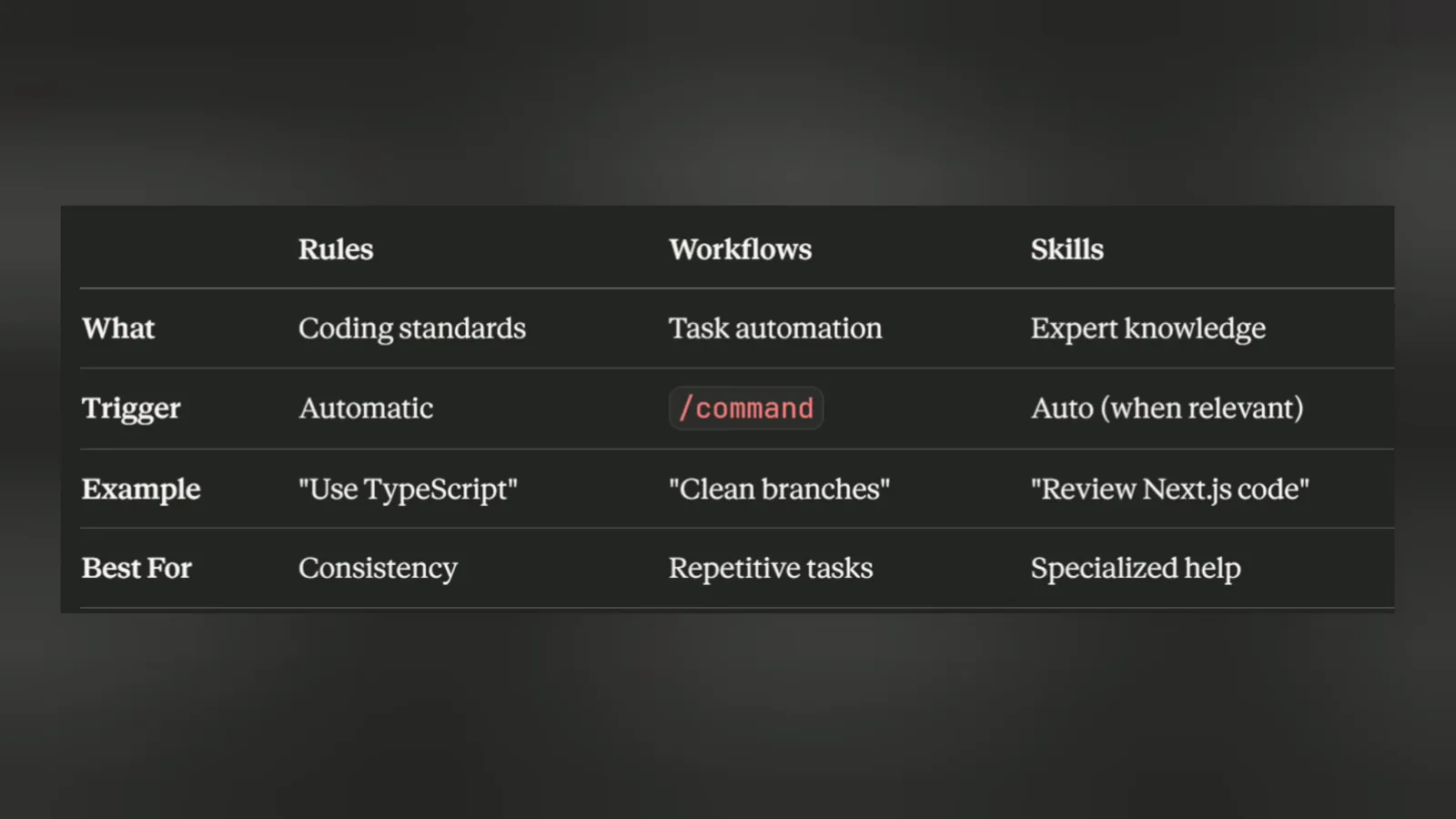
A Rules vs Workflows vs Skills comparison table: coding standards apply automatically, task automation runs from slash commands, expert knowledge is discovered when relevant.Watch at 10:20