
Kimi K3 in Claude Code: the Complete Setup Guide
Moonshot ships an Anthropic-compatible endpoint, so Claude Code runs on Kimi K3 with one settings.json env block. Every configuration value below is quoted from the official Kimi guide, and the eight screenshots follow a real K3 session from first prompt to a verified, playable game.
TL;DR — Kimi K3 inside Claude Code
- Moonshot's Messages API is Anthropic-compatible: point ANTHROPIC_BASE_URL at https://api.moonshot.ai/anthropic, paste your Kimi API key into ANTHROPIC_AUTH_TOKEN, and Claude Code keeps every feature while Kimi K3 does the thinking.
- The official settings.json maps every model tier to kimi-k3[1m] (the 1M-context variant), the Haiku tier to kimi-k2.7-code, sets CLAUDE_CODE_AUTO_COMPACT_WINDOW to 1000000 and CLAUDE_CODE_EFFORT_LEVEL to max.
- Verify two ways: run /status and check the Base URL plus the kimi-k3[1m] model, or just read the startup banner — in the recorded demo it reads Using kimi-k3 (from .claude/settings.json).
- K3 is pay-as-you-go on the Kimi API Platform: $3 per million input tokens, $15 per million output, $0.30 cached input, 1M context. The model itself is a 2.8T-parameter MoE with 104B active and thinking always on.
- Update note — K3.1 Pro launched October 22–23, 2026: same 1M context, new model ID kimi-k3.1-pro, and cheaper than K3 at $2/$10 per million tokens. The env block below still works; swap the model ID to move up.
Kimi K3 + Claude Code Demo
Video walkthrough:Data Science in your pocket8:11
Use Kimi in Claude Code — official guide
Product facts:platform.kimi.aiKimi API Platform docs
Steps 1-4 (install, API key, env block, curl check) are documented from the official Kimi guide because no clean-screen recording of the setup exists — every YouTube walkthrough carries a face cam. Steps 5-12 are stills from a terminal-only demo of Claude Code v2.1.207 running on kimi-k3.
Frames are credited screenshots from the source video, each deep-linked to its timestamp. This guide's text is original — not a transcript.
Kimi K3 in Claude Code, step by step
1 · Point Claude Code at Kimi K3
- 1
Install Claude Code
Use Anthropic's native installer — curl -fsSL https://claude.ai/install.sh | bash on macOS and Linux, or irm https://claude.ai/install.ps1 | iex in Windows PowerShell. The npm route works too: npm install -g @anthropic-ai/claude-code needs Node.js 22 or later. Already have Claude Code? Skip ahead — but if a third-party tool ever edited ~/.claude/settings.json, clean the stale ANTHROPIC_* entries from its env field first, because those values silently override anything you export in the terminal.
- 2
Create a Kimi API key
Sign in at platform.kimi.ai, open Console and create a key under API Keys. K3 unlocks after a successful top-up and the minimum is $1, so a single dollar is enough to follow this whole tutorial. Note this is the pay-as-you-go Kimi API Platform — a Kimi Code or Kimi Membership subscription is a different product and does not provision the API key used here.
- 3
Write the env block into ~/.claude/settings.json
Open (or create) ~/.claude/settings.json and fill the env field exactly as the official guide prescribes: ANTHROPIC_BASE_URL to https://api.moonshot.ai/anthropic, ANTHROPIC_AUTH_TOKEN to your Kimi key, ANTHROPIC_MODEL plus the OPUS, SONNET and FABLE tiers and CLAUDE_CODE_SUBAGENT_MODEL to kimi-k3[1m], ANTHROPIC_DEFAULT_HAIKU_MODEL to kimi-k2.7-code, CLAUDE_CODE_AUTO_COMPACT_WINDOW to 1000000, CLAUDE_CODE_EFFORT_LEVEL to max. Mapping every tier matters: Claude Code sends background and sub-agent requests on those aliases, and a missing one fails silently. The env block overrides terminal exports, and it stores your key in plain text — never commit it.
- 4
Prove the endpoint and key with curl
Before launching Claude Code, send a one-token request straight at the Anthropic-compatible route: curl https://api.moonshot.ai/anthropic/v1/messages with an Authorization: Bearer header carrying your Kimi key and a body naming model kimi-k3 with max_tokens 1. A normal JSON reply means endpoint and credential both work. A 401 means the key is invalid, the base URL does not match the platform that issued the key, or a leftover ANTHROPIC_API_KEY is colliding with ANTHROPIC_AUTH_TOKEN — remove it.
2 · Launch and prove K3 is driving
- 5
Launch claude and read the banner
Start claude inside a project folder. The banner tells the whole story: Claude Code v2.1.207 in the demo, then kimi-k3 · API Usage Billing, then the line that matters — Using kimi-k3 (from .claude\settings.json) · /model. That is the env block being picked up; a project-level .claude/settings.json works the same way. If your banner still shows a Claude or Anthropic billing line, revisit step 3 and restart Claude Code.
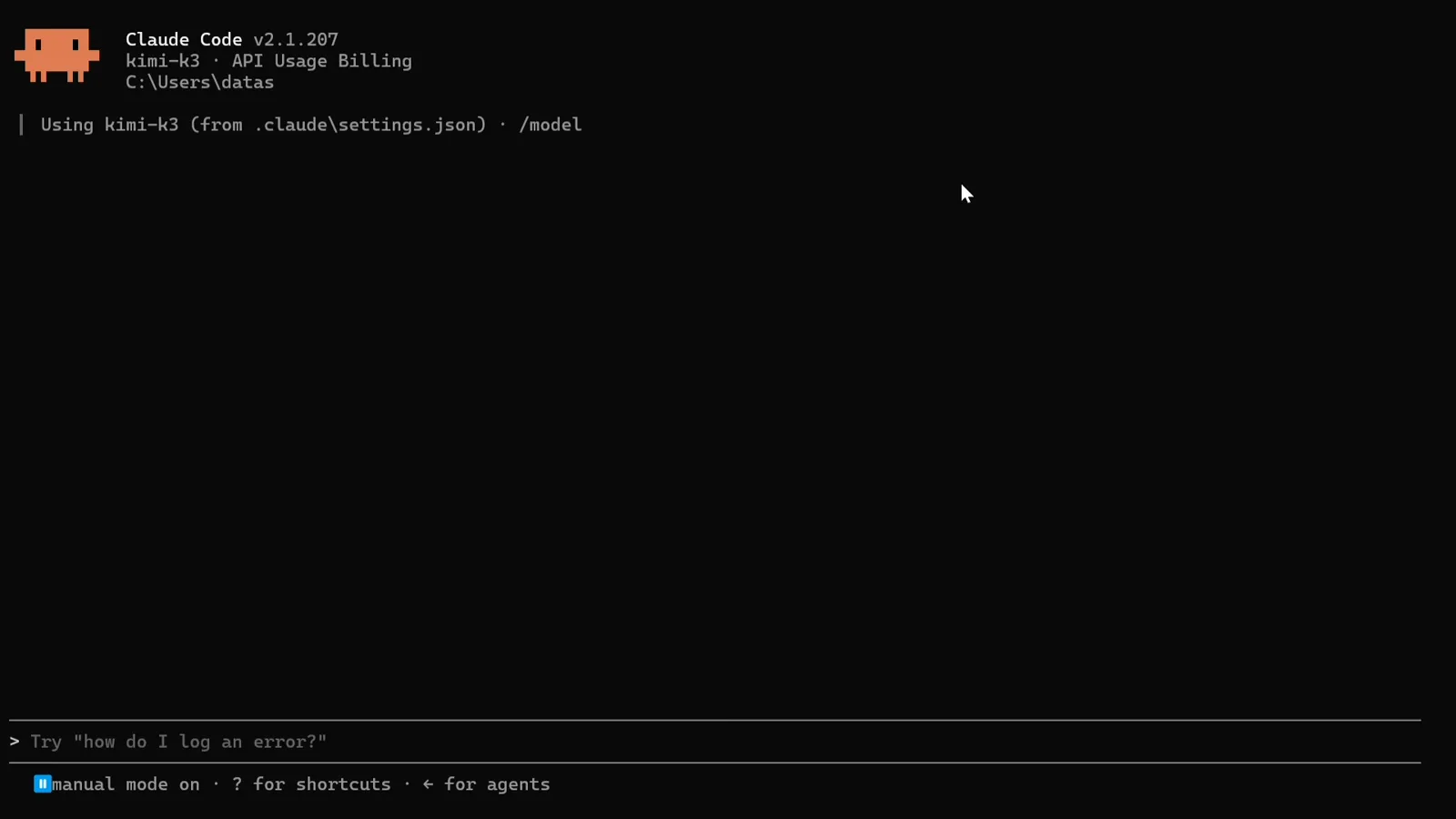
The startup banner naming kimi-k3 and the settings.json it came from.Watch at 0:22 - 6
Send a real task, not a who-are-you
The demo opens with help me develop a game called snake and ladders. — a concrete, buildable brief. K3 thinks before answering: Thought for 16s, then the reply streams in while the status line counts Channeling… 25s · ↓1.0k tokens. Skip the what model are you probe: the config maps Claude's aliases onto Kimi IDs, so self-identification proves nothing — /status and the banner are the evidence.
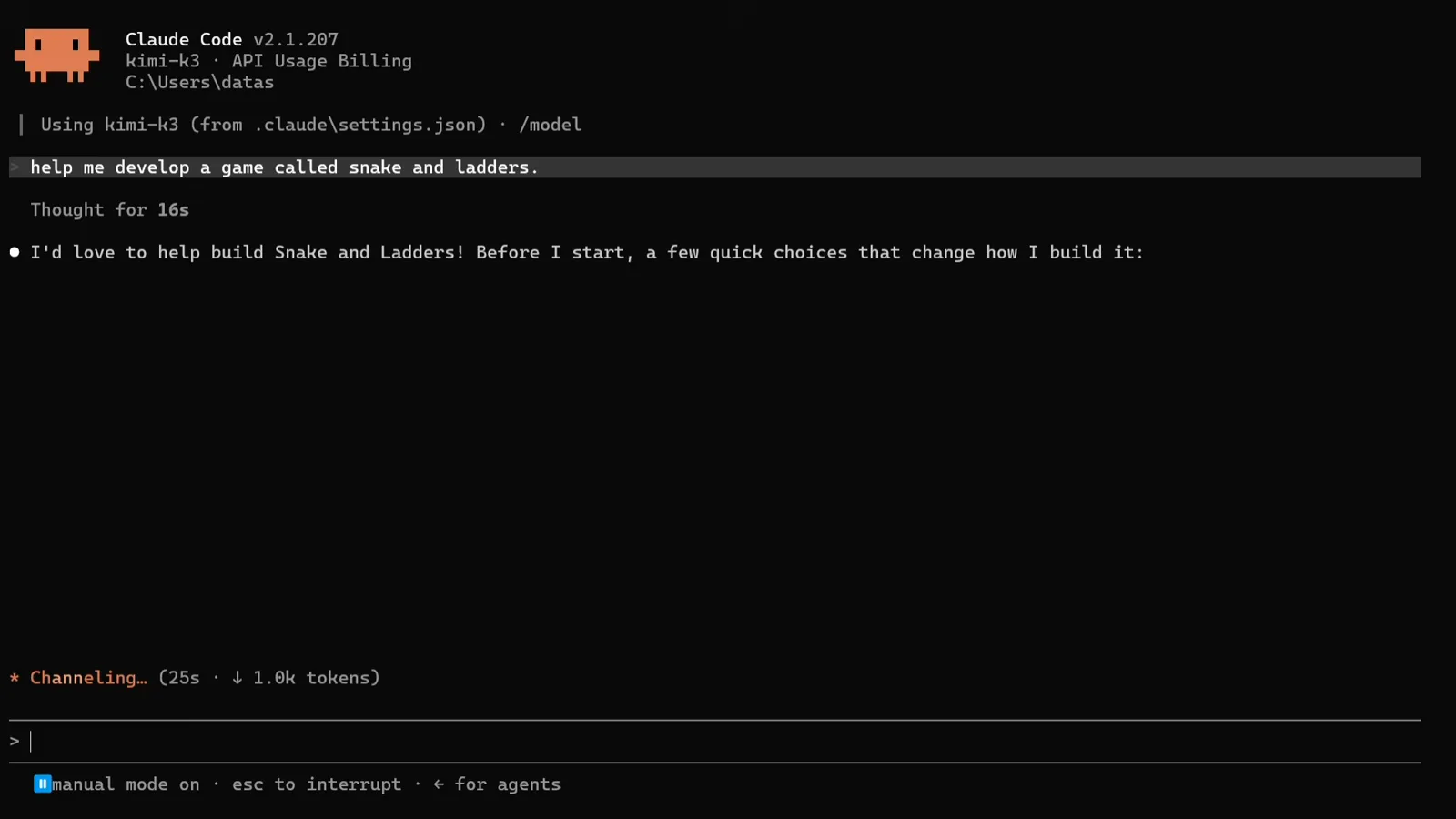
First prompt in, K3 thinking — the token counter starts running.Watch at 1:42 - 7
Answer the clarifying questions
Instead of guessing, K3 asks. A tabbed picker appears — Platform, Players, Rules, Submit — offering Web (HTML/CSS/JS), Python console, Python + pygame or your own text, with hints under each option. Enter selects, Tab and the arrow keys navigate, Esc cancels. This structured questioning up front is half of why the finished build needs no rework.
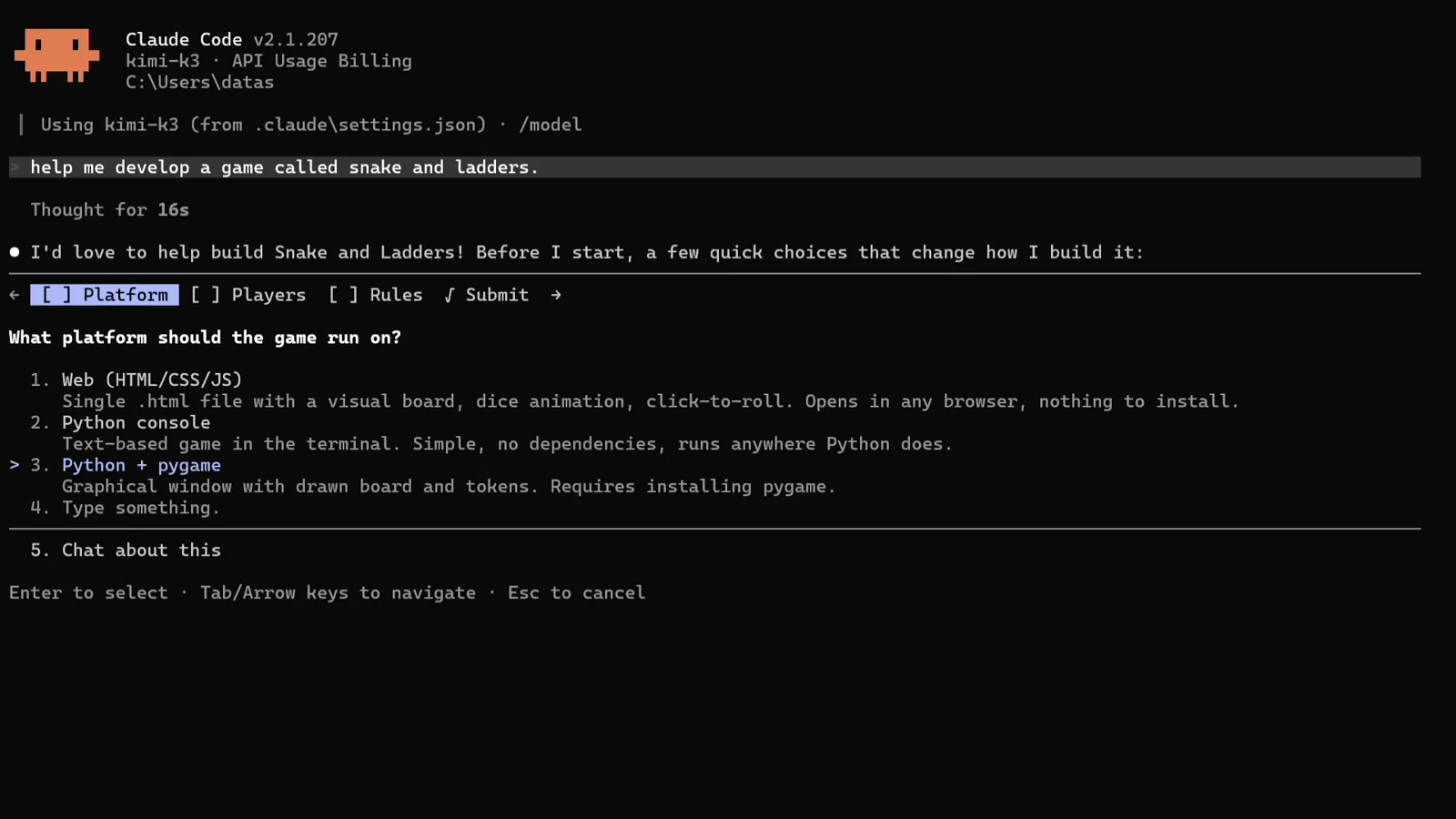
The tabbed question UI: Enter to select, Tab and arrow keys to navigate, Esc to cancel.Watch at 2:04
3 · One prompt, one game: the K3 loop
- 8
Review and submit your answers
Before anything runs, Claude Code shows a Review your answers screen: the Platform, Players and Rules tabs tick green — Python + pygame, 1 player vs computer, Classic in the demo — and Submit answers waits as the highlighted option. One Enter later the agent has its full spec. Answer carefully here; the plan is built from exactly these choices.
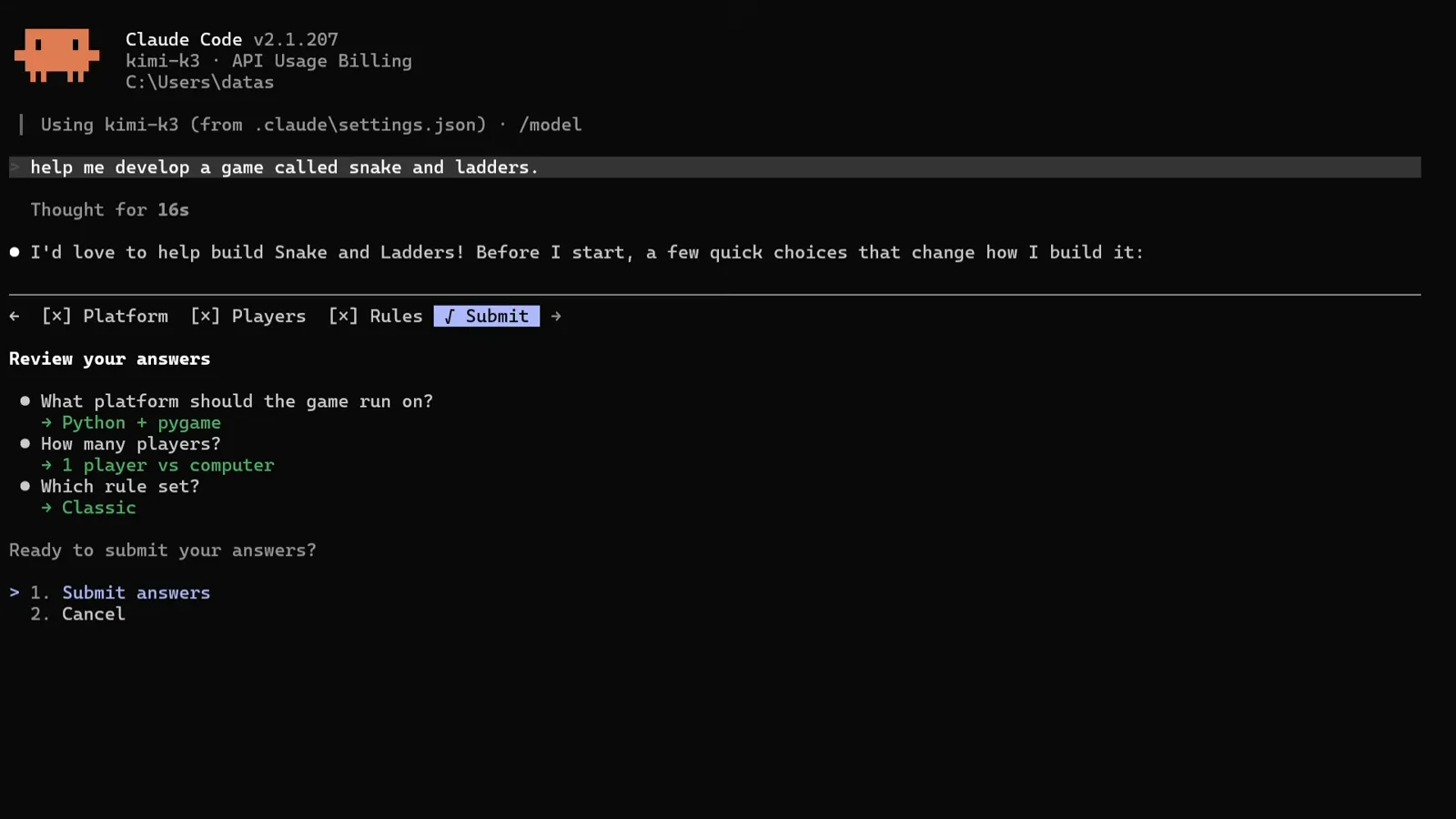
Platform, Players and Rules all ticked — Submit answers is one Enter away.Watch at 2:12 - 9
Read the plan, let it install what is missing
The plan arrives in verifiable steps: check the environment and confirm Python + pygame; write the game and confirm it compiles; smoke-test logic and rendering headlessly so simulated games end on an exact-100 win. It detects Python 3.13, finds pygame missing and runs python -m pip install pygame on its own. Note the thinking time — 4m 53s on one stretch — that is CLAUDE_CODE_EFFORT_LEVEL=max doing its job; K3 defaults to maximum reasoning effort.
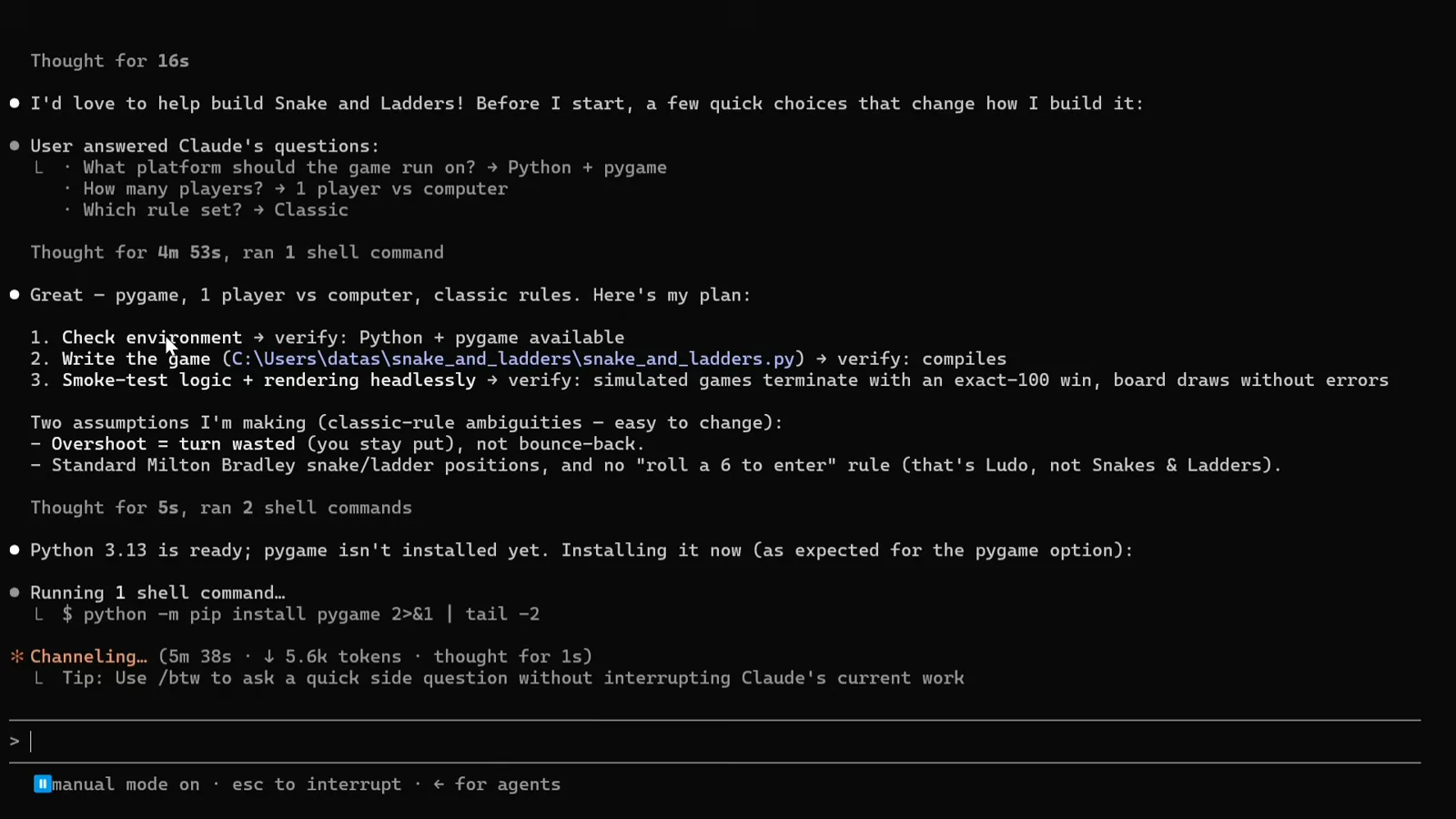
The three-part plan, then the automatic pygame install on Python 3.13.Watch at 3:42 - 10
Approve the write, watch the compile check
K3 writes snake_and_ladders.py — 279 lines in the demo — then verifies its own work: first a compile check (python -m py_compile … && echo "compile OK"), then a headless smoke test that renders every element and simulates thousands of full games. The footer reads accept edits on (shift+tab to cycle), which is the permission mode letting writes land without a prompt per file. A rejected write is recoverable — the demo itself recovers from an accidental rejection and re-attempts.
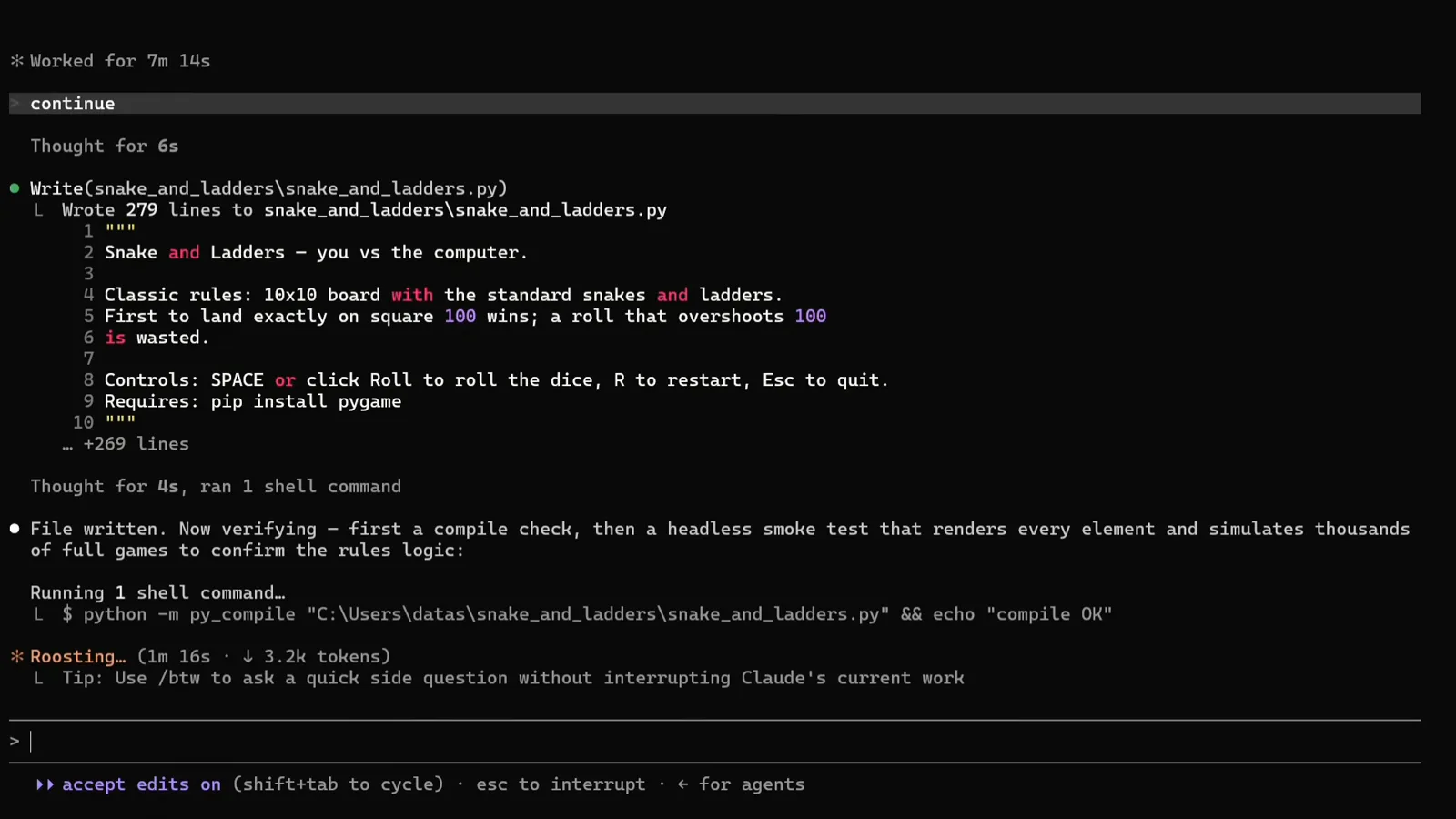
Wrote 279 lines, then python -m py_compile under accept edits on.Watch at 6:05
4 · Verified output you can run
- 11
Read the verification checklist
All checks pass. The game is done and verified — and Claude Code lists the evidence: Compile ✓, Rendering — board, snakes, ladders, dice all draw ✓, Board mapping — square 1 bottom-left zigzagging to 100 ✓, Rules — overshoot wasted, exact-100 win ✓, and 2000 simulated games all terminating with a winner ✓. Below it prints the run command and a What you get summary. This is the habit worth copying: never trust the code, simulate it.
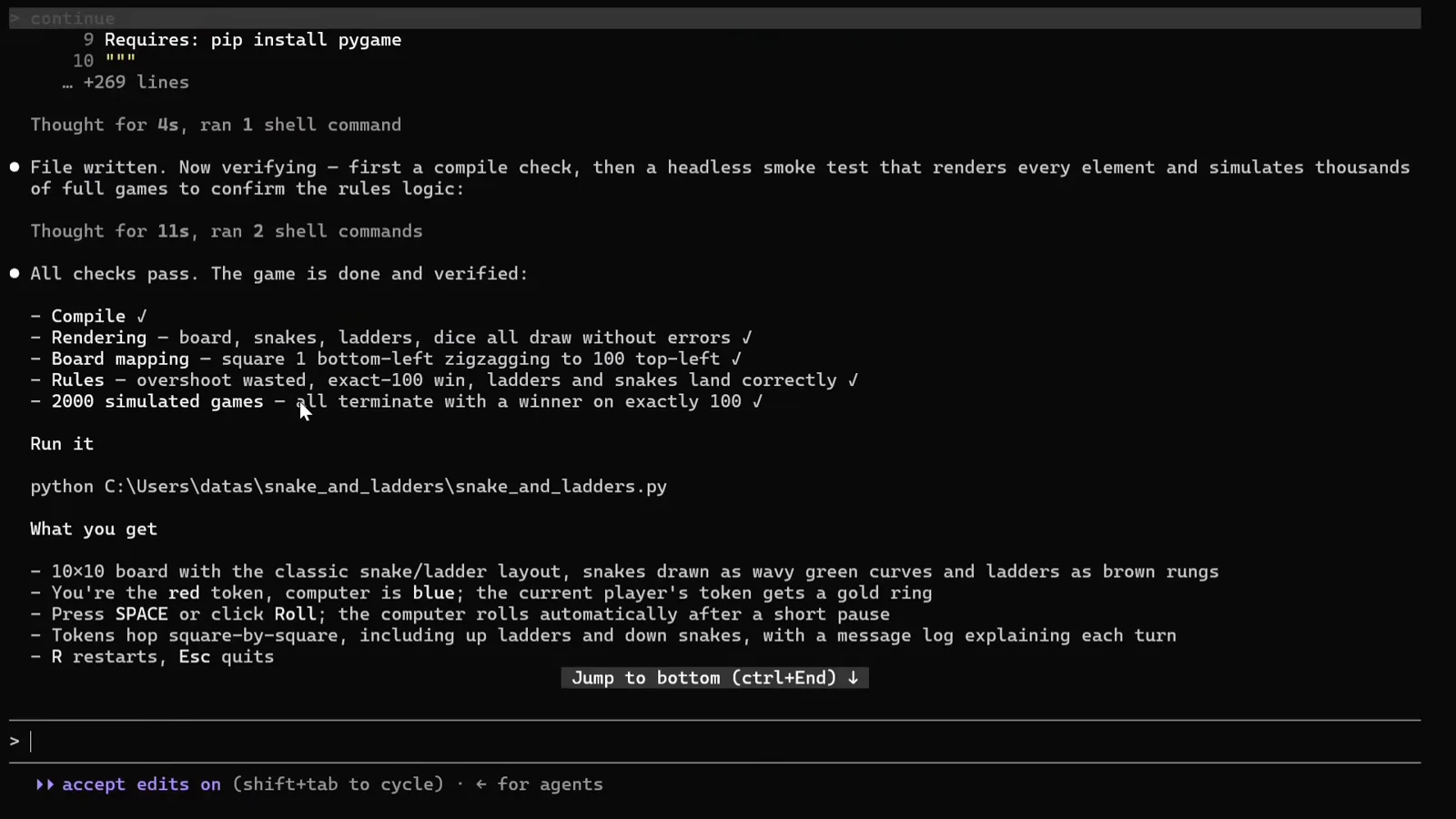
Compile, rendering, board mapping, rules and 2000 simulated games — all green.Watch at 6:55 - 12
Run it
Launch the printed command — python C:\Users\datas\snake_and_ladders\snake_and_ladders.py in the demo — and the game window opens: a 10x10 board with wavy green snakes and brown ladders, a SNAKES & LADDERS side panel with the turn indicator, a dice face and a green Roll button. SPACE or click rolls, R restarts, Esc quits. From one sentence to a playable, self-verified game in roughly ten minutes of K3 time.
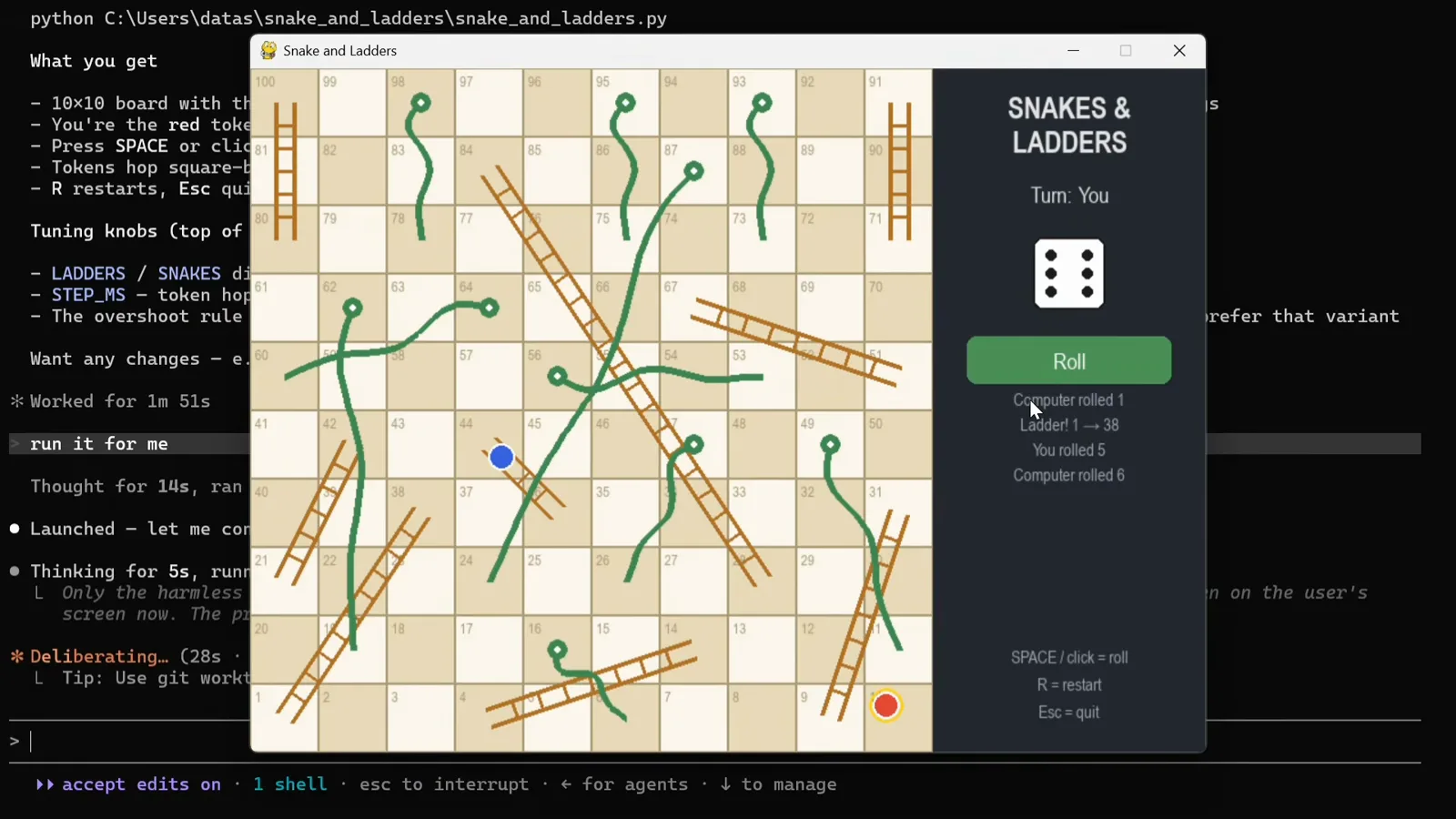
The finished Snakes & Ladders window, launched from the command K3 printed.Watch at 7:35
K3.1 update: K3.1 Pro is live — and it's cheaper than K3
Moonshot launched Kimi K3.1 Pro on October 22–23, 2026 — "the first model in our new K3.1 series," post-trained from Kimi K3 with substantially larger RL compute. Two naming facts matter before you touch config: there is no plain kimi-k3.1 ID (the series starts at Pro), and there are no [1m] suffix variants — the 1M context (1,048,576 tokens) is built in. The highspeed twin, kimi-k3.1-pro-highspeed, runs the same intelligence roughly 2–3× faster. Full open weights are promised by November 4, 2026.
The verified headline delta is factual reliability: on Moonshot's factual-accuracy stress test, claim-level hallucination fell from 23.35% (K3) to 6.85%, and responses containing at least one factual error dropped to 46.4% of K3's rate. Thinking is always on, with a new reasoning_effort parameter (low / high / max, default max). Moonshot's docs claim K3.1 Pro matches or approaches the strongest proprietary models on coding and agentic work — but the published score tables are placeholders, so we are not quoting numbers until real ones ship.
K3.1 Pro also reset the price floor:
| Model | Input $/MTok | Output $/MTok | Cached input |
|---|---|---|---|
| kimi-k3.1-pro | $2.00 | $10.00 | $0.20 |
| kimi-k3.1-pro-highspeed | $4.00 | $20.00 | $0.20 |
| kimi-k3 | $3.00 | $15.00 | $0.30 |
Cache writes on K3.1 Pro cost $2/MTok (5-minute TTL) or $4/MTok (1-hour TTL); the Batch API runs at 60% of standard rates. Net effect: the Pro tier is a third cheaper than K3 — $2/$10 versus $3/$15. The K2 series closed to new users on October 31, 2026 and fully retires at the end of December; deprecated models now migrate to kimi-k3.1-pro. kimi-k3 itself remains active and unchanged.
For Claude Code users: the setup above keeps working as-is — kimi-k3[1m] remains documented and functional. But you can move up today by swapping the model ID. Moonshot's Anthropic-compatible Messages API now defaults to kimi-k3.1-pro, and the official smoke test calls it directly, so change every ANTHROPIC_MODEL / OPUS / SONNET / FABLE tier in the env block to kimi-k3.1-pro — and drop the [1m] suffix, which does not exist for the K3.1 series. Keep kimi-k2.7-code on the HAIKU tier for now, or try kimi-k3.1-pro there too.